

PDF to Word Scanner·CleanScan
Faisal Alshamsi Utilities iPhoneiPadiPod touch
PDF to Word Scanner·CleanScan is a free Utilities app for iPhone and iPad by Faisal Alshamsi. Rated 5.0/5 from 1 ratings. Requires iOS 17.
- Rating
- 5.0
- 1 ratings
- Price
- Free
- on the App Store
- Size
- 36 MB
- Age 4+
- Updated
- Aug 31
- 2026 · v1.0.10
Screenshots


About PDF to Word Scanner·CleanScan
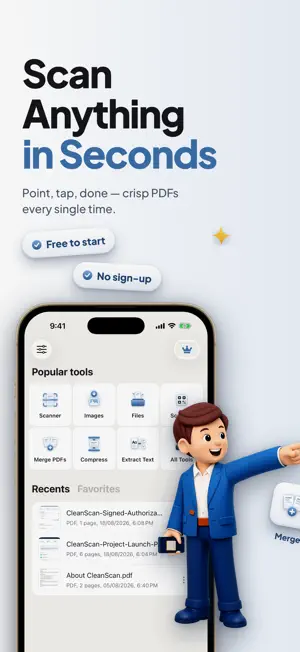
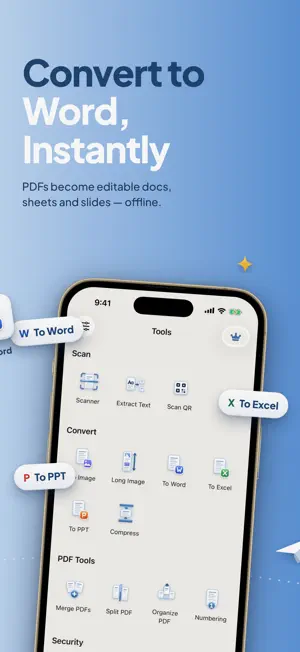
Turn your iPhone into a pocket scanner, PDF editor and eSign tool. Point the camera at any page and CleanScan auto-detects the edges, removes shadows and skew, and gives you a clean, sharp PDF — ready to sign, convert to Word, or share. Scan IDs, receipts and contracts, turn JPG and photos into PDF, and copy text from any paper with OCR. RECEIPTS, CONTRACTS, IDS, NOTES Scan anything: invoices, business cards, ID cards and passports, whiteboards, handwritten notes, books. Multi-page scans go into one PDF automatically. SCAN • Automatic edge detection, perspective and shadow correction • Color, grayscale and black-and-white filters • Batch scanning — capture many pages, get one document • Import photos from your library and convert them to PDF EDIT PDF • Reorder, rotate, delete and add pages • Merge several PDFs into one, or split one into many • Add page numbers, watermarks and annotations • Compress large files for email and messaging SIGN • Draw or import your signature once, reuse it everywhere • Fill and sign forms, contracts and authorizations • Protect sensitive documents with a password OCR TEXT RECOGNITION • Extract editable text from scans and photos in dozens of languages • Copy, search and share the recognized text • Turn paper into searchable PDFs CONVERT • PDF to Word, Excel and PowerPoint — editable documents, offline • Photo to PDF, JPG to PDF, PNG to PDF, image to PDF • PDF to images • Export to Files, iCloud Drive, Mail, Messages, WhatsApp and any app that accepts PDFs QR & BARCODE SCANNER • Read QR codes and barcodes instantly from the camera or from images ORGANIZED & PRIVATE • Folders, tags and search keep every document one tap away • Everything is processed on your device — your documents never leave your phone unless you share them CleanScan is built for people who deal with paper every day: freelancers, students, teachers, lawyers, accountants, real-estate agents, travelers — anyone who needs a document scanned, signed and sent in under a minute. Privacy Policy: https://cleanscan-ruddy.vercel.app/privacy.html Terms and Conditions: https://cleanscan-ruddy.vercel.app/terms.html CleanScan Pro is a subscription that unlocks every feature. Subscriptions renew automatically unless canceled at least 24 hours before the end of the current period. You can manage or cancel your subscription in your App Store account settings at any time.
What’s new
Version 1.0.10 · Updated August 31, 2026
• CleanScan now speaks 30 new languages • Bug fixes and performance improvements
App privacy
The developer, Faisal Alshamsi, reported these privacy practices to Apple.
Data Not Linked to You
The following data, which may be collected but is not linked to your identity, may be used for the following purposes:
- Usage Data: Product Interaction
- Purchases: Purchase History
- Identifiers: Device ID
Used for: Analytics, App Functionality
Alternatives to PDF to Word Scanner·CleanScan
Looking for apps like PDF to Word Scanner·CleanScan? Here are 6 similar apps on the App Store. The highest rated is ScanFlow - PDF Scanner (5.0/5), and all 6 are free to download.
-
 ScanFlow - PDF Scanner
5.0
-
 Snapdf - PDF Scanner
-
 Crisp Document Scanner
-
 SysScope
5.0
-
 Document Scanner Universal
5.0
-
 Zebra: Code Scanner
5.0
| App | Rating | Price | Last updated | Compare |
|---|---|---|---|---|
| PDF to Word Scanner·CleanScan | 5.0 / 5 (1 rating) | Free | August 31, 2026 | |
| ScanFlow - PDF Scanner | 5.0 / 5 (1) | Free | Oct 26, 2026 | Compare |
| Snapdf - PDF Scanner | – | Free | Jun 6, 2026 | Compare |
| Crisp Document Scanner | – | Free | Feb 16, 2026 | Compare |
| SysScope | 5.0 / 5 (2) | Free | Sep 7, 2026 | Compare |
| Document Scanner Universal | 5.0 / 5 (2) | Free | Dec 4, 2024 | Compare |
| Zebra: Code Scanner | 5.0 / 5 (1) | Free | Mar 9, 2026 | Compare |