

Frame Screenshots & Videos
Mobile Card Games & Travel Apps LLC Photo & Video iPhoneiPadiPod touch
Frame Screenshots & Videos is a free Photo & Video app for iPhone and iPad by Mobile Card Games & Travel Apps LLC. Rated 5.0/5 from 4 ratings.
- Rating
- 5.0
- 4 ratings
- Price
- Free
- on the App Store
- Size
- 7 MB
- Age 4+
- Updated
- Jun 20
- 2026 · v2.2
Screenshots
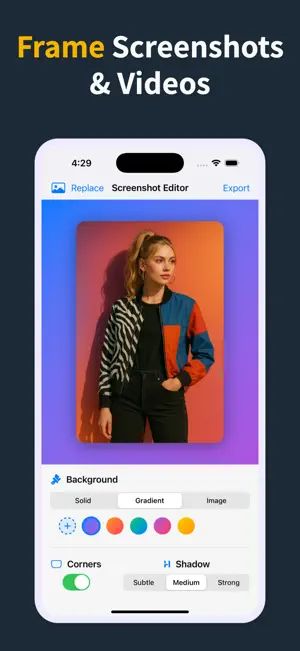
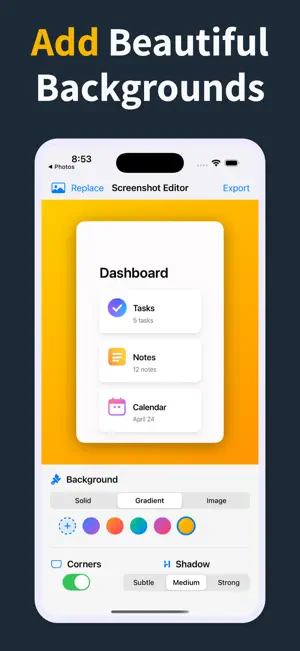


About Frame Screenshots & Videos
First impressions satisfying, every time. Screenshots are often the first thing people see — in app stores, on social media, in client presentations. Framed helps you make that first impression count. In seconds, turn plain screenshots and videos into polished visuals that look like a designer made them. No templates. No complicated editors. Just import, style, and share. BACKGROUNDS • Solid colors and beautiful gradients • Stunning image backgrounds from Unsplash • Eye-catching patterns: dots, lines, checkerboard, waves, and grid • Background blur effects for depth and focus • Custom gradient picker for your brand colors DEVICE FRAMES • Realistic iPhone, iPad, and MacBook mockups • Show your app the way users will actually see it • Perfect for App Store screenshots and portfolios FINE-TUNE YOUR LOOK • Adjustable padding and corner radius • Three shadow levels with custom colors • 3D perspective effects for dramatic angles EXPORT & SHARE • Aspect ratio presets for Instagram, App Store, and more • Save to Photos, copy to clipboard, or share anywhere • Video framing with full audio support • Works with images and videos from other apps via Share Sheet WHO IT'S FOR App developers showcasing their work. Designers building portfolios. Content creators growing their audience. Professionals presenting to clients. Anyone who wants to be taken seriously when they share a screen. Three steps. Import, style, export. Your screenshots will never look plain again.
What’s new
Version 2.2 · Updated June 20, 2026
Added: - Device frames: Place your screenshots inside realistic iPhone, iPad, and MacBook mockups - Pattern backgrounds: Dots, lines, checkerboard, waves, and grid patterns - 3D perspective: Add depth with adjustable rotation effects - Custom shadow colors: Choose any color for your drop shadows - Aspect ratio presets: Export in sizes optimized for Instagram, App Store, and more - Adjustable padding and corner radius: Fine-tune spacing and rounding with precise sliders - Paste from clipboard: Quickly edit screenshots without opening your photo library - Redesigned toolbar: New tabbed layout for faster access to all controls
App privacy
The developer, Mobile Card Games & Travel Apps LLC, reported these privacy practices to Apple.
Data Not Collected
The developer does not collect any data from this app.
Alternatives to Frame Screenshots & Videos
Looking for apps like Frame Screenshots & Videos? Here are 6 similar apps on the App Store. The highest rated is VideoToLive Pro-Live Wallpaper (5.0/5), and 5 of the 6 are free to download.
-
 Stopmotion Animation Pro
4.5
Stopmotion Animation Pro
4.5
-
 FX Cam: Camera Filters
4.0
FX Cam: Camera Filters
4.0
-
 Video Edit Tools. Video Editor
-
 AutoAlign: Scan & Straighten
3.7
AutoAlign: Scan & Straighten
3.7
-
 VideoToLive Pro-Live Wallpaper
5.0
VideoToLive Pro-Live Wallpaper
5.0
-
 Happy Photo Exporter
4.0
Happy Photo Exporter
4.0
| App | Rating | Price | Last updated | Compare |
|---|---|---|---|---|
| Frame Screenshots & Videos | 5.0 / 5 (4 ratings) | Free | June 20, 2026 | |
| Stopmotion Animation Pro | 4.5 / 5 (6) | 9.99 USD | Jan 27, 2026 | Compare |
| FX Cam: Camera Filters | 4.0 / 5 (4) | Free | Oct 5, 2026 | Compare |
| Video Edit Tools. Video Editor | – | Free | Oct 9, 2025 | Compare |
| AutoAlign: Scan & Straighten | 3.7 / 5 (3) | Free | Oct 31, 2026 | Compare |
| VideoToLive Pro-Live Wallpaper | 5.0 / 5 (8) | Free | Aug 8, 2025 | Compare |
| Happy Photo Exporter | 4.0 / 5 (9) | Free | Oct 2, 2026 | Compare |