

AutoAlign: Scan & Straighten
Osama Mazhar Photo & Video iPhoneiPadiPod touch
AutoAlign: Scan & Straighten is a free Photo & Video app for iPhone and iPad by Osama Mazhar. Rated 3.7/5 from 3 ratings. Requires iOS 17.0.
- Rating
- 3.7
- 3 ratings
- Price
- Free
- on the App Store
- Size
- 55 MB
- Age 4+
- Updated
- Oct 20
- 2026 · v4.1.1
Screenshots

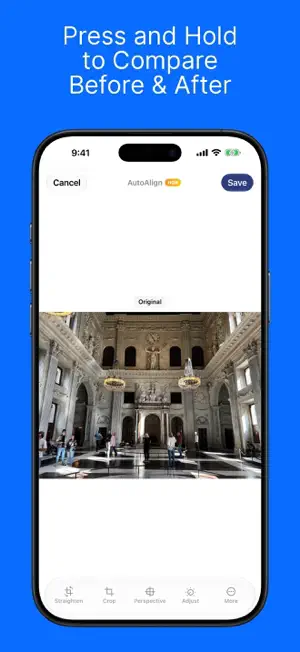


About AutoAlign: Scan & Straighten
Straighten leaning buildings in one tap, keep your HDR, and now keep your documents too. Shoot a building from street level and a wide-angle lens makes the walls lean inward. AutoAlign works out the exact angle the photo was taken at and reverses it, so verticals stand straight without the stretched look other tools leave behind. No tripod, no tilt-shift lens. NEW IN 4.1 • Documents: scan receipts, letters, cards and slides, one shot per page. Pages are cropped, straightened and filed by type. • Ask Documents (experimental): ask about your documents with the on-device model of Apple Intelligence. • A new editor in the style of Photos, and several photos at once. STRAIGHTEN • A perspective engine built on real camera geometry, the mathematics professional desktop tools use. Straight lines come back straight and proportions stay true. • Full, or vertical only. Skewed facades are squared too, not just converging verticals. • Not just buildings: billboards, posters, whiteboards and artwork straighten automatically as well. • Manual Fix for anything the automatic pass cannot read. Drag four corners onto the subject and it flattens square. • Decide what happens to the empty corners: keep them, fill them, or cut them off. Trim sky and foreground too. • Straighten, Crop, Perspective and Adjust in an editor in the style of Photos. Press and hold to compare before and after. • Pick several photos and move between them with the strip under the photo. • Works inside the Photos app as an extension. No exporting, no duplicates. DOCUMENTS • Scan with the built-in camera, one shot per page. AutoAlign finds the page, then crops and straightens it. • Or add pages from Photos and Files. • Every document gets a title and a category, from the on-device model of Apple Intelligence where available: receipts, bills, cards, notes, slides, letters, IDs, or your own. • Search by any word on the page, who sent it, or where you scanned it, in the app or from Spotlight. • Share any document as a searchable PDF. • Date, place and camera are kept on every page. ASK DOCUMENTS, WITH APPLE INTELLIGENCE (EXPERIMENTAL) Ask in your own words: "what was the total on the Hofer receipt?" The answer comes with the document it came from. Nothing is sent anywhere. Uses the on-device model of Apple Intelligence; needs a supported device with Apple Intelligence turned on. Works best in English. WHAT IT KEEPS • HDR. The gain map is corrected alongside the photo, so brightness and colour survive intact. • EXIF, GPS, timestamps and camera settings. • Your original. Every edit is revertible from the Photos app. PRIVATE BY DESIGN No account, no tracking, no analytics. Your photos and documents are processed and stored on your device. LANGUAGES English, العربية, Deutsch, Español, Français, Nederlands, 简体中文. FREE AND PREMIUM Free: the full correction, Manual Fix, cropping, and up to 4 documents. Exports carry a watermark, and photos save at reduced resolution. Premium: full-resolution and HDR export, no watermark, unlimited documents. Monthly, yearly, or a one-time purchase. MADE FOR Architecture, real estate, interiors, cityscapes and travel. Posters, whiteboards and artwork shot at an angle. And the receipts, letters and cards you need to keep. NOTE Automatic correction works best where the scene has clear straight edges. Where it does not, Manual Fix always does. Learn more: orbitaar.com/auto-align.html Terms: orbitaar.com/autoalign/terms-of-use.html
What’s new
Version 4.1.1 · Updated October 20, 2026
AutoAlign 4.1 straightens your photos more accurately. • Improved distortion detection. A new method measures a building's own edges and holds up in busy scenes: trees, branches, poles and street clutter no longer pull the result off true. Facades made of many short details, such as rows of windows and pilasters, are now measured as well. • Full now applies the complete facade correction it measures, instead of stopping partway on facades photographed at an angle. • Full now shows what it did: how many degrees it turned the facade, or that there was no facade to square, as when looking straight down a street. • Ask Documents answers more reliably: replies stay on the question, totals across several receipts are added up correctly, and a rare word finds the right document. Bug fixes • The saved photo now matches the correction shown in the editor exactly. • Overwrite Existing and Save as New can both be reverted in Photos. • Edits are kept when you open Settings to change photo access and come back. • Photos edited from the Photos app keep their date, place, camera and lens. • Minor bug fixes.
App privacy
The developer, Osama Mazhar, reported these privacy practices to Apple.
Data Not Collected
The developer does not collect any data from this app.
Alternatives to AutoAlign: Scan & Straighten
Looking for apps like AutoAlign: Scan & Straighten? Here are 6 similar apps on the App Store. The highest rated is Cameratio (5.0/5), and all 6 are free to download.
-
 Photo Cleaner - Smart Cleanup
3.7
Photo Cleaner - Smart Cleanup
3.7
-
 Cameratio
5.0
Cameratio
5.0
-
 ImageFlux: Multiple Exposure
4.9
ImageFlux: Multiple Exposure
4.9
-
 Odays:Relive & Tidy Photos
4.9
Odays:Relive & Tidy Photos
4.9
-
 Screen Capture・Game Recorder
4.4
Screen Capture・Game Recorder
4.4
-
 Video Edit Tools. Video Editor
| App | Rating | Price | Last updated | Compare |
|---|---|---|---|---|
| AutoAlign: Scan & Straighten | 3.7 / 5 (3 ratings) | Free | October 20, 2026 | |
| Photo Cleaner - Smart Cleanup | 3.7 / 5 (7) | Free | Aug 30, 2026 | Compare |
| Cameratio | 5.0 / 5 (1) | Free | Jun 19, 2026 | Compare |
| ImageFlux: Multiple Exposure | 4.9 / 5 (24) | Free | Oct 2, 2026 | Compare |
| Odays:Relive & Tidy Photos | 4.9 / 5 (51) | Free | Oct 1, 2026 | Compare |
| Screen Capture・Game Recorder | 4.4 / 5 (30) | Free | Dec 24, 2025 | Compare |
| Video Edit Tools. Video Editor | – | Free | Oct 9, 2025 | Compare |