

NapSense
CHI-YU WU Health & Fitness iPhoneiPadiPod touch
NapSense is a free Health & Fitness app for iPhone and iPad by CHI-YU WU. Requires iOS 17.0. Updated October 2, 2026.
- Price
- Free
- on the App Store
- Size
- 18 MB
- Age 4+
- Updated
- Oct 2
- 2026 · v1.0.6
Screenshots
About NapSense
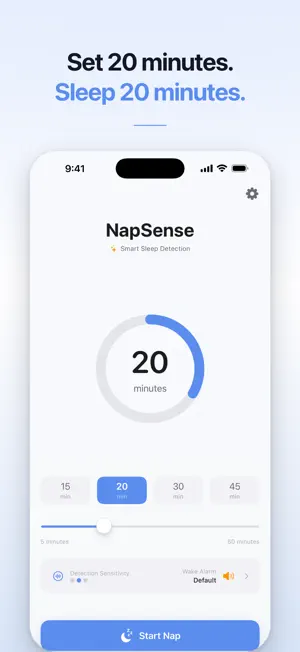
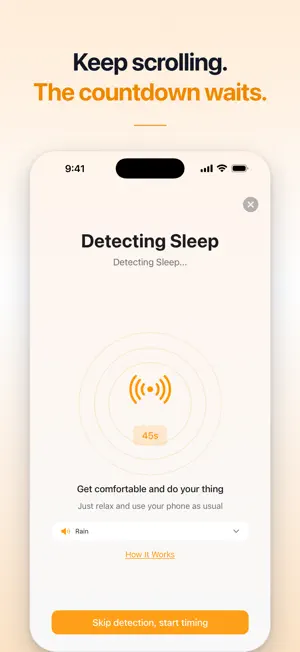
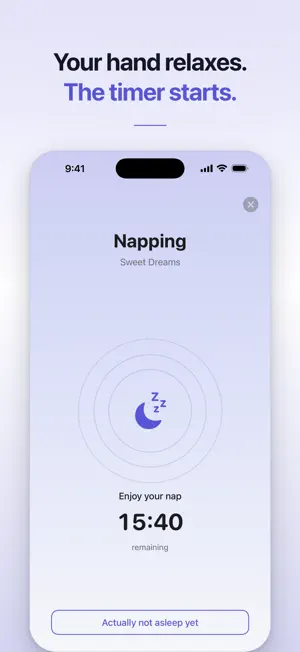
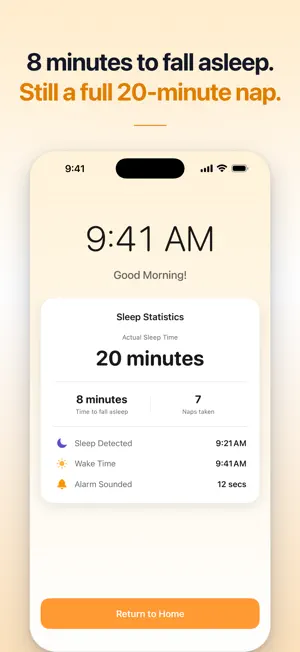
Set a 20-minute nap and an ordinary timer starts counting the moment you press it. Spend twelve minutes falling asleep and you get eight minutes of rest. NapSense waits. It watches for your phone to go still, and only then does the countdown begin. The nap you set is the nap you get. HOW IT WORKS 1. Choose how long you want to nap, anywhere from 5 to 60 minutes. 2. Keep using your phone. Watch something, scroll, whatever helps you wind down. 3. When you drift off and the phone stops moving, NapSense starts the timer. 4. The alarm wakes you at the end of the nap you actually asked for. WHAT YOU GET • Sleep detection. The countdown starts when you do, not when you press start. • Four white noise tracks: rain, ocean, pure rain, and midnight ambience. • Live Activities. Detection status and countdown on the Lock Screen and Dynamic Island, iPhone 14 Pro and later. • Alarms that work on silent. Pick a sound, set the volume, and test it before you lie down. • Nap history. Every nap you have taken, how long it took to drop off, and how long you slept. • A Home Screen widget. One tap and the nap begins. WHERE TO PUT YOUR PHONE On the mattress beside you, or in your hand. A phone on a nightstand never moves at all, so NapSense reads that as sleep the moment you set it down and starts counting early. IN A HURRY If you know you will be out in seconds, skip detection and start the countdown yourself. NapSense is free. One purchase removes ads and unlocks your nap history. There is no subscription, nothing renews, and there is nothing to cancel. No account. No sign-up. Your naps stay on your phone and are never uploaded. --- Note: Not a medical device. For rest and wellbeing, not for diagnosis or treatment.
What’s new
Version 1.0.6 · Updated October 2, 2026
• Fixed the volume check reopening on its own after using the widget • The widget now shows your actual nap length straight after updating • Tapping the widget works even if you last closed the app on a settings screen
App privacy
The developer, CHI-YU WU, reported these privacy practices to Apple.
Data Used to Track You
The following data may be used to track you across apps and websites owned by other companies:
- Identifiers: Device ID
- Usage Data: Product Interaction, Advertising Data
- Diagnostics: Crash Data, Performance Data
Data Not Linked to You
The following data, which may be collected but is not linked to your identity, may be used for the following purposes:
- Identifiers: Device ID
- Usage Data: Product Interaction, Advertising Data
- Diagnostics: Crash Data, Performance Data
Used for: Third-Party Advertising, Analytics, App Functionality
Alternatives to NapSense
Looking for apps like NapSense? Here are 6 similar apps on the App Store. The highest rated is Power Nap Assist - NapKit (5.0/5), and all 6 are free to download.
-
 PowerNap: Nap Timer & Alarm
-
 NapBest
2.0
NapBest
2.0
-
 NapBoost
3.0
NapBoost
3.0
-
 Power Nap Assist - NapKit
5.0
Power Nap Assist - NapKit
5.0
-
 PowerNapTime: Smart Naps
-
 Smart Nap: Power Nap Alarm
5.0
Smart Nap: Power Nap Alarm
5.0
| App | Rating | Price | Last updated | Compare |
|---|---|---|---|---|
| NapSense | – | Free | October 2, 2026 | |
| PowerNap: Nap Timer & Alarm | – | Free | Sep 8, 2026 | Compare |
| NapBest | 2.0 / 5 (4) | Free | Mar 20, 2026 | Compare |
| NapBoost | 3.0 / 5 (2) | Free | Apr 22, 2026 | Compare |
| Power Nap Assist - NapKit | 5.0 / 5 (1) | Free | Sep 4, 2026 | Compare |
| PowerNapTime: Smart Naps | – | Free | Sep 15, 2026 | Compare |
| Smart Nap: Power Nap Alarm | 5.0 / 5 (1) | Free | Oct 9, 2026 | Compare |
Compare NapSense with the top alternatives: ratings, updates, ASO score and keyword gaps →