

Smart Nap: Power Nap Alarm
Sources Knight Health & Fitness iPhoneiPadiPod touchApple Watch
Smart Nap: Power Nap Alarm is a free Health & Fitness app for iPhone and iPad by Sources Knight. Rated 5.0/5 from 1 ratings. Requires iOS 26.0.
- Rating
- 5.0
- 1 ratings
- Price
- Free
- on the App Store
- Size
- 68 MB
- Age 17+
- Updated
- Oct 9
- 2026 · v1.1
Screenshots

About Smart Nap: Power Nap Alarm
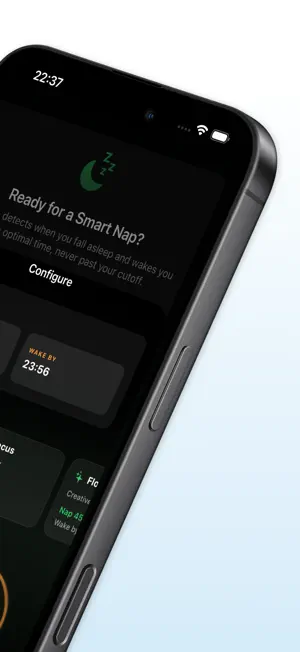
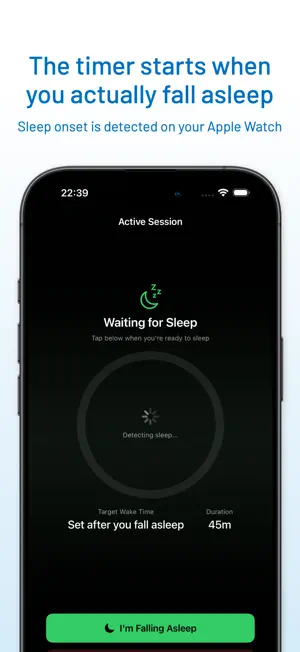
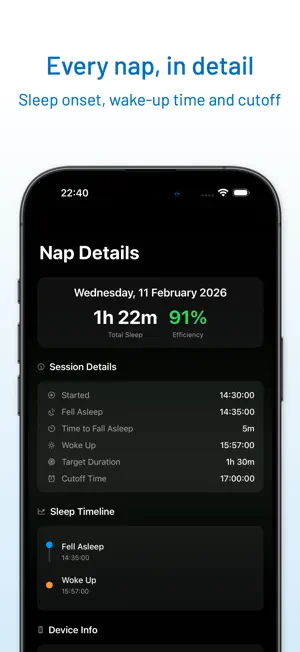
Choose how long you want to nap and the latest time you want to wake. Smart Nap automatically estimates sleep onset using a compatible paired Apple Watch, then starts timing your nap. You can also start the timer manually on iPhone. Your initial alarm respects your wake-time cutoff. If you choose Snooze, the extra time can extend beyond that cutoff. HOW IT WORKS 1. Set two things: how long you want to sleep, and the latest time you must be awake. 2. Lie down. Smart Nap estimates sleep onset using your Apple Watch. 3. The initial alarm is set for whichever comes first — your nap duration after estimated onset, or your cutoff. That cutoff is the whole point. If a 90-minute nap would end at 18:15 but your cutoff is 18:00, Smart Nap sets the initial alarm for 18:00. You can still choose Snooze when it rings. HOW IT KNOWS Your Apple Watch establishes a heart-rate baseline near the start of your nap, then looks for changes in heart rate, heart-rate variability and movement that suggest sleep onset. Smart Nap uses estimated onset times from previous naps and your optional feedback to adjust detection. SIX SMART PRESETS • Power — 20 min, a quick reset • Focus — 30 min, clear your head • Flow — 45 min, creative boost • Balance — 1 hour, steady recharge • Deep — 1h 30m, a longer rest • Recovery — 2 hours, a long reset Or dial in any duration and any cutoff you want. SEE WHAT ACTUALLY HAPPENED Each session records its start time, estimated sleep onset when available, time to fall asleep, recorded wake time, your target, and your cutoff. Estimated sleep efficiency is scored per nap and charted over weeks, so you can explore which nap length works for you. WRIST ALERTS The Watch app uses heart rate, heart-rate variability and movement to estimate sleep onset, then alerts you with wrist haptics and optional sound. YOUR HEALTH DATA STAYS ON YOUR DEVICES Smart Nap reads heart rate and HRV from Apple Health and movement from Apple Watch to estimate sleep onset. These health and sensor readings are processed on your iPhone and Apple Watch. They are not uploaded to a server, sold, or used for advertising. WHO IT'S FOR Shift workers who need a controlled nap before a night on. Students napping between classes. Parents grabbing a window while the baby sleeps. Anyone who has ever set a 25-minute alarm and woken up two hours later in the dark. REQUIREMENTS Smart Nap runs on iPhone with iOS 26 or later. Automatic sleep-onset detection requires a paired Apple Watch running watchOS 26 or later. Without one, Smart Nap runs as a manual-start nap timer with the same cutoff for the initial alarm. SUBSCRIPTION Your first nap is free, no subscription needed. After that, Smart Nap Pro unlocks unlimited naps with sleep-onset detection and your full nap history through weekly or annual subscriptions. Eligible users can get a 3-day free trial on the annual plan. See the app for available offers and local pricing. Payment is charged to your Apple Account at confirmation of purchase. Subscriptions renew automatically unless auto-renew is turned off at least 24 hours before the end of the current period. Manage or cancel anytime in your Apple Account settings. Terms of Use: https://sourcesknight.com/apps/smart-nap/terms-of-use/ Privacy Policy: https://sourcesknight.com/apps/smart-nap/privacy-policy/
What’s new
Version 1.1 · Updated October 9, 2026
• Improved stability and fixed issues with alarms. • Added Japanese language support. • Added a short guide to Apple Watch sleep-onset estimates and starting the nap timer manually on iPhone.
App privacy
The developer, Sources Knight, reported these privacy practices to Apple.
Data Used to Track You
The following data may be used to track you across apps and websites owned by other companies:
- Purchases: Purchase History
- Location: Coarse Location
- Identifiers: User ID, Device ID
- Usage Data: Product Interaction, Advertising Data
- Other Data: Other Data Types
Data Linked to You
The following data, which may be collected and linked to your identity, may be used for the following purposes:
- Purchases: Purchase History
- Location: Coarse Location
- Identifiers: User ID, Device ID
- Usage Data: Product Interaction, Advertising Data
- Other Data: Other Data Types
- Diagnostics: Performance Data, Other Diagnostic Data
Used for: Developer’s Advertising or Marketing, Analytics, App Functionality
Alternatives to Smart Nap: Power Nap Alarm
Looking for apps like Smart Nap: Power Nap Alarm? Here are 6 similar apps on the App Store. The highest rated is PaceBuddy: Smart Pacer (5.0/5), and all 6 are free to download.
-
 NapBoost
3.0
NapBoost
3.0
-
 PowerNap: Nap Timer & Alarm
-
 PaceBuddy: Smart Pacer
5.0
PaceBuddy: Smart Pacer
5.0
-
 TimeSleep: Sleep & Snore Alarm
-
 PowerNapTime: Smart Naps
-
 Stand & Hydrate
| App | Rating | Price | Last updated | Compare |
|---|---|---|---|---|
| Smart Nap: Power Nap Alarm | 5.0 / 5 (1 rating) | Free | October 9, 2026 | |
| NapBoost | 3.0 / 5 (2) | Free | Apr 22, 2026 | Compare |
| PowerNap: Nap Timer & Alarm | – | Free | Sep 8, 2026 | Compare |
| PaceBuddy: Smart Pacer | 5.0 / 5 (2) | Free | Sep 10, 2026 | Compare |
| TimeSleep: Sleep & Snore Alarm | – | Free | Oct 14, 2026 | Compare |
| PowerNapTime: Smart Naps | – | Free | Sep 15, 2026 | Compare |
| Stand & Hydrate | – | Free | Oct 5, 2026 | Compare |