

Costify: Expense Tracker
MARLON JOEL PITTERS Finance iPhoneiPadiPod touch
Costify: Expense Tracker is a free Finance app for iPhone and iPad by MARLON JOEL PITTERS. Rated 4.7/5 from 13 ratings. Requires iOS 18.5.
- Rating
- 4.7
- 13 ratings
- Price
- Free
- on the App Store
- Size
- 100 MB
- Age 4+
- Updated
- Aug 4
- 2026 · v1.4.0
Screenshots


About Costify: Expense Tracker
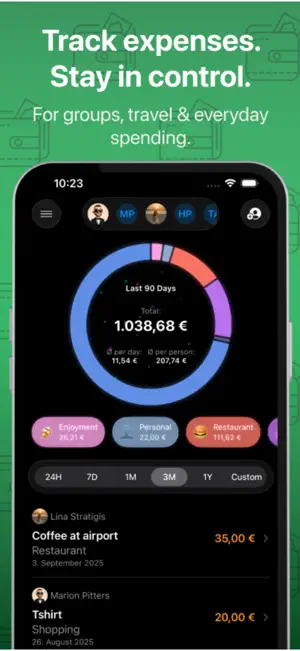
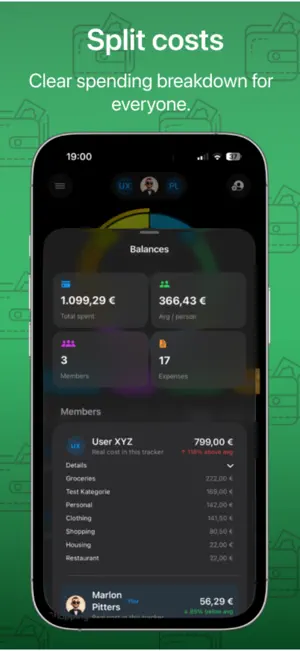
Costify - Track & Split Expenses Easily Costify is a modern expense tracker designed for individuals and groups who want full control over their spending — without complexity. Whether you’re traveling with friends, managing shared expenses in a group, or tracking personal budgets, Costify helps you stay organized, transparent, and stress-free. What you can do with Costify: - Create multiple trackers for trips, projects, or everyday expenses - Create virtual accounts to mirror your bank accounts, cash wallets, or savings funds - Track expenses with categories, notes, dates, and attachments - Share trackers with friends and see who spent what in real time - Split costs automatically and keep balances clear within groups - Attach receipts, photos, and files to your expenses - Export trackers as CSV or PDF for easy sharing or documentation - Analyze your spending with clean overviews and smart analytics - Create and manage installment plans with flexible payments, extra payments, and full payoff anytime - View a clear budget overview for the current month and see how much you’ve already spent - Convert currencies instantly with the built-in currency converter - Automatically add expenses after Apple Pay payments using Shortcuts automations - Open the expense flow instantly with Shortcuts and tap gestures for faster tracking - Personalize your profile and collaborate seamlessly with others Costify is built with a focus on clarity, collaboration, and privacy — no ads, no clutter, just the features you actually need. Take control of your expenses. Together or on your own. Terms of Use (EULA): https://www.apple.com/legal/internet-services/itunes/dev/stdeula/ Privacy Policy: https://costify.app/privacy-policy/
Ratings & reviews
4.7
13 ratings
What’s new
Version 1.4.0 · Updated August 4, 2026
- Redesigned the onboarding experience - Added a Shortcut tutorial to the onboarding
App privacy
The developer, MARLON JOEL PITTERS, reported these privacy practices to Apple.
Data Used to Track You
The following data may be used to track you across apps and websites owned by other companies:
- Identifiers: Device ID
- Usage Data: Product Interaction
Data Linked to You
The following data, which may be collected and linked to your identity, may be used for the following purposes:
- Identifiers: Device ID, User ID
- Contact Info: Email Address, Name
- Purchases: Purchase History
- Usage Data: Product Interaction
- Diagnostics: Crash Data
- User Content: Photos or Videos, Other User Content
Used for: Third-Party Advertising, Developer’s Advertising or Marketing, Analytics, App Functionality
Data Not Linked to You
The following data, which may be collected but is not linked to your identity, may be used for the following purposes:
- Usage Data: Product Interaction
- Identifiers: User ID
- Diagnostics: Performance Data
- Location: Coarse Location
Used for: Third-Party Advertising, Developer’s Advertising or Marketing, Analytics, App Functionality
Alternatives to Costify: Expense Tracker
Looking for apps like Costify: Expense Tracker? Here are 6 similar apps on the App Store. The highest rated is Kelo: Expense Tracker & Budget (5.0/5), and all 6 are free to download.
-
 Budget Tracker - Brim
3.4
-
 Control: Budget Tracker
4.3
-
 Budjetly: Budget Planner
3.7
-
 SyncSpend
3.4
-
 Kelo: Expense Tracker & Budget
5.0
-
 Qalta: Budget, Expense Tracker
4.6
| App | Rating | Price | Last updated | Compare |
|---|---|---|---|---|
| Costify: Expense Tracker | 4.7 / 5 (13 ratings) | Free | August 4, 2026 | |
| Budget Tracker - Brim | 3.4 / 5 (5) | Free | Oct 4, 2026 | Compare |
| Control: Budget Tracker | 4.3 / 5 (11) | Free | Oct 6, 2026 | Compare |
| Budjetly: Budget Planner | 3.7 / 5 (3) | Free | Aug 24, 2026 | Compare |
| SyncSpend | 3.4 / 5 (7) | Free | Mar 25, 2026 | Compare |
| Kelo: Expense Tracker & Budget | 5.0 / 5 (9) | Free | Oct 11, 2026 | Compare |
| Qalta: Budget, Expense Tracker | 4.6 / 5 (15) | Free | Sep 25, 2026 | Compare |