

QuickClipper
Nirmita Technologies LLC Productivity iPhoneiPadiPod touch
QuickClipper is a free Productivity app for iPhone and iPad by Nirmita Technologies LLC. Requires iOS 15.5. Updated October 15, 2026.
- Price
- Free
- on the App Store
- Size
- 110 MB
- Age 4+
- Updated
- Oct 15
- 2026 · v1.4.0
Screenshots



About QuickClipper
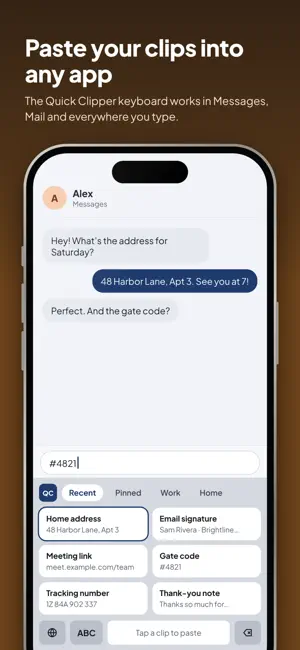
QuickClipper keeps everything you copy and save in one place: notes, links, code, checklists, sketches and photos. Find anything in seconds and paste it anywhere. EVERYTHING IN ONE PLACE - Save notes, links, code, checklists and sketches - Clips are sorted automatically, so links look like links and code looks like code - Folders, pins, tags and search keep things easy to find - Reminders so you never forget a clip that matters SHARE PRIVATELY, LIVE - Share a list, note or folder with only the people you invite - Everyone can edit together and changes show up right away - See who made the last change, and get a notification when someone edits - Or just send a copy through Messages, Mail or any app SECURE VAULT - Keep passwords, codes and private photos in an encrypted Vault - Unlock with Face ID or your passcode - Vault items stay on your device and are never uploaded WRITING TOOLS ON YOUR DEVICE - Summarize, fix spelling, make it shorter, more professional or friendlier - Turn notes into checklists or translate them - Runs on your device with Apple Intelligence, so your text is never sent anywhere (on supported devices) WORKS EVERYWHERE YOU DO - Quick Clipper keyboard: paste saved clips into any app - Home Screen widget for your recent clips - Save from any app with the Share button - Optional sign-in to sync across your devices - Text from photos, themes, card styles and fonts to make it yours QUICKCLIPPER PRO Unlock live sharing, the Secure Vault, unlimited folders, every theme, card style and font, and more. - Monthly or yearly subscription (the yearly plan includes a 7-day free trial), or a one-time Lifetime purchase - Payment is charged to your Apple Account when you confirm the purchase - Subscriptions renew automatically unless canceled at least 24 hours before the end of the current period - Manage or cancel anytime in your Apple Account settings - Any unused part of a free trial ends when you buy a subscription Terms of Use: https://nirmitatechnologies.com/legal/quickclipper/terms Privacy Policy: https://nirmitatechnologies.com/legal/quickclipper/privacy
What’s new
Version 1.4.0 · Updated October 15, 2026
A big update! - Share lists, notes and folders privately and edit together, live - A fresh new design with cleaner cards - Writing tools: summarize, fix, rewrite and translate on your device - Secure Vault for passwords, codes and private photos - QuickClipper Pro with monthly, yearly (7-day free trial) and Lifetime plans - Optional sign-in to sync across your devices - Your clips from earlier versions come with you automatically
App privacy
The developer, Nirmita Technologies LLC, reported these privacy practices to Apple.
Data Linked to You
The following data, which may be collected and linked to your identity, may be used for the following purposes:
- Contact Info: Email Address, Name
- User Content: Other User Content
- Identifiers: User ID
Used for: App Functionality
Data Not Linked to You
The following data, which may be collected but is not linked to your identity, may be used for the following purposes:
- Diagnostics: Crash Data
Used for: App Functionality
Alternatives to QuickClipper
Looking for apps like QuickClipper? Here are 6 similar apps on the App Store. The highest rated is Pacts: Lifes Experiments (5.0/5), and 5 of the 6 are free to download.
-
 Prompt Planter
-
 Pacts: Lifes Experiments
5.0
-
 iLinks
4.6
-
 LicenseManagerPro
-
 LaterCue: AI Task from Links
5.0
-
 Dailivo
5.0
| App | Rating | Price | Last updated | Compare |
|---|---|---|---|---|
| QuickClipper | – | Free | October 15, 2026 | |
| Prompt Planter | – | Free | Sep 9, 2026 | Compare |
| Pacts: Lifes Experiments | 5.0 / 5 (2) | Free | Oct 23, 2026 | Compare |
| iLinks | 4.6 / 5 (7) | 0.99 USD | Jan 18, 2025 | Compare |
| LicenseManagerPro | – | Free | Oct 22, 2026 | Compare |
| LaterCue: AI Task from Links | 5.0 / 5 (1) | Free | May 12, 2026 | Compare |
| Dailivo | 5.0 / 5 (1) | Free | Sep 1, 2025 | Compare |
Compare QuickClipper with the top alternatives: ratings, updates, ASO score and keyword gaps →