

Prompt Planter
Yusuke Nakashima Productivity iPhoneiPadiPod touch
Prompt Planter is a free Productivity app for iPhone and iPad by Yusuke Nakashima. Requires iOS 26.0. Updated September 9, 2026.
- Price
- Free
- on the App Store
- Size
- 3 MB
- Age 4+
- Updated
- Sep 9
- 2026 · v1.0.3
Screenshots
About Prompt Planter
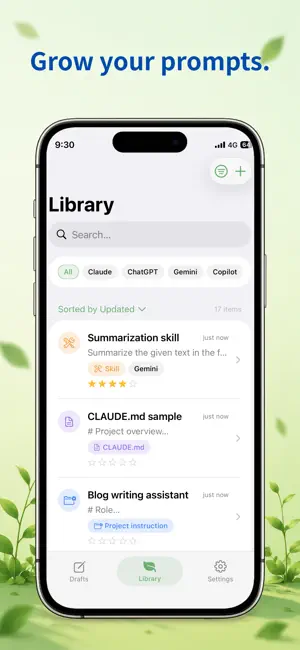
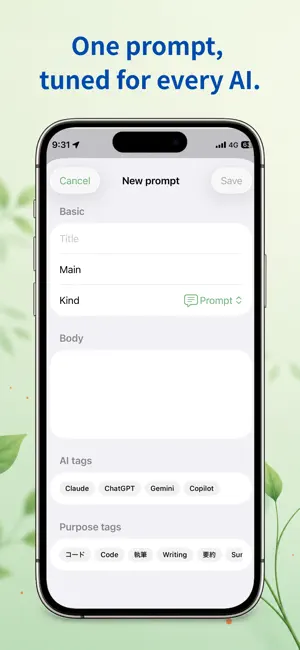
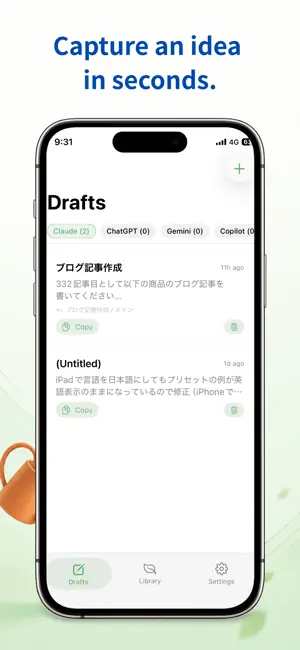
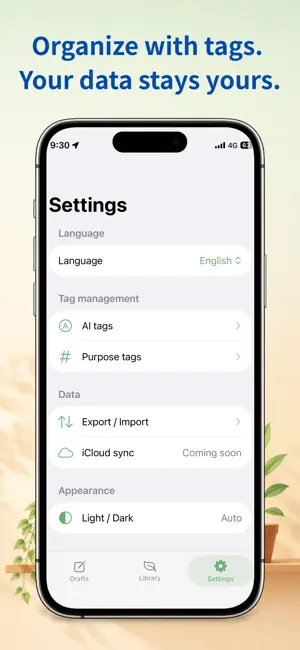
Write, test, and grow your prompts. Track versions of your AI prompts with diff view, version restore, and {{template}} variables - now synced across iPhone, iPad, and Mac. Prompt Planter is a calm, private home for the AI prompts you actually want to keep. If you reuse the same prompts across different AI assistants, you know the pain: the good version is buried somewhere in a chat history, and you end up rewriting it from scratch. Prompt Planter lets you save your best prompts, improve them over time, and grab the right one in seconds. THE SAME LIBRARY ON EVERY DEVICE - Syncs automatically over iCloud. Start a draft on your iPhone and finish it on your iPad or Mac. - Nothing to set up. If you are signed in to iCloud, everything is already there when you open the app. - You can check the sync status any time in Settings. GROW YOUR PROMPTS - Keep prompts, project instructions, skills, CLAUDE.md files, and system prompts in one library. - Every prompt has a full version history. Save a new version whenever you tweak it, with a short note on what changed. - See exactly what changed between versions, highlighted with + and - marks. - Restore any past version at any time. Restoring adds a new revision, so your history is never lost. - Rate each version and record how it actually performed, so you always know which one works best. ONE PROMPT, TUNED FOR EVERY AI - Create variants of the same prompt for different models. - Tag prompts by AI and by purpose so you can find exactly what you need. Give AI tags a color to tell them apart at a glance. - Duplicate a whole prompt, version history included, when you want to take it in a different direction. CAPTURE IDEAS FAST - Jot a quick draft, then save it to your library as a new prompt, a new version, or a new variant. - One-tap copy to the clipboard, ready to paste into any chat. - Write {{name}} in a prompt body and a fill-in form appears when you copy it or send it to Drafts. FIND WHAT YOU ARE LOOKING FOR - Pin your go-to prompts to the top. - Mark favorites and filter by kind, AI, or purpose. - Search covers change notes and result notes too, not just the prompt body, so you can find that one insight you wrote down. - Your sort order and filters are remembered between launches. YOUR DATA STAYS YOURS - No account, no sign-in, no ads, no tracking. - Sync uses your own iCloud private database. The developer cannot see its contents. - Not using iCloud? Everything stays on your device and every feature still works. - Export and import your whole library as a JSON file for backup or moving between devices. FULLY BILINGUAL - Use the app in English or Japanese, switchable anytime. Prompt Planter is designed to be quiet, fast, and out of your way, so your prompts can grow alongside your work.
What’s new
Version 1.0.3 · Updated September 9, 2026
■ Fixed the cursor drifting while typing in Japanese While writing a draft, the cursor could drift away from where you were actually typing, in the middle of converting text. Autosave was landing right on top of your input; it now waits until you pause. Longer drafts made it more likely. ■ Language on first launch The app now starts in Japanese if that is your device language, and in English otherwise. It used to always start in English. You can still switch anytime in Settings. ■ A consistent look in Drafts The Drafts tab now uses the same background as Library and Settings, so the cards are easier to tell apart. Feedback and feature requests are always welcome in your reviews.
App privacy
The developer, Yusuke Nakashima, reported these privacy practices to Apple.
Data Not Collected
The developer does not collect any data from this app.
Alternatives to Prompt Planter
Looking for apps like Prompt Planter? Here are 6 similar apps on the App Store.
-
 KanataNote
-
 Snippet: Templates Keyboard
-
 ぺたっとメモ
-
 Prompt Note: AI Prompt Library
-
 Crisp Scan
-
 Save Any Link: Read Later
| App | Rating | Price | Last updated | Compare |
|---|---|---|---|---|
| Prompt Planter | – | Free | September 9, 2026 | |
| KanataNote | – | Free | Sep 2, 2026 | Compare |
| Snippet: Templates Keyboard | – | Free | Aug 30, 2026 | Compare |
| ぺたっとメモ | – | Free | May 21, 2026 | Compare |
| Prompt Note: AI Prompt Library | – | Free | Jun 24, 2026 | Compare |
| Crisp Scan | – | Free | Sep 29, 2026 | Compare |
| Save Any Link: Read Later | – | Free | Sep 21, 2026 | Compare |
Compare Prompt Planter with the top alternatives: ratings, updates, ASO score and keyword gaps →