
PDF Compare & AI Detector
Marsel Tagaev Productivity iPhoneiPadiPod touchMac
PDF Compare & AI Detector is a free Productivity app for iPhone and iPad by Marsel Tagaev. Rated 5.0/5 from 2 ratings. Requires iOS 17.6.
- Rating
- 5.0
- 2 ratings
- Price
- Free
- on the App Store
- Size
- 23 MB
- Age 12+
- Updated
- Jun 28
- 2026 · v1.24
Screenshots



About PDF Compare & AI Detector
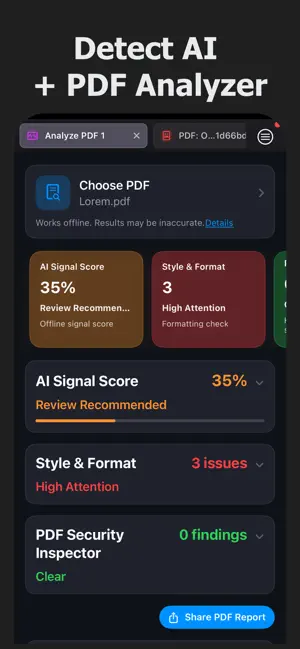
Your helper for working with AI, LLMs, and digital documents. Compare PDFs, Word, DOCX and text files, analyze documents, inspect PDF metadata, check formatting issues, and review AI-related signals before you share, submit or sign. Useful tools to compare, inspect, validate, and review content with confidence. COMPARE PDF, WORD, DOCX & TEXT • Highlight document differences • Check similarity score • Compare images in PDFs • Review changes side by side • Find added, removed and changed content AI SIGNALS / AI DETECTOR REVIEW • Check offline AI/Bot signal score • Review metadata and document properties • Detect unusual document patterns • See triggered signals with explanations The AI Signal Score does not determine whether content was created by AI. It highlights document signals that may require review. STYLE & FORMAT CHECKER • Detect formatting inconsistencies • Identify print cut and page edge risks • Check margins, spacing and text placement • Find long lines and readability issues • Detect excessive blank lines and empty pages PDF SECURITY INSPECTOR • View PDF metadata • Scan PDFs for hidden content • Detect tiny, invisible or unreadable text • Review suspicious links and embedded actions • Check PDF restrictions and permissions • Inspect forms, annotations and signature fields PDF REPORT EXPORT • Export a professional PDF report • Share document analysis results easily • Include AI signals, formatting issues and security findings • Add metadata summaries and key insights • Create reports for audits, reviews and documentation WORKS OFFLINE Document analysis runs offline on your device for enhanced privacy. Results are informational and may be incomplete or inaccurate. The app does not provide legal, forensic, cybersecurity or digital signature validation. USEFUL FOR • Contracts • Reports • Academic papers • Invoices • Resumes and CVs • Technical documents • Legal drafts • AI-generated drafts • Business documents • Before and after document versions PRO FEATURES: Some advanced features may require Pro access, including full PDF analysis, advanced comparison tools, larger document limits, detailed reports and premium document review features. PDF Compare & Analyzer is built for users who need more than a simple PDF viewer. Compare changes, inspect document structure, check metadata, review AI-related signals and analyze files with more confidence. Terms of Use (EULA): https://www.apple.com/legal/internet-services/itunes/dev/stdeula/ Privacy Policy: https://tagaev.xyz/pdftextcompate-pp.html Support: [email protected]
What’s new
Version 1.24 · Updated June 28, 2026
Improved performance, document analysis, and overall user experience.
App privacy
The developer, Marsel Tagaev, reported these privacy practices to Apple.
Data Not Collected
The developer does not collect any data from this app.
Alternatives to PDF Compare & AI Detector
Looking for apps like PDF Compare & AI Detector? Here are 6 similar apps on the App Store. The highest rated is FileDuel (5.0/5), and all 6 are free to download.
-
 Diff Checker - Compare Text
-
 Compare Text: PDF & Documents
-
 Similar Basic
-
 文档对比:文本内容差异检查阅读编辑器
-
 Pinmo
Pinmo
-
 FileDuel
5.0
FileDuel
5.0
| App | Rating | Price | Last updated | Compare |
|---|---|---|---|---|
| PDF Compare & AI Detector | 5.0 / 5 (2 ratings) | Free | June 28, 2026 | |
| Diff Checker - Compare Text | – | Free | Nov 21, 2025 | Compare |
| Compare Text: PDF & Documents | – | Free | Oct 20, 2026 | Compare |
| Similar Basic | – | Free | Dec 23, 2025 | Compare |
| 文档对比:文本内容差异检查阅读编辑器 | – | Free | Apr 16, 2025 | Compare |
| Pinmo | – | Free | Apr 5, 2026 | Compare |
| FileDuel | 5.0 / 5 (1) | Free | Oct 13, 2026 | Compare |