

Dollar Count: Budget App
Fazley Rabbi Finance iPhoneiPadiPod touch
Dollar Count: Budget App is a free Finance app for iPhone and iPad by Fazley Rabbi. Rated 4.0/5 from 2 ratings. Requires iOS 18.5. Updated August 18, 2026.
- Rating
- 4.0
- 2 ratings
- Price
- Free
- on the App Store
- Size
- 4 MB
- Age 4+
- Updated
- Aug 18
- 2026 · v2
Screenshots

About Dollar Count: Budget App
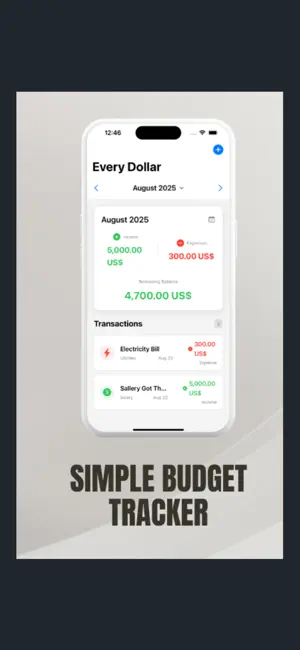
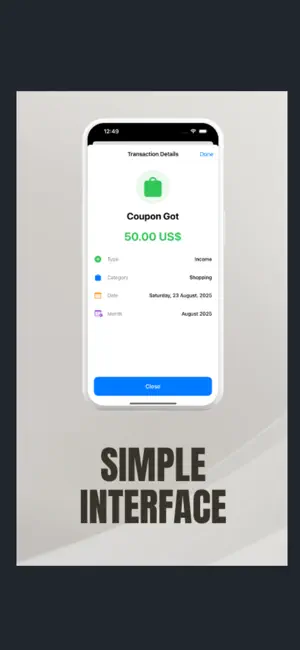
Every dollar you earn should have a job. Dollar Count makes sure it does. Dollar Count is a fast, simple budget app and expense tracker for people who want a clear picture of their money — without spreadsheets, bank logins, or a finance degree. Add what you earn, add what you spend, and see your real balance instantly. TRACK EXPENSES IN SECONDS Logging a transaction takes three taps. Enter the amount, pick a category, save. Switch between income and expense with one toggle. No long forms, no clutter, no waiting — fast enough to record a purchase while you're still standing at the counter. SEE YOUR REAL BALANCE Your home screen shows total income, total expenses, and what's actually left for the month, updated the moment you add anything. Move between months to review past spending or plan ahead. Every transaction is listed with its category, date, and amount so nothing gets lost. UNDERSTAND YOUR SPENDING HABITS The Insights tab breaks your spending down by category in a clean visual chart, so you can see at a glance whether rent, groceries, or small daily expenses are eating your budget. A 6-month trend view shows how your income and spending move over time — the kind of pattern you can only spot when someone shows it to you. SET MONTHLY BUDGET LIMITS Give every category a monthly limit — groceries, transportation, entertainment, healthcare, shopping and more. Track your spending against each limit as the month goes on, so you know where you stand before it's too late to change course. BUILT-IN CATEGORIES Salary, Rent, Groceries, Utilities, Transportation, Entertainment, Healthcare and Shopping, each with a clear icon so you can scan your transaction history in a second. Everything is organized for you from the first launch. WHY PEOPLE CHOOSE DOLLAR COUNT No bank connection required — your budget lives on your phone Clean, modern design that's genuinely pleasant to open every day Month-by-month view, so nothing gets mixed up between periods Works offline, anywhere Simple enough to actually stick with WHO IT'S FOR Whether you're paying off debt, saving for something specific, managing an irregular freelance income, splitting household bills, or just tired of wondering where your paycheck went — Dollar Count gives you the clarity to take control of your personal finances. Most budgeting apps fail because they ask too much of you. This one asks for three taps. Download Dollar Count and start tracking today. https://www.apple.com/legal/internet-services/itunes/dev/stdeula/
What’s new
Version 2 · Updated August 18, 2026
• Log income and expenses in three taps • See your real monthly balance update instantly • Spending breakdown by category with a visual chart • 6-month income and spending trend • Set a monthly budget limit for every category • Built-in categories with clear icons • Works offline — no bank connection needed
App privacy
The developer, Fazley Rabbi, reported these privacy practices to Apple.
Data Not Collected
The developer does not collect any data from this app.
Alternatives to Dollar Count: Budget App
Looking for apps like Dollar Count: Budget App? Here are 6 similar apps on the App Store. The highest rated is Wally: Simple Budget Tracker (4.8/5), and all 6 are free to download.
-
 Wally: Simple Budget Tracker
4.8
Wally: Simple Budget Tracker
4.8
-
 Pennies: Budget & Bill Tracker
4.6
Pennies: Budget & Bill Tracker
4.6
-
 Budgeting App - Spend Tracker
4.7
Budgeting App - Spend Tracker
4.7
-
 Hold: Money & Budget Manager
4.6
Hold: Money & Budget Manager
4.6
-
 Actual Budget Spendıng Tracker
4.4
Actual Budget Spendıng Tracker
4.4
-
 Our Expenses: Household Budget
4.8
Our Expenses: Household Budget
4.8
| App | Rating | Price | Last updated | Compare |
|---|---|---|---|---|
| Dollar Count: Budget App | 4.0 / 5 (2 ratings) | Free | August 18, 2026 | |
| Wally: Simple Budget Tracker | 4.8 / 5 (20) | Free | Oct 15, 2026 | Compare |
| Pennies: Budget & Bill Tracker | 4.6 / 5 (1,818) | Free | Oct 15, 2026 | Compare |
| Budgeting App - Spend Tracker | 4.7 / 5 (87) | Free | Oct 18, 2026 | Compare |
| Hold: Money & Budget Manager | 4.6 / 5 (5) | Free | Oct 17, 2026 | Compare |
| Actual Budget Spendıng Tracker | 4.4 / 5 (88) | Free | Oct 21, 2026 | Compare |
| Our Expenses: Household Budget | 4.8 / 5 (491) | Free | Apr 13, 2026 | Compare |