

Tiny Web Inspector
chanwool kim Developer Tools iPhoneiPadiPod touch
Tiny Web Inspector is a free Developer Tools app for iPhone and iPad by chanwool kim. Rated 4.1/5 from 8 ratings. Requires iOS 18.0.
- Rating
- 4.1
- 8 ratings
- Price
- Free
- on the App Store
- Size
- 8 MB
- Age 17+
- Updated
- Oct 26
- 2026 · v1.8
Screenshots

About Tiny Web Inspector
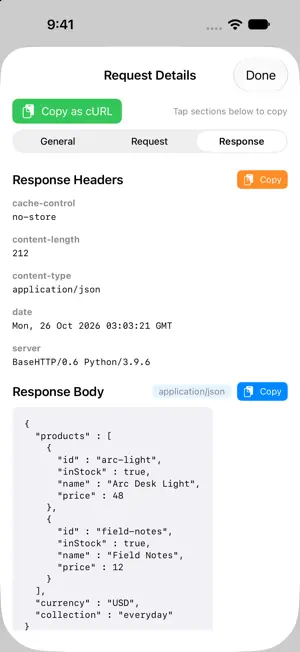
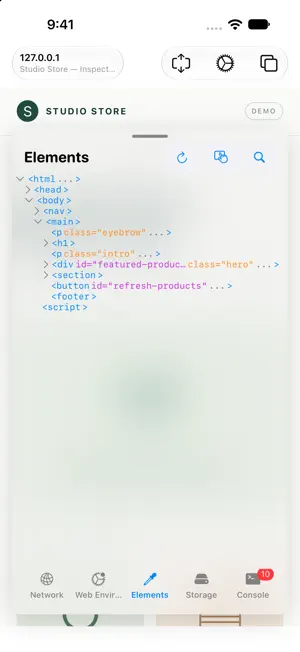
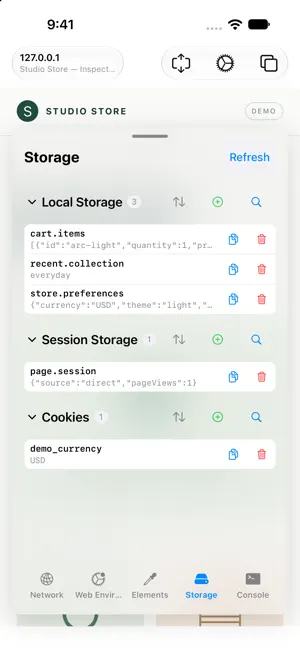
Inspect and debug websites directly on your iPhone and iPad with Tiny Web Inspector. Browse a page and keep your developer tools close at hand. NETWORK Follow page resources, Fetch and XMLHttpRequest activity. Filter requests by resource type, status or host, search captured data, inspect available headers and bodies, and copy requests as cURL. ELEMENTS Browse and search the HTML tree. Use Touch selection to find a visible element, inspect its HTML, and copy its path or source. CONSOLE Read console.log, warnings and errors. Run JavaScript with quick commands and command history to investigate the current page. STORAGE Inspect local storage, session storage and cookies. Search, copy, edit or remove values, and view JSON in a readable format. WEB ENVIRONMENT Try User Agent presets, manage custom headers and inject your own scripts. Keep multiple pages open in separate tabs. ADAPTIVE WORKSPACE Use the inspector on iPhone and iPad, with layouts adapted for iPhone Duo's outer and inner displays. On the expanded Duo layout, browse alongside the inspector. Capture availability depends on WebKit and the resource type. Some browser-managed headers, cross-origin resources, binary payloads and navigation response bodies may not be exposed. Large captured bodies and older logs are limited to keep memory usage bounded.
Ratings & reviews
4.1
8 ratings
What’s new
Version 1.8 · Updated October 26, 2026
• Added an adaptive inspector workspace for iPhone Duo. • Improved Touch element selection and restored normal page interaction when selection ends. • Improved request-body capture and JSON response handling. • Added clearer empty, unavailable and truncated body states. • Improved console quick commands, command history, network filters and storage browsing. • Reduced memory growth and repeated work on the main thread.
App privacy
The developer, chanwool kim, reported these privacy practices to Apple.
Data Linked to You
The following data, which may be collected and linked to your identity, may be used for the following purposes:
- Location: Coarse Location
- Identifiers: Device ID
- Usage Data: Product Interaction
Used for: Analytics
Data Not Linked to You
The following data, which may be collected but is not linked to your identity, may be used for the following purposes:
- Diagnostics: Other Diagnostic Data, Crash Data
Used for: Analytics, App Functionality
Alternatives to Tiny Web Inspector
Looking for apps like Tiny Web Inspector? Here are 6 similar apps on the App Store. The highest rated is WebView Inspector (5.0/5), and all 6 are free to download.
-
 WebView Inspector
5.0
WebView Inspector
5.0
-
 WebDebug - Web debugging tool
4.5
WebDebug - Web debugging tool
4.5
-
 Web Monitor - HTML Inspector
4.2
Web Monitor - HTML Inspector
4.2
-
 Right On Page Devtools
3.7
Right On Page Devtools
3.7
-
 Web DevTools+
5.0
Web DevTools+
5.0
-
 DevInspect Browser
| App | Rating | Price | Last updated | Compare |
|---|---|---|---|---|
| Tiny Web Inspector | 4.1 / 5 (8 ratings) | Free | October 26, 2026 | |
| WebView Inspector | 5.0 / 5 (2) | Free | Mar 17, 2026 | Compare |
| WebDebug - Web debugging tool | 4.5 / 5 (24) | Free | Oct 10, 2026 | Compare |
| Web Monitor - HTML Inspector | 4.2 / 5 (5) | Free | May 31, 2026 | Compare |
| Right On Page Devtools | 3.7 / 5 (3) | Free | Jul 7, 2026 | Compare |
| Web DevTools+ | 5.0 / 5 (2) | Free | Oct 21, 2026 | Compare |
| DevInspect Browser | – | Free | Sep 28, 2026 | Compare |
Compare Tiny Web Inspector with the top alternatives: ratings, updates, ASO score and keyword gaps →