

Alarm Stacks
Conor Nolan Productivity iPhoneiPadiPod touch
Alarm Stacks is a free Productivity app for iPhone and iPad by Conor Nolan. Requires iOS 26.0. Updated October 18, 2026.
- Price
- Free
- on the App Store
- Size
- 9 MB
- Age 4+
- Updated
- Oct 18
- 2026 · v1.4
Screenshots
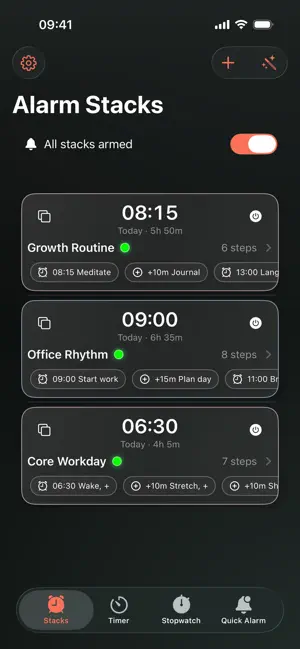


About Alarm Stacks
Build step-by-step alarm routines that actually ring. Alarm Stacks lets you create stacks like Wake → Hydrate → Stretch → Shower → Leave. The first step can be Start in (a countdown) or Fixed time; later steps can be Fixed time or After previous. Alarms use the system’s full-screen interface and ring even with Silent or Focus enabled. Follow along on the Lock Screen with a Live Activity, skip or snooze a step, or control stacks with Siri and Shortcuts. Highlights • Real alarms — System-grade ringing that works even with Silent/Focus on. • Stacks = routines — First step: Start in or Fixed time. Following steps: Fixed time or After previous. • Live Activities (Lock Screen) — See countdowns and quick controls at a glance. • Quick Alarm — Set an alarm for “in X minutes” or “at a time” in two taps. • Stopwatch & Timer — Simple, precise, each with a Lock Screen Live Activity. • On-device routine generator — Type “06:30 gym, then 30m later shower, then 10m later coffee” and review the proposed stack before saving. • Shortcuts & Siri — Arm, disarm, start, stop, or snooze via voice or automations. • Themes — Pick a colour that suits you. • No account, no ads, no tracking — Your data stays on your device. How it works 1. Create a stack and add steps (first step = Start in or Fixed time; later steps = Fixed time or After previous). 2. Arm the stack — Alarm Stacks schedules everything for you. 3. Use the Lock Screen Live Activity to complete, skip, or snooze; the next step starts automatically. Free vs Plus Free: up to 2 stacks and 3 steps per stack. Alarm Stacks Plus: unlimited stacks & steps, extra themes, and future premium features. Privacy Works entirely on-device. Routine generation also runs on-device; conversational interpretation uses Apple Intelligence where available. No accounts, no analytics, and no third-party SDKs. Notes • Allow alarm access and enable Live Activities for the best experience. • Siri/Shortcuts require permission to run voice or automation actions. • Dynamic Island is present on compatible devices but not yet fully optimised in this version. Terms of Use (EULA): https://www.apple.com/legal/internet-services/itunes/dev/stdeula/ Privacy Policy: https://alarmstacks.com/privacy.html
What’s new
Version 1.4 · Updated October 18, 2026
• Added layouts for iPhone Duo, with a new analogue clock and calendar. • Improved Generate Routine with clearer previews and more reliable timing. • Fixed Live Activities remaining after alarms are cancelled or completed. • Fixed repeating alarms and polished controls, spacing and themes.
App privacy
The developer, Conor Nolan, reported these privacy practices to Apple.
Data Not Collected
The developer does not collect any data from this app.
Alternatives to Alarm Stacks
Looking for apps like Alarm Stacks? Here are 6 similar apps on the App Store. The highest rated is Minus Alarm - Schedule Alarm (5.0/5), and all 6 are free to download.
-
 Minus Alarm - Schedule Alarm
5.0
Minus Alarm - Schedule Alarm
5.0
-
 Alarm Clock: Wake Up Timer.
-
 Call to Meet: Meeting Alarm
-
 Alarm Clk - Tracker & Sounds
-
 PomoTask: Pomodoro Focus Timer
-
 Todoloo
| App | Rating | Price | Last updated | Compare |
|---|---|---|---|---|
| Alarm Stacks | – | Free | October 18, 2026 | |
| Minus Alarm - Schedule Alarm | 5.0 / 5 (1) | Free | Oct 10, 2026 | Compare |
| Alarm Clock: Wake Up Timer. | – | Free | Oct 30, 2025 | Compare |
| Call to Meet: Meeting Alarm | – | Free | Oct 29, 2026 | Compare |
| Alarm Clk - Tracker & Sounds | – | Free | Mar 23, 2026 | Compare |
| PomoTask: Pomodoro Focus Timer | – | Free | Oct 24, 2026 | Compare |
| Todoloo | – | Free | Jul 26, 2026 | Compare |
Compare Alarm Stacks with the top alternatives: ratings, updates, ASO score and keyword gaps →