

Nottery AI: Voice to Text
Nerds Boutique L.L.C. Productivity iPhoneiPadiPod touch
Nottery AI: Voice to Text is a free Productivity app for iPhone and iPad by Nerds Boutique L.L.C. Requires iOS 15.6. Updated October 23, 2026.
- Price
- Free
- on the App Store
- Size
- 33 MB
- Age 4+
- Updated
- Oct 23
- 2026 · v2.1.12
Screenshots


About Nottery AI: Voice to Text
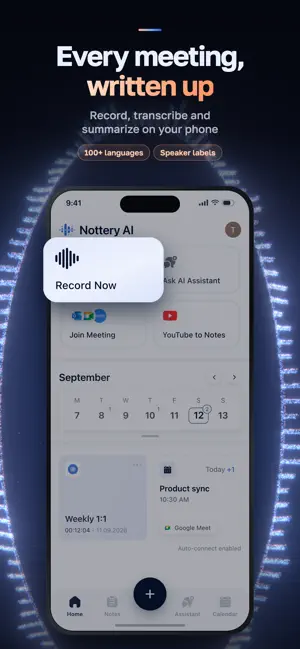
Nottery AI: Speech To Text App is your best assistant for recording meetings, interviews, lectures, voice notes, and more. Supports Google Meet, Zoom, Microsoft Outlook, YouTube integrations. Key Features: * Google Meet, Zoom, Microsoft Outlook integrations – Seamlessly connect and record meetings across your favourite platforms. * Built-in AI Chat plus Voice AI Chat – Interact with your recordings via text or voice and get instant AI-powered insights. * High-Quality Voice Recording – Capture important content effortlessly. Whether it’s a conversation, lecture, or idea, our app helps you document every significant moment quickly and reliably. * AI-Powered Transcription – With AI transcription technology, your voice recordings are instantly converted into text, saving you time and effort on manual transcription, supporting any language. * Built-in Calendar to Manage Workflow – Organize your schedule, set reminders, and manage all your recordings in one place. * AI Summary – Automatically generate detailed summaries tailored to your preferred format (bullet points, paragraphs, reports, etc.). * Smart Summaries and Highlights – Automatically generate summaries and highlight key points from your recordings. * YouTube Link Transcribe – Paste any YouTube link and instantly get an accurate transcription of the video content. * Multilingual Support – Transcribe and understand recordings in any language, making it a versatile tool for users around the world. * Seamless Text Sharing – Share your transcribed text with colleagues, friends, or anyone via multiple platforms with ease. * Secure Cloud Storage – Enjoy unlimited, secure cloud storage for all your data, keeping your recordings safe and accessible at any time. Don’t miss a single important detail. Nottery AI is the best way to capture, save, and share critical moments effortlessly. Download it now and start recording! The app is free to download. To unlock all premium features, a subscription is required. Subscriptions auto-renew unless canceled at least 24 hours before the end of the current period. Your account will be charged for renewal within 24 hours before the end of the current period. Terms of Use: https://www.apple.com/legal/internet-services/itunes/dev/stdeula/
What’s new
Version 2.1.12 · Updated October 23, 2026
This version brings enhanced transcription models for more accurate and reliable results.
App privacy
The developer, Nerds Boutique L.L.C., reported these privacy practices to Apple.
Data Used to Track You
The following data may be used to track you across apps and websites owned by other companies:
- Identifiers: Device ID
- Usage Data: Product Interaction
Data Linked to You
The following data, which may be collected and linked to your identity, may be used for the following purposes:
- Usage Data: Product Interaction
- User Content: Audio Data
- Identifiers: Device ID
- Diagnostics: Crash Data, Performance Data
Used for: Analytics, App Functionality
Alternatives to Nottery AI: Voice to Text
Looking for apps like Nottery AI: Voice to Text? Here are 6 similar apps on the App Store. The highest rated is Limemo: AI Note Taker (5.0/5), and all 6 are free to download.
-
 Phrase: AI Meeting Note Taker
4.8
Phrase: AI Meeting Note Taker
4.8
-
 Limemo: AI Note Taker
5.0
Limemo: AI Note Taker
5.0
-
 HAPGETA AI
-
 OpenWhispr: Voice to Text
3.5
OpenWhispr: Voice to Text
3.5
-
 Quickmind: Voice to AI Notes
4.7
Quickmind: Voice to AI Notes
4.7
-
 Oriole - Text to Speech Reader
4.6
Oriole - Text to Speech Reader
4.6
| App | Rating | Price | Last updated | Compare |
|---|---|---|---|---|
| Nottery AI: Voice to Text | – | Free | October 23, 2026 | |
| Phrase: AI Meeting Note Taker | 4.8 / 5 (8) | Free | Oct 17, 2026 | Compare |
| Limemo: AI Note Taker | 5.0 / 5 (8) | Free | Oct 10, 2026 | Compare |
| HAPGETA AI | – | Free | Oct 22, 2026 | Compare |
| OpenWhispr: Voice to Text | 3.5 / 5 (13) | Free | Oct 23, 2026 | Compare |
| Quickmind: Voice to AI Notes | 4.7 / 5 (61) | Free | Oct 11, 2026 | Compare |
| Oriole - Text to Speech Reader | 4.6 / 5 (204) | Free | Aug 27, 2026 | Compare |