

Borrow: Screen Time Control
Poteo de la una Productivity iPhoneiPadiPod touch
Borrow: Screen Time Control is a free Productivity app for iPhone and iPad by Poteo de la una. Rated 4.8/5 from 25 ratings. Requires iOS 17.6.
- Rating
- 4.8
- 25 ratings
- Price
- Free
- on the App Store
- Size
- 26 MB
- Age 4+
- Updated
- Mar 24
- 2026 · v1.0.9
Screenshots


About Borrow: Screen Time Control
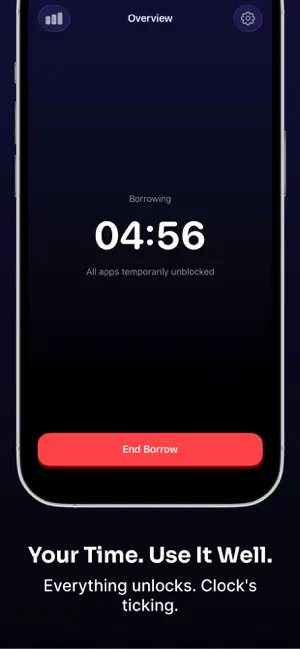
You already know. You pick it up without thinking. Another evening gone. You meant to put it down an hour ago. Borrow doesn't judge you. It gives you a daily budget and makes every unlock a conscious choice. Focus Mode blocks everything on your phone. When you actually need it, you borrow time. You choose how long, you choose why, and when the time's up everything locks again. No streaks. No guilt. Just a limit that means something. Set your daily budget anywhere from 1 minute to 8 hours. Every borrow counts against it. When it's gone, it's gone. Resets at midnight. Each unlock asks you two things: how long, and why. Talk to someone. Something specific. Just need a break. The reason matters, and over time the patterns become obvious. If you need Focus Mode to actually stick, you can set it to Protected mode with a 30-second cooldown before you can turn it off, or go full Strict and lock yourself in until your commitment ends. No exceptions. Your bank app, phone calls, Maps, anything you need always available through the Allowlist. Sessions let you unlock specific apps for a set window. Schedules handle recurring blocks for work hours or evenings. There's a Live Activity countdown on your Lock Screen and Dynamic Island, home screen widgets, and Siri Shortcuts if you need them. Your Screen Time data never leaves your device. No servers, no account, no analytics, no ads. Take back your time. Terms of Use: https://www.apple.com/legal/internet-services/itunes/dev/stdeula/ Protected mode, Strict mode, and the Allowlist require Borrow Pro, an optional subscription.
Ratings & reviews
4.8
25 ratings
What’s new
Version 1.0.9 · Updated March 24, 2026
- Better performance
App privacy
The developer, Poteo de la una, reported these privacy practices to Apple.
Data Used to Track You
The following data may be used to track you across apps and websites owned by other companies:
- Identifiers: Device ID
Data Not Linked to You
The following data, which may be collected but is not linked to your identity, may be used for the following purposes:
- Identifiers: Device ID
- Usage Data: Product Interaction
Used for: Developer’s Advertising or Marketing, Analytics
Alternatives to Borrow: Screen Time Control
Looking for apps like Borrow: Screen Time Control? Here are 6 similar apps on the App Store. The highest rated is Body Doubling: EarlyBird (4.7/5), and all 6 are free to download.
-
 Body Doubling: EarlyBird
4.7
Body Doubling: EarlyBird
4.7
-
 Enermind: Habits Over Scroll
4.0
Enermind: Habits Over Scroll
4.0
-
 Screen Time Control - Blucky
4.5
Screen Time Control - Blucky
4.5
-
 Limit – Control the Scroll
4.6
Limit – Control the Scroll
4.6
-
 Unglue: Screen Time Friend
4.7
Unglue: Screen Time Friend
4.7
-
 Jolt: Screen Time Control
4.3
Jolt: Screen Time Control
4.3
| App | Rating | Price | Last updated | Compare |
|---|---|---|---|---|
| Borrow: Screen Time Control | 4.8 / 5 (25 ratings) | Free | March 24, 2026 | |
| Body Doubling: EarlyBird | 4.7 / 5 (48) | Free | Oct 14, 2026 | Compare |
| Enermind: Habits Over Scroll | 4.0 / 5 (20) | Free | Jun 9, 2026 | Compare |
| Screen Time Control - Blucky | 4.5 / 5 (14) | Free | Aug 17, 2026 | Compare |
| Limit – Control the Scroll | 4.6 / 5 (256) | Free | May 28, 2026 | Compare |
| Unglue: Screen Time Friend | 4.7 / 5 (2,679) | Free | Oct 14, 2026 | Compare |
| Jolt: Screen Time Control | 4.3 / 5 (106) | Free | Sep 29, 2026 | Compare |