

Jolt: Screen Time Control
ASAKIRA CONSULTANTS LLP Productivity iPhoneiPadiPod touch
Jolt: Screen Time Control is a free Productivity app for iPhone and iPad by ASAKIRA CONSULTANTS LLP. Rated 4.3/5 from 106 ratings. Requires iOS 17.0.
- Rating
- 4.3
- 106 ratings
- Price
- Free
- on the App Store
- Size
- 177 MB
- Age 4+
- Updated
- Sep 29
- 2026 · v2.0.4
Screenshots



About Jolt: Screen Time Control
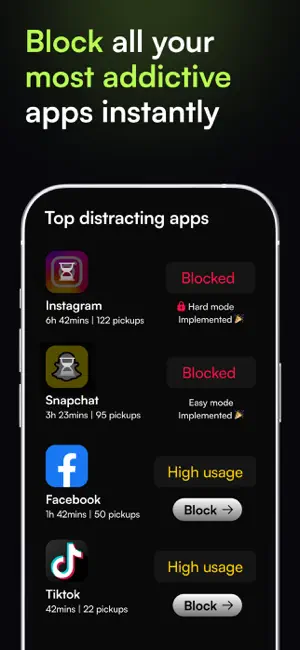
You know exactly what you should be doing right now. So does your phone - and it's betting you'll check it anyway. Jolt is built for people who are done losing that bet. —— KNOW IF YOU'RE ACTUALLY IMPROVING Attention Forecast - New Before your day starts, Jolt tells you how it's likely to go. One predictive score built from last night's sleep, your 28-day usage trend, your streak, and your blocking discipline. Attention Score: One number. Every day. Your Focus, Sleep, and Discipline combined. It rises when all three do - it won't let one good habit carry the weight of two bad ones. Watch it over 7, 14, 30 days. The direction it moves is the most honest feedback you'll get. Discipline Score: The gap between the limits you set and the limits you actually held. Not whether you blocked Instagram - whether you stayed blocked when it counted. Most people are surprised by this number. That's the point. Focus Score: Most people think they're focused. The Focus Score measures whether they actually were - how much deep work you completed, how many sessions you finished without quitting, how little you touched your phone mid-session. The score doesn't round up. Sleep Score: Your last pickup before bed. Your first reach in the morning. How many times you interrupted your own sleep. Tracked, scored, shown back to you every day. —— SET LIMITS THAT ACTUALLY HOLD Duration Limit: Daily time cap on any app - 30 minutes on Instagram, 20 on YouTube. When it hits, it locks. No snooze, no exceptions. Open Limit: Cap how many times you open an app each day. Three opens on Twitter. Five on Reddit. Once you've hit the number, it's done. Blocking Modes: Easy: a breathing pause before the app opens. Medium: rapid taps or a timed challenge - your brain earns the unlock. Hard: nothing gets through. Hard Mode: Set it once. Can't edit, delete, or override it until the next day. Your morning self makes the rules. Your evening self lives with them. —— FOCUS SESSIONS Focus Flights - New: You don't start a timer anymore. You book a flight. Pick a destination reachable in your focus window. Choose your seat: First Class seals the cabin - no early exit. Business puts a challenge between you and the door. Economy lets you tap out. Board, take off, block your apps. Land and it logs as a completed flight. Quit early and it goes down as a crash - distance credited for how far you got. Every flight lives in your Flight Wallet. Focus Sessions Block every distracting app for a set window - deep work, exam session, meeting hour. 20+ templates or build your own. Everything else disappears until you're done. Quick Sessions: One tap. Immediate block. Zero setup. Focus right now, not after configuring anything. —— CLOSE EVERY LOOPHOLE Sleep Schedule: Set your bedtime and wake-up time. Every distracting app locks automatically. You choose which essentials stay on - everything else is off until morning, with full tracking of every pickup. Accountability Partner: A real person who sees your screen time and must approve every override. Not an algorithm. A human who will actually push back. GPS Blocking: Set your office, library, or gym. The moment you arrive, Jolt activates. The environment does what willpower can't. Good Apps First: Use your journal, reading app, or workout tracker first. Once you do, the distracting apps unlock. Focus becomes the price of entry. Block 18+ One toggle. Every adult site and app - off. Shield Customisation - New: The screen that blocks you now looks how you want it. Choose a persona or build your own: custom text, colors, and icon. Turn on Randomized Experience, and it changes every time a block fires. —— PRIVACY FIRST: All blocking runs locally via Apple's Screen Time API. No personal data leaves your device. Download free. Block your first app in 30 seconds. Support: [email protected] Terms: thejoltapp.com/terms & https://www.apple.com/legal/internet-services/itunes/dev/stdeula/ Privacy: thejoltapp.com/privacy
Ratings & reviews
4.3
106 ratings
What’s new
Version 2.0.4 · Updated September 29, 2026
Jolt 2.0.4 is here. —— ONBOARDING FLOW Made onboarding easier and smoother for new users. —— ADULT BLOCKING Updated the Adult Blocking flow for a better experience. —— NOTIFICATION SETTINGS Added new notification settings to give you more control over notifications. Fixed some blocking notification bugs reported by users. —— BOUNCER MODE Improved the Bouncer Mode UX and made app selection easier.
App privacy
The developer, ASAKIRA CONSULTANTS LLP, reported these privacy practices to Apple.
Data Used to Track You
The following data may be used to track you across apps and websites owned by other companies:
- Identifiers: Device ID
- Usage Data: Product Interaction
Data Linked to You
The following data, which may be collected and linked to your identity, may be used for the following purposes:
- Contact Info: Email Address, Name, Phone Number
- Identifiers: User ID
- Contacts: Contacts
- User Content: Photos or Videos
Used for: Developer’s Advertising or Marketing, Analytics, Product Personalization, App Functionality
Data Not Linked to You
The following data, which may be collected but is not linked to your identity, may be used for the following purposes:
- Identifiers: Device ID
- Usage Data: Product Interaction
Used for: Analytics
Alternatives to Jolt: Screen Time Control
Looking for apps like Jolt: Screen Time Control? Here are 6 similar apps on the App Store. The highest rated is Pattrn - Discipline Tracker (4.8/5), and all 6 are free to download.
-
 Pattrn - Discipline Tracker
4.8
Pattrn - Discipline Tracker
4.8
-
 LockMyApps Screen Time Control
4.6
LockMyApps Screen Time Control
4.6
-
 One Thing: Earn Screen Time
4.7
One Thing: Earn Screen Time
4.7
-
 BeTimeful: Screen Time 2.0
4.1
BeTimeful: Screen Time 2.0
4.1
-
 YLAG: Daily Habits Tracker
4.8
YLAG: Daily Habits Tracker
4.8
-
 No Scroll - Limit Screen Time
4.5
No Scroll - Limit Screen Time
4.5
| App | Rating | Price | Last updated | Compare |
|---|---|---|---|---|
| Jolt: Screen Time Control | 4.3 / 5 (106 ratings) | Free | September 29, 2026 | |
| Pattrn - Discipline Tracker | 4.8 / 5 (1,035) | Free | Oct 21, 2026 | Compare |
| LockMyApps Screen Time Control | 4.6 / 5 (295) | Free | Mar 15, 2026 | Compare |
| One Thing: Earn Screen Time | 4.7 / 5 (892) | Free | Oct 23, 2026 | Compare |
| BeTimeful: Screen Time 2.0 | 4.1 / 5 (115) | Free | Apr 21, 2025 | Compare |
| YLAG: Daily Habits Tracker | 4.8 / 5 (1,408) | Free | Jan 24, 2026 | Compare |
| No Scroll - Limit Screen Time | 4.5 / 5 (699) | Free | Oct 24, 2026 | Compare |