

LockMyApps Screen Time Control
Andrew Lee Productivity iPhoneiPadiPod touch
LockMyApps Screen Time Control is a free Productivity app for iPhone and iPad by Andrew Lee. Rated 4.6/5 from 295 ratings. Requires iOS 16.0.
- Rating
- 4.6
- 295 ratings
- Price
- Free
- on the App Store
- Size
- 60 MB
- Age 4+
- Updated
- Mar 15
- 2026 · v1.13
Screenshots

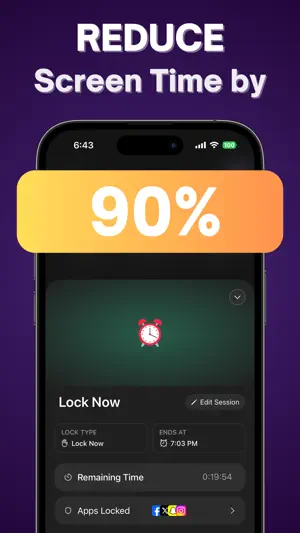


About LockMyApps Screen Time Control
Introducing LockMyApps, the revolutionary AI-powered productivity app that helps you reduce your screen time so that you can focus on what matters in the real world. What LockMyApps can do for you: ● Set productivity timers to block out apps ● Increase your productivity ● Reduce your screen time ● Reduce “doom scrolling” on your phone And more. ———————————————————— How to use LockMyApps: 1. Select the apps that you want to temporarily block on your phone 2. Set the amount of minutes or hours you want to block your apps 3. Your selected apps will be unable to be opened until your timer is completed *If you need to remove the block on your apps (due to an emergency or something) you can do so in your app’s settings ———————————————————— LockMyApps Premium policy: Once you sign up to LockMyApps Premium, you will have full access to all of LockMyApps's features. You can cancel your subscription any time and you will be sent a reminder before your LockMyApps subscription begins after your trial. With LockMyApps Premium, you get access to the full app: ● Lock your apps and reduce your screen time up to 90% ● Use the Lock Now feature for short term focus ● Add daily time limits to your apps ● Schedule when to lock your apps ahead of time ● Works for any app on your phone ● No ads ● Cancel anytime LockMyApps Premium options: ● LockMyApps Weekly: $8.99/week ● LockMyApps Yearly: 3 days free and then $69.99/year ———————————————————— Have any questions or recommendations? Feel free to reach out to me at: [email protected] Privacy Policy: https://andrewlee.ventures/privacy Terms Of Use: https://andrewlee.ventures/terms-of-use
Ratings & reviews
4.6
295 ratings
What’s new
Version 1.13 · Updated March 15, 2026
Fixed a bug that some users were experiencing when setting recurring time blocks on their phones. If you're enjoying LockMyApps, please let us know by writing a quick app review - it would have a tremendous impact on helping others find the app in the App Store. Have any questions or issues? Feel free to reach out to me at [email protected]
App privacy
The developer, Andrew Lee, reported these privacy practices to Apple.
Data Used to Track You
The following data may be used to track you across apps and websites owned by other companies:
- Usage Data: Product Interaction, Advertising Data
Data Linked to You
The following data, which may be collected and linked to your identity, may be used for the following purposes:
- Usage Data: Advertising Data
Used for: Third-Party Advertising, Developer’s Advertising or Marketing, Analytics
Data Not Linked to You
The following data, which may be collected but is not linked to your identity, may be used for the following purposes:
- Location: Coarse Location
- Usage Data: Product Interaction
- Diagnostics: Crash Data
Used for: Third-Party Advertising, Developer’s Advertising or Marketing, Analytics, App Functionality
Alternatives to LockMyApps Screen Time Control
Looking for apps like LockMyApps Screen Time Control? Here are 6 similar apps on the App Store. The highest rated is Habit Tracker - HabitPal (4.7/5), and all 6 are free to download.
-
 App Blocker: Limit Screen Time
4.4
App Blocker: Limit Screen Time
4.4
-
 Teleprompter Video ™
4.6
Teleprompter Video ™
4.6
-
 Vox: AI Note Taker & Summary
4.3
Vox: AI Note Taker & Summary
4.3
-
 Routine Planner - Todotics
4.6
Routine Planner - Todotics
4.6
-
 AI Podcast Maker - PODLM
4.1
AI Podcast Maker - PODLM
4.1
-
 Habit Tracker - HabitPal
4.7
Habit Tracker - HabitPal
4.7
| App | Rating | Price | Last updated | Compare |
|---|---|---|---|---|
| LockMyApps Screen Time Control | 4.6 / 5 (295 ratings) | Free | March 15, 2026 | |
| App Blocker: Limit Screen Time | 4.4 / 5 (84) | Free | May 30, 2025 | Compare |
| Teleprompter Video ™ | 4.6 / 5 (121) | Free | Feb 27, 2026 | Compare |
| Vox: AI Note Taker & Summary | 4.3 / 5 (83) | Free | Jun 17, 2026 | Compare |
| Routine Planner - Todotics | 4.6 / 5 (39) | Free | May 29, 2026 | Compare |
| AI Podcast Maker - PODLM | 4.1 / 5 (128) | Free | May 29, 2026 | Compare |
| Habit Tracker - HabitPal | 4.7 / 5 (91) | Free | Oct 27, 2026 | Compare |