

Friction°: App Blocker & Focus
Matthew Harder Productivity iPhoneiPadiPod touch
Friction°: App Blocker & Focus is a free Productivity app for iPhone and iPad by Matthew Harder. Rated 5.0/5 from 1 ratings. Requires iOS 18.2.
- Rating
- 5.0
- 1 ratings
- Price
- Free
- on the App Store
- Size
- 26 MB
- Age 4+
- Updated
- Sep 25
- 2026 · v1.5
Screenshots


About Friction°: App Blocker & Focus
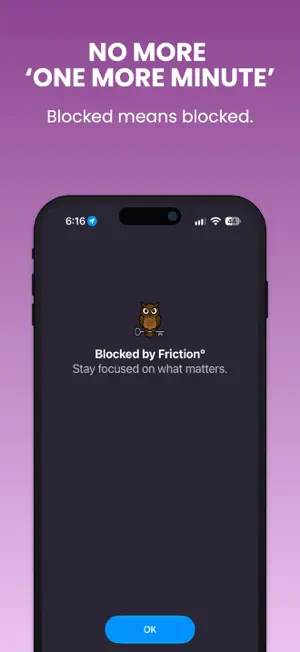
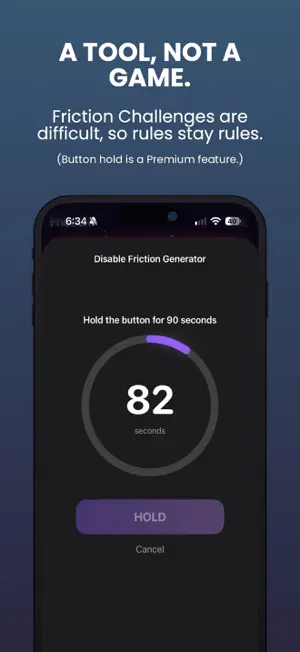
Friction blocks the apps you choose — and makes it genuinely hard to change your mind. Other screen time apps let you tap "ignore" in one second. Friction doesn't. When you try to disable a block, you'll face a randomized challenge string you have to type out perfectly: 20 characters free, up to 80 with Premium. By the time you could finish, the impulse has passed. That's the whole idea. SET YOUR OWN RULES Create blocking rules that fit your life: • Schedule — block apps on specific days and times (e.g. no Instagram on weekdays 9–5) • Multi-Time — multiple blocking windows in a single rule • Session — start an immediate focus block for a set duration • Location — automatically block apps when you arrive at or leave a place THE FRICTION GENERATOR This is what makes Friction different. When you try to disable your own rules, you face a challenge: • Type a randomly-generated string of characters (adjustable length with Premium) • Or hold a button for up to 90 seconds • Maximum Friction mode requires the challenge to even edit or delete a rule The harder you make it, the less often you'll bother. WEBSITE BLOCKING Block specific domains or all adult content. Website blocks follow the same friction rules as app blocks. PREVENT DELETION Turn on Prevent Deletion to stop yourself from uninstalling Friction during an active session. DESIGNED FOR SELF-CONTROL Friction is not a parental control app. It's a tool for adults who want to set their own boundaries and actually keep them. You make the rules. Friction enforces them. Friction Premium unlocks location-based rules, multi-time blocking, unlimited schedule rules, and more. Available as a monthly and yearly subscription. • Frictionº Monthly: $4.99 • Frictionº Yearly: $19.99 Payment will be charged to iTunes Account at confirmation of purchase. Subscription automatically renews unless auto-renew is turned off at least 24-hours before the end of the current period. Terms of Use: https://getfriction.app/terms Privacy Policy: https://getfriction.app/privacy
What’s new
Version 1.5 · Updated September 25, 2026
• New app icon • Fixed an iOS 27 bug where scheduled rules could block, re-block, then unblock again at their start time • Notifications now show the name of the rule that's turning on or off • Improved notification reliability • Free users can now create unlimited templates, no matter how many rules are active • The keyboard now closes after you add a website to a rule • Smoother animated background that stays consistent across tabs
App privacy
The developer, Matthew Harder, reported these privacy practices to Apple.
Data Linked to You
The following data, which may be collected and linked to your identity, may be used for the following purposes:
- Purchases: Purchase History
- Identifiers: Device ID
Used for: App Functionality
Data Not Linked to You
The following data, which may be collected but is not linked to your identity, may be used for the following purposes:
- Usage Data: Product Interaction, Other Usage Data
Used for: Analytics, App Functionality
Alternatives to Friction°: App Blocker & Focus
Looking for apps like Friction°: App Blocker & Focus? Here are 6 similar apps on the App Store.
-
 Pause: App Blocker
-
 WatchPomo - Focus Timer
-
 FrictionBlock: App Blocker
-
 Serene: App & Website Blocker
-
 Svala: Screen Time Control
-
 Earned - Screen Time
| App | Rating | Price | Last updated | Compare |
|---|---|---|---|---|
| Friction°: App Blocker & Focus | 5.0 / 5 (1 rating) | Free | September 25, 2026 | |
| Pause: App Blocker | – | Free | Oct 1, 2026 | Compare |
| WatchPomo - Focus Timer | – | 2.99 USD | Apr 8, 2026 | Compare |
| FrictionBlock: App Blocker | – | Free | Jul 25, 2026 | Compare |
| Serene: App & Website Blocker | – | Free | Aug 24, 2026 | Compare |
| Svala: Screen Time Control | – | Free | Jul 24, 2026 | Compare |
| Earned - Screen Time | – | Free | Jun 23, 2026 | Compare |