

Superscribe - AI Note Taker
Brighten Labs Productivity iPhoneiPadiPod touch
Superscribe - AI Note Taker is a free Productivity app for iPhone and iPad by Brighten Labs. Rated 4.8/5 from 4 ratings. Requires iOS 18.0.
- Rating
- 4.8
- 4 ratings
- Price
- Free
- on the App Store
- Size
- 27 MB
- Age 4+
- Updated
- May 22
- 2026 · v1.1
Screenshots

About Superscribe - AI Note Taker
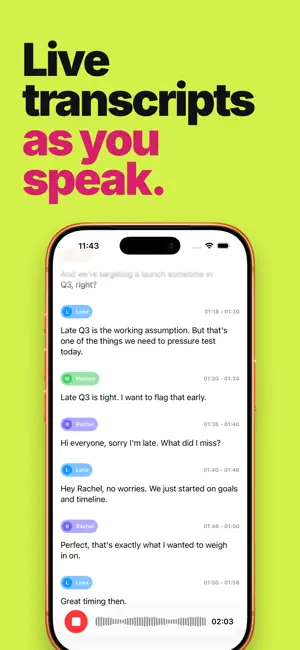
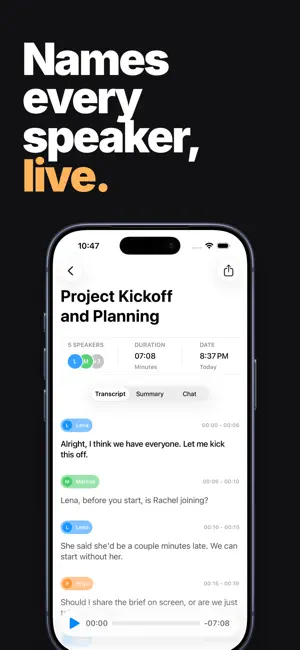
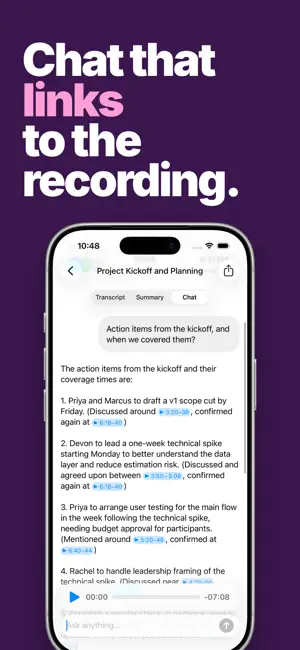
The live AI note taker. Tap record at the start of your meeting, class, or interview. Superscribe writes a transcript as people talk, names each speaker, and turns the conversation into a summary and outline you can browse. Chat and get answers that link to the key moments. Everything links back to the audio so you can check the app's work: tap any word in the transcript, or outline item to jump to that moment. Every chat answer links back to the relevant moments in the recording — tap any of them to play back and hear it for yourself. - Live transcription: words appear on screen the moment they're spoken. Read along as you record, and never lose your place. - Live speaker identification: Superscribe figures out who's talking from the context of the conversation. Fix any mistakes with a tap — no more "Speaker 1, Speaker 2" guessing games. - Live sync across devices: start recording on your iPhone, watch the transcript come in on your iPad, pick it up on the web later. Everything stays in sync. - Tappable transcripts: tap any word to jump straight to that moment in the recording. - Outlines that link to the audio: a short summary plus a section-by-section outline of what was discussed. Tap any section to play that part of the recording. - AI chat with citations: ask follow-up questions about what was said. Every answer points back to the moments in the audio it came from. Built for iOS 26 with Liquid Glass: feels at home on your device. Terms of Use: https://www.apple.com/legal/internet-services/itunes/dev/stdeula/ Privacy Policy: https://brightenlabs.app/privacy/
What’s new
Version 1.1 · Updated May 22, 2026
We're hard at work updating Superscribe! In this version: - Superscribe now appears in the share sheet whenever you're sharing audio. So in Voice Memos, you can tap Share and send a memo directly to Superscribe. Any other recording or other apps that let you share audio will work as well. - ↑ or ↓ arrow button appears when you scroll away from the playing position on the transcript, so you can find your place again! - Bugfixes and other improvements Thanks for being an early user! If you're enjoying Superscribe please take a moment to leave us a rating on the App Store. It really does make a huge difference.
App privacy
The developer, Brighten Labs, reported these privacy practices to Apple.
Data Linked to You
The following data, which may be collected and linked to your identity, may be used for the following purposes:
- Purchases: Purchase History
- Contact Info: Email Address
- Usage Data: Product Interaction
- User Content: Audio Data
- Identifiers: User ID
Used for: Analytics, App Functionality
Data Not Linked to You
The following data, which may be collected but is not linked to your identity, may be used for the following purposes:
- Diagnostics: Crash Data, Performance Data
Used for: Analytics, App Functionality
Alternatives to Superscribe - AI Note Taker
Looking for apps like Superscribe - AI Note Taker? Here are 6 similar apps on the App Store. The highest rated is Wispr Flow: AI Voice Keyboard (4.8/5), and all 6 are free to download.
-
 AI Note Taker - Voice to Notes
4.7
AI Note Taker - Voice to Notes
4.7
-
 Summary - AI Note Taker
4.7
Summary - AI Note Taker
4.7
-
 KekVPN – Fast & Secure VPN
4.4
KekVPN – Fast & Secure VPN
4.4
-
 Locally AI by LM Studio
4.7
Locally AI by LM Studio
4.7
-
 Google AI Edge Gallery
4.0
Google AI Edge Gallery
4.0
-
 Wispr Flow: AI Voice Keyboard
4.8
Wispr Flow: AI Voice Keyboard
4.8
| App | Rating | Price | Last updated | Compare |
|---|---|---|---|---|
| Superscribe - AI Note Taker | 4.8 / 5 (4 ratings) | Free | May 22, 2026 | |
| AI Note Taker - Voice to Notes | 4.7 / 5 (2,082) | Free | Mar 11, 2026 | Compare |
| Summary - AI Note Taker | 4.7 / 5 (52,756) | Free | Oct 1, 2026 | Compare |
| KekVPN – Fast & Secure VPN | 4.4 / 5 (492) | Free | Apr 21, 2026 | Compare |
| Locally AI by LM Studio | 4.7 / 5 (1,706) | Free | Sep 14, 2026 | Compare |
| Google AI Edge Gallery | 4.0 / 5 (160) | Free | Sep 4, 2026 | Compare |
| Wispr Flow: AI Voice Keyboard | 4.8 / 5 (16,481) | Free | Oct 1, 2026 | Compare |