

PDF & Document Scanner
Boris Spiro Utilities iPhoneiPadiPod touch
PDF & Document Scanner is a free Utilities app for iPhone and iPad by Boris Spiro. Requires iOS 16.6. Updated July 1, 2026.
- Price
- Free
- on the App Store
- Size
- 8 MB
- Age 4+
- Updated
- Jul 1
- 2026 · v9.0
Screenshots


About PDF & Document Scanner
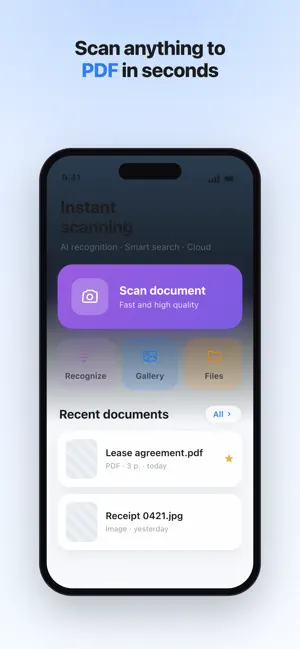
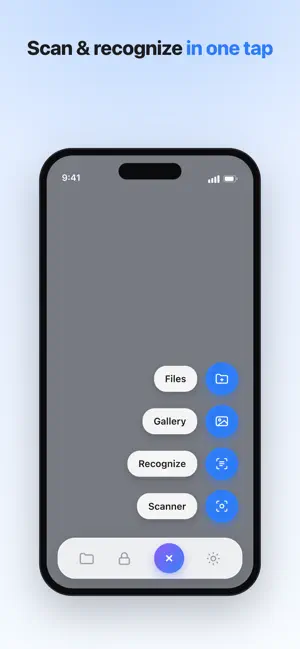
ScanMe transforms your iPhone into a powerful portable scanner. Capture documents, receipts, ID cards, business cards, and more with professional quality in seconds. Trusted by millions of users worldwide, ScanMe is the fastest way to scan, sign, and share documents — right from your pocket. SMART DOCUMENT SCANNING • Instant automatic edge detection and perspective correction • Multi-page batch scanning for long documents • High-resolution capture with AI-enhanced smart filters • Scan receipts, contracts, notes, books, whiteboards, and ID cards ADVANCED OCR TEXT RECOGNITION • Accurate text recognition powered by AI in 40+ languages • Extract and copy text from any scanned document instantly • Search within all your scanned files with full-text search • Convert paper documents into editable digital text PDF CREATION & FILE MANAGEMENT • Create multi-page PDF files with one tap • Compress PDFs without losing quality • Merge, split, and reorder pages effortlessly • Organize documents in smart folders with tags DIGITAL SIGNATURES & FORMS • Sign documents directly on your device — no printing needed • Save multiple signature styles for quick access • Place signatures precisely on any page of a PDF • Fill out forms and annotations with ease SECURE VAULT & PRIVACY • Protect sensitive documents with Face ID or Touch ID • End-to-end encrypted storage for confidential files • Access your secure vault from anywhere CLOUD SYNC & BACKUP • Automatic iCloud synchronization across all your Apple devices • Never lose your important documents with smart backup • Seamless integration with your existing workflow EXPORT & SHARE ANYWHERE • Share via email, Messages, WhatsApp, or AirDrop • Export as PDF, JPG, PNG, or TXT • Print directly from the app to any AirPrint printer • Save to Files, Google Drive, Dropbox, and more WHY CHOOSE SCANME? → Lightning-fast scanning in under 2 seconds → AI-powered edge detection and image enhancement → The only scanner with built-in digital signatures → No watermarks on your scanned documents → Regular updates with new features every month SUBSCRIPTION OPTIONS ScanMe offers a free version with essential scanning features. ScanMe Premium unlocks unlimited scans, advanced OCR, cloud backup, digital signatures, and an ad-free experience. • Payment will be charged to your Apple ID account at confirmation of purchase • Subscription automatically renews unless auto-renew is turned off at least 24 hours before the end of the current period • Your account will be charged for renewal within 24 hours prior to the end of the current period Privacy Policy: https://preview--dark-sphere-portfolio.lovable.app/scanme-ios-privacy Terms of Use: https://www.apple.com/legal/internet-services/itunes/dev/stdeula/
What’s new
Version 9.0 · Updated July 1, 2026
Thanks for using ScanMe! This update brings: • More reliable export to PDF, Word, and Excel. • Smoother, more accurate document signing. • Faster iCloud sync and stability improvements. We read every review — tell us what to add next.
App privacy
The developer, Boris Spiro, reported these privacy practices to Apple.
Data Not Collected
The developer does not collect any data from this app.
Alternatives to PDF & Document Scanner
Looking for apps like PDF & Document Scanner? Here are 6 similar apps on the App Store. The highest rated is Scanner - Document & Photo (5.0/5), and all 6 are free to download.
-
 Scanner - Document & Photo
5.0
Scanner - Document & Photo
5.0
-
 Photo to PDF - Scanner & Maker
5.0
Photo to PDF - Scanner & Maker
5.0
-
 Document Scanner - ALG
-
 CleanScanner: PDF Scanner App
4.0
CleanScanner: PDF Scanner App
4.0
-
 TRUCK SCAN
-
 Hit VPN Super
4.5
Hit VPN Super
4.5
| App | Rating | Price | Last updated | Compare |
|---|---|---|---|---|
| PDF & Document Scanner | – | Free | July 1, 2026 | |
| Scanner - Document & Photo | 5.0 / 5 (2) | Free | Jul 8, 2026 | Compare |
| Photo to PDF - Scanner & Maker | 5.0 / 5 (1) | Free | May 18, 2026 | Compare |
| Document Scanner - ALG | – | Free | Sep 18, 2025 | Compare |
| CleanScanner: PDF Scanner App | 4.0 / 5 (2) | Free | Jan 20, 2026 | Compare |
| TRUCK SCAN | – | Free | Jan 2, 2024 | Compare |
| Hit VPN Super | 4.5 / 5 (22) | Free | Sep 3, 2026 | Compare |