

Photo to PDF - Scanner & Maker
Reda Boubkraoui Utilities iPhoneiPadiPod touch
Photo to PDF - Scanner & Maker is a free Utilities app for iPhone and iPad by Reda Boubkraoui. Rated 5.0/5 from 1 ratings. Requires iOS 15.1.
- Rating
- 5.0
- 1 ratings
- Price
- Free
- on the App Store
- Size
- 36 MB
- Age 4+
- Updated
- May 18
- 2026 · v2.6.0
Screenshots


About Photo to PDF - Scanner & Maker
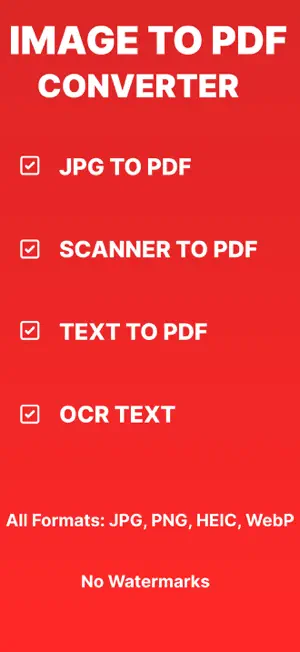
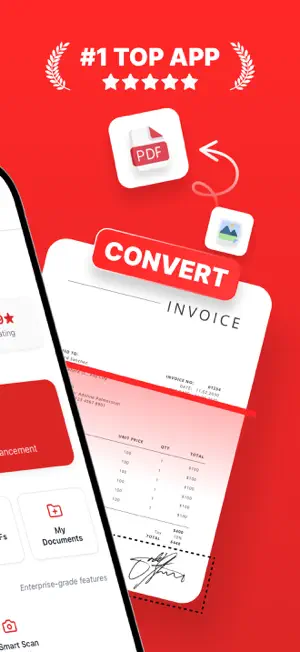
Transform your photos into professional PDFs with Photo to PDF: Scanner Converter – the ultimate app for converting images to PDFs, scanning documents, and creating PDFs effortlessly. Whether you’re converting a single photo or multiple images, this app delivers fast, high-quality results. Key Features: • Photo to PDF: Convert photos (JPG, PNG, HEIC) to PDFs in seconds. • PDF Scanner: Scan documents, receipts, or notes with your camera and save as PDFs. • Image to PDF: Easily turn any image into a PDF with a few taps. • JPG to PDF: Convert JPG files to PDFs with precision and speed. • Scan to PDF: Capture and digitize paper documents instantly. • PDF Maker: Create custom PDFs with options to rearrange pages and adjust quality. • Batch Processing: Convert multiple photos to PDF in one tap – perfect for efficiency. • Secure & Offline: All conversions happen on your device, keeping your data private. Go offline—no Wi-Fi needed! Why Choose Photo to PDF? • Top Speed: Fastest photo to PDF and scan to PDF conversions. • High Quality: Retain image clarity with our advanced PDF converter technology. • User-Friendly: Simple interface for seamless photo to PDF and PDF scanner use. • Versatile: Ideal for students, professionals, and anyone needing quick PDF solutions. • No Internet Needed: Convert and scan offline, anytime, anywhere. • Loved by Users: "This app saved my workday—fast and flawless!" – Happy User How It Works: • Pick photos from your gallery or snap new ones with your camera. • Use the PDF scanner to capture documents or receipts. • Arrange pages as needed with our PDF maker tools. • Convert to PDF and save or share instantly. Perfect For: • Converting photos to PDF for sharing or storage. • Scanning receipts, notes, or contracts to PDF. • Creating PDFs from multiple images with ease. • Archiving important documents digitally. Download Photo to PDF: Scanner Converter today and dominate your document needs with the best photo to PDF, PDF scanner, and PDF converter app on the Store! Photo to PDF Pro : 12-month subscription - $29.99 one month subscription - $5.99 Privacy Policy: http://cleverapps.us/phototopdf/privacypolicy Terms of Use: https://www.apple.com/legal/internet-services/itunes/dev/stdeula/
What’s new
Version 2.6.0 · Updated May 18, 2026
What's New in This Version Improved photo to PDF conversion speed for faster results Enhanced PDF scanner with better image clarity Fixed minor bugs to improve overall app performance Optimized batch processing for converting multiple photos Updated user interface for a smoother experience Improved stability and reduced crashes
App privacy
The developer, Reda Boubkraoui, reported these privacy practices to Apple.
Data Not Linked to You
The following data, which may be collected but is not linked to your identity, may be used for the following purposes:
- Usage Data: Other Usage Data
- Diagnostics: Crash Data, Other Diagnostic Data
- User Content: Photos or Videos
Used for: Analytics, App Functionality
Alternatives to Photo to PDF - Scanner & Maker
Looking for apps like Photo to PDF - Scanner & Maker? Here are 6 similar apps on the App Store. The highest rated is Convert Photo To PDF: PicToPDF (5.0/5), and all 6 are free to download.
-
 Image to PDF Converter img2pdf
4.6
Image to PDF Converter img2pdf
4.6
-
 Image to PDF - Photos PDF
-
 Convert Photo To PDF: PicToPDF
5.0
Convert Photo To PDF: PicToPDF
5.0
-
 PDF & Document Scanner
-
 Photo to PDF Converter - PDFer
5.0
Photo to PDF Converter - PDFer
5.0
-
 Photo to PDF Converter: Image
4.5
Photo to PDF Converter: Image
4.5
| App | Rating | Price | Last updated | Compare |
|---|---|---|---|---|
| Photo to PDF - Scanner & Maker | 5.0 / 5 (1 rating) | Free | May 18, 2026 | |
| Image to PDF Converter img2pdf | 4.6 / 5 (68) | Free | Oct 31, 2025 | Compare |
| Image to PDF - Photos PDF | – | Free | Sep 28, 2026 | Compare |
| Convert Photo To PDF: PicToPDF | 5.0 / 5 (1) | Free | Sep 1, 2026 | Compare |
| PDF & Document Scanner | – | Free | Jul 1, 2026 | Compare |
| Photo to PDF Converter - PDFer | 5.0 / 5 (2) | Free | Aug 19, 2025 | Compare |
| Photo to PDF Converter: Image | 4.5 / 5 (30) | Free | Jun 20, 2026 | Compare |