

Image to PDF: Photo to PDF
Kevin Rupareliya Productivity iPhoneiPadiPod touch
Image to PDF: Photo to PDF is a free Productivity app for iPhone and iPad by Kevin Rupareliya. Rated 5.0/5 from 4 ratings. Requires iOS 14.0.
- Rating
- 5.0
- 4 ratings
- Price
- Free
- on the App Store
- Size
- 11 MB
- Age 4+
- Updated
- Jul 3
- 2026 · v1.4
Screenshots

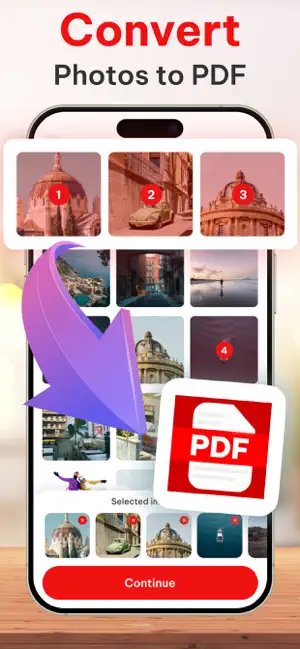


About Image to PDF: Photo to PDF
Image to PDF: JPG to PDF Converter & Photo to PDF Maker Convert Images to PDF – Fast, Simple, and Offline Image to PDF is the ultimate photo to PDF converter for turning your images, JPGs, and PNGs into high-quality PDF documents. Whether you need to scan, organize, or share images as PDFs, this app offers all the tools you need—without internet, ads, or watermarks. Perfect for personal, academic, and business use, this app is designed to make PDF creation easy and reliable on iPhone and iPad. Key Features : Convert Photos to PDF Instantly Select one or more photos from your gallery and convert them into a single PDF document in seconds. Custom Page Layout Options Choose Horizontal or Vertical PDF page orientation and apply custom aspect ratios to fit your layout needs. Add PDF Margins Adjust margins for better spacing, printing, and readability. Reorder and Remove Images Drag and drop to rearrange photos or remove any before exporting to PDF. Save, Share, or Print Export PDFs directly to Gmail, iCloud Drive, Dropbox, Google Drive, WhatsApp, or AirDrop. Print your files straight from the app. Mark Favorite PDFs Quickly access your most important files by marking them as favorites. Works Offline with No Limitations Convert images to PDF anytime, anywhere—no internet required. Why Choose Image to PDF :- • Best-in-class JPG to PDF converter for iPhone and iPad • Custom layout control: orientation, ratio, and margins • Organize, manage, and preview images before converting • Export, print, and share with a single tap • Lightweight and privacy-focused with full offline support • No watermarks, no subscriptions, no sign-in required Common Use Cases :- • Convert photos, receipts, notes, or documents to PDF • Create photo albums or portfolios in PDF format • Generate school or office documents from image collections • Save scanned pages with customizable layout options Download Image to PDF today – the fastest way to turn your images into professional PDF documents. Privacy policy : https://imagetopdfphototopdfprivacy.blogspot.com Terms of use : https://sites.google.com/view/kr-terms-of-use/home
What’s new
Version 1.4 · Updated July 3, 2026
Performance improvements and bug fixes
App privacy
The developer, Kevin Rupareliya, reported these privacy practices to Apple.
Data Not Collected
The developer does not collect any data from this app.
Alternatives to Image to PDF: Photo to PDF
Looking for apps like Image to PDF: Photo to PDF? Here are 6 similar apps on the App Store. The highest rated is PDF Compressor ・ PDF Converter (4.8/5), and all 6 are free to download.
-
 BoltPDF: Fill, Sign & Edit PDF
4.5
BoltPDF: Fill, Sign & Edit PDF
4.5
-
 Image to PDF Converter +
4.7
Image to PDF Converter +
4.7
-
 Image to PDF Converter:Convert
4.7
Image to PDF Converter:Convert
4.7
-
 Image to PDF : PDF Maker
4.5
Image to PDF : PDF Maker
4.5
-
 PDF Compressor ・ PDF Converter
4.8
PDF Compressor ・ PDF Converter
4.8
-
 PDF Maker - Convert to PDF
4.6
PDF Maker - Convert to PDF
4.6
| App | Rating | Price | Last updated | Compare |
|---|---|---|---|---|
| Image to PDF: Photo to PDF | 5.0 / 5 (4 ratings) | Free | July 3, 2026 | |
| BoltPDF: Fill, Sign & Edit PDF | 4.5 / 5 (25) | Free | Mar 11, 2026 | Compare |
| Image to PDF Converter + | 4.7 / 5 (236) | Free | Oct 20, 2026 | Compare |
| Image to PDF Converter:Convert | 4.7 / 5 (19) | Free | Aug 8, 2025 | Compare |
| Image to PDF : PDF Maker | 4.5 / 5 (128) | Free | Dec 11, 2025 | Compare |
| PDF Compressor ・ PDF Converter | 4.8 / 5 (73) | Free | May 18, 2026 | Compare |
| PDF Maker - Convert to PDF | 4.6 / 5 (1,242) | Free | Jun 22, 2026 | Compare |