

Screenshot Manager - Stitch
亚琴 宋 Productivity iPhoneiPadiPod touch
Screenshot Manager - Stitch is a free Productivity app for iPhone and iPad by 亚琴 宋. Requires iOS 17. Updated December 14, 2025.
- Price
- Free
- on the App Store
- Size
- 16 MB
- Age 4+
- Updated
- Dec 14
- 2025 · v1.1.0
Screenshots
About Screenshot Manager - Stitch
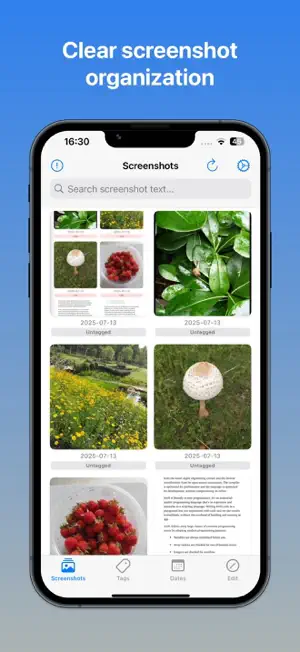
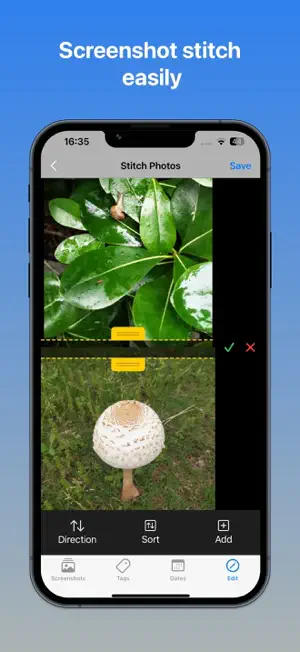
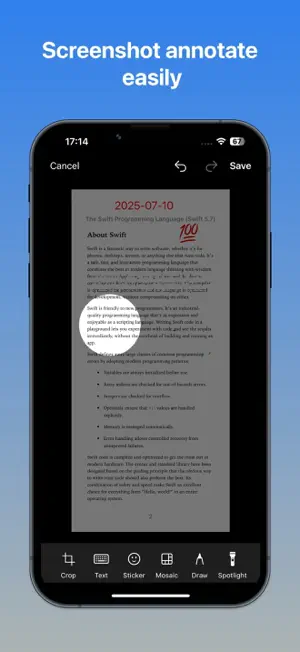
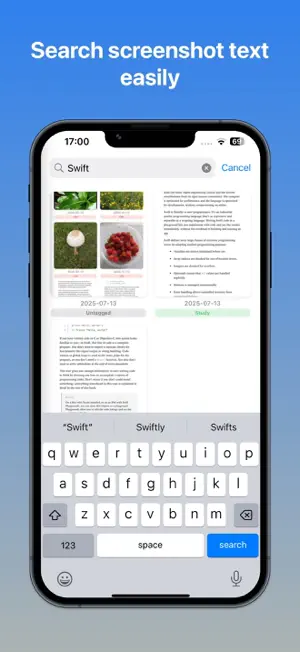
Unleash the power of your screenshots! Stop endlessly scrolling through a chaotic camera roll and start instantly finding the information you need. Screenshot Manager transforms your photo library into a powerful, organized, and fully searchable database, designed for developers, designers, students, and anyone who saves screenshots. KEY FEATURES Powerful Text Recognition (OCR) - Our advanced OCR automatically scans every screenshot, making the text within them instantly searchable. Find that specific error message, airline ticket, receipt, or chat bubble in seconds. Just type what you remember, and let us find it for you. Full-Featured Photo Editor Go beyond simple viewing. Our robust editing suite lets you perfect your screenshots right in the app: - Add & Edit Text: Annotate your images with fully customizable text overlays. Resize, rotate, and style your text with ease. - Crop & Spotlight: Focus on what's important and highlight key areas. - Draw & Annotate: Use the pencil tool to mark up screenshots, draw arrows, or circle important details. - Stickers & Mosaics: Add fun stickers to express yourself or use the mosaic tool to blur out private information before sharing. Photo Stitching - Stitch multiple photos into a long screenshot, that can be stitched horizontally and vertically Smart Tagging & Organization - Bring order to your collection. Create custom tags to categorize your screenshots by project, topic, or whatever system works for you. Filter your entire library with a single tap to see exactly what you need. Global-Ready - Designed for everyone. Our app fully supports multilingual keyboard input, allowing you to search and add text in your preferred language, regardless of your device's settings. Unlock Premium with a One-Time Purchase For users who want a truly professional touch, we offer a simple, one-time purchase to unlock premium features. - Remove Watermark: Save and share all your edited images without any branding for a clean, polished look. - Lifetime Access: This is not a subscription. Pay once and get lifetime access to this feature and support the app's future development. Download Screenshot Manager today and take back control of your screenshots # Privacy Policy Thanks to the powerful CoreML and Vision framework, Screenshot Manager uses on-device detection. It won't upload any of your images.
What’s new
Version 1.1.0 · Updated December 14, 2025
1. Added image stitching function 2. Optimized interface design
App privacy
The developer, 亚琴 宋, reported these privacy practices to Apple.
Data Not Collected
The developer does not collect any data from this app.
Alternatives to Screenshot Manager - Stitch
Looking for apps like Screenshot Manager - Stitch? Here are 6 similar apps on the App Store. The highest rated is Calm Toy Rotation (5.0/5), and all 6 are free to download.
-
 LicenseManagerPro
-
 FindShot: Screenshot Library
-
 Calm Toy Rotation
5.0
Calm Toy Rotation
5.0
-
 Social Media Timer - Alarm
-
 Nib - AI Notes & Translation
-
 Screenshot Manager & Organizer
| App | Rating | Price | Last updated | Compare |
|---|---|---|---|---|
| Screenshot Manager - Stitch | – | Free | December 14, 2025 | |
| LicenseManagerPro | – | Free | Oct 22, 2026 | Compare |
| FindShot: Screenshot Library | – | Free | Oct 23, 2026 | Compare |
| Calm Toy Rotation | 5.0 / 5 (1) | Free | Jul 23, 2026 | Compare |
| Social Media Timer - Alarm | – | Free | Jul 17, 2026 | Compare |
| Nib - AI Notes & Translation | – | Free | Aug 19, 2026 | Compare |
| Screenshot Manager & Organizer | – | Free | Sep 8, 2025 | Compare |