

Control.Click
Mohammadmehdı MADAHZADEHZOGHI Utilities iPhoneiPadiPod touch
Control.Click is a free Utilities app for iPhone and iPad by Mohammadmehdı MADAHZADEHZOGHI. Requires iOS 15.0. Updated September 14, 2026.
- Price
- Free
- on the App Store
- Size
- 82 MB
- Age 4+
- Updated
- Sep 14
- 2026 · v32
Screenshots



About Control.Click
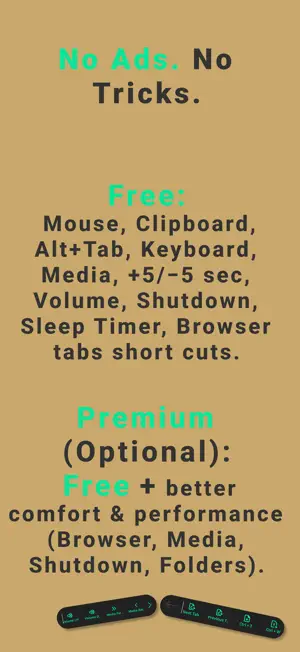
Turn your iPhone into a Wi-Fi mouse / touchpad for your PC. Control your computer from the couch: mouse, clipboard, media, browser tabs, and shortcuts — with an ethical, transparent model. What you can do (Free — No Ads, No Tricks) Wi-Fi Mouse & Touchpad control Clipboard: copy on iPhone → paste on PC Alt+Tab app switching Keyboard when you need it Media controls: volume up/down, next/previous Movie controls: +5s / −5s (one tap) Browser shortcuts: next tab, previous tab, new tab, close tab Remote Shutdown & Sleep Timer Premium (Optional) Everything in Free, plus improved comfort & performance for Browser, Media, Shutdown actions, and Folder-related features. Ethical Policy No ads. No bait-and-switch paywalls. Core features stay free — premium is only for extra comfort/performance. Requirements Install the PC Companion from: getControl.click iPhone and PC must be on the same Wi-Fi / local network. Privacy Works over your local network. No account required. Support: [email protected] — Subscription — Control Premium is an auto-renewable subscription. Premium Monthly: $0.99 USD/month. Payment is charged to your Apple ID account at confirmation of purchase. The subscription automatically renews unless auto-renew is turned off at least 24 hours before the end of the current period. Your account is charged for renewal within 24 hours prior to the end of the current period. You can manage or cancel your subscription in your App Store account settings after purchase. Terms of Use (EULA): https://www.apple.com/legal/internet-services/itunes/dev/stdeula/ Privacy Policy: https://getcontrol.click/privacy
What’s new
Version 32 · Updated September 14, 2026
$1 Lifetime premium is back !!! ( for a limited time) In-app purchase issues fixed. This release focuses on a faster first-time setup and a more reliable connection between your phone and your computer. A redesigned guided onboarding Setting up getControl is now simpler than ever. A short, video-based walkthrough shows you exactly how to connect your phone to your Windows PC or Mac, with clear step-by-step instructions and a live setup checklist so you know the moment you are ready to start controlling your computer. More reliable Wi-Fi pairing no need QR code Even! We improved how getControl discovers your computer on the same Wi-Fi network. Your PC or Mac now appears automatically and connects faster, so you can go from opening the app to controlling your desktop in seconds. A complete wireless remote for your computer Precision trackpad with tap, right-click, scroll and drag Full wireless keyboard for typing on your computer from your phone Media controls for play, pause, seek and volume Browser shortcuts for new tab, close tab and switching tabs Clipboard sharing between your phone and your computer PC sleep, shutdown and sleep-timer controls Premium experience Upgrade to Premium for a cleaner, distraction-free experience, advanced controls and access to all future features. Prefer to install the desktop companion later? You can now email yourself the download link and set up your PC or Mac in just a few taps. Performance and polish Smoother animations, refined layouts and a range of stability improvements across the app. Thank you for using getControl. Turn your phone into the ultimate wireless remote for your PC or Mac and control your computer from anywhere in the room, no cables required.
App privacy
The developer, Mohammadmehdı MADAHZADEHZOGHI, reported these privacy practices to Apple.
Data Not Collected
The developer does not collect any data from this app.
Alternatives to Control.Click
Looking for apps like Control.Click? Here are 6 similar apps on the App Store. The highest rated is ZUP AI (5.0/5), and 5 of the 6 are free to download.
-
 Desk Remote: Mouse control
-
 QuickPad - Touch & Control
-
 Laser Mouse
3.0
Laser Mouse
3.0
-
 WiMouse: Remote Mouse Keyboard
3.0
WiMouse: Remote Mouse Keyboard
3.0
-
 ZUP AI
5.0
ZUP AI
5.0
-
 Chroma Key FX - Green Screen
3.7
Chroma Key FX - Green Screen
3.7
| App | Rating | Price | Last updated | Compare |
|---|---|---|---|---|
| Control.Click | – | Free | September 14, 2026 | |
| Desk Remote: Mouse control | – | Free | Aug 1, 2026 | Compare |
| QuickPad - Touch & Control | – | Free | May 21, 2026 | Compare |
| Laser Mouse | 3.0 / 5 (2) | Free | Sep 16, 2026 | Compare |
| WiMouse: Remote Mouse Keyboard | 3.0 / 5 (5) | Free | Oct 26, 2026 | Compare |
| ZUP AI | 5.0 / 5 (1) | Free | Oct 20, 2026 | Compare |
| Chroma Key FX - Green Screen | 3.7 / 5 (13) | 1.99 USD | Dec 4, 2024 | Compare |
Compare Control.Click with the top alternatives: ratings, updates, ASO score and keyword gaps →