

QuickPad - Touch & Control
KAZUHIRO KAKIMOTO Utilities iPhoneiPadiPod touch
QuickPad - Touch & Control is a free Utilities app for iPhone and iPad by KAZUHIRO KAKIMOTO. Requires iOS 13.0. Updated May 21, 2026.
- Price
- Free
- on the App Store
- Size
- 35 MB
- Age 4+
- Updated
- May 21
- 2026 · v5.1
Screenshots


About QuickPad - Touch & Control
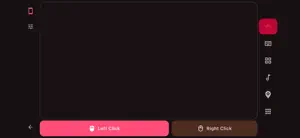
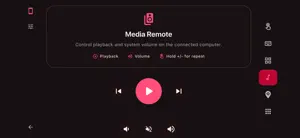
QuickPad is a wireless trackpad, keyboard, and macro pad that turns your iPhone, iPad, and Mac into a remote input device for your computer. Connect over your local network and control your desktop with multi-touch gestures, custom macros, and media keys. TRACKPAD: - Full-surface multi-touch trackpad emulation - Adjustable tracking speed (0.5x–5.0x) - Two-finger scrolling with natural/reverse scroll option - Tap-to-click support - Visual touch feedback with animated indicators EXTENDED KEYBOARD: - Sticky modifier keys: Ctrl, Alt, Shift, Cmd/Win - Function keys F1–F12 - Arrow keys, Home, End, Page Up/Down, Insert - Special keys: Esc, Tab, Enter, Space, Backspace, Delete - Auto-release modifiers after action key press MACRO PAD: - 4x3 configurable button grid (12 slots) - Custom labels, icons, and colors per button - Assign any key + modifier combination - Pre-configured common macros (Undo, Copy, Paste, Save, Find, etc.) - Long-press to edit any button MEDIA CONTROLS: - Play/Pause, Previous, Next track - Volume Up, Down, Mute with hold-to-repeat - Dedicated media control tab CONNECTION: - LAN auto-discovery via mDNS/Bonjour - Save multiple computer profiles - Quick connect by IP address - Auto-reconnect with retry (up to 3 attempts) - Auto-detect host computer's operating system SESSION: - Keep screen on during active session - Connection status indicators - Tab-based mode switching (Trackpad / Macros / Media) CUSTOMIZATION: - 20+ theme colors with dark/light mode - Haptic feedback toggle - Responsive layout for mobile, tablet, and desktop QuickPad Pro unlocks: - Bluetooth HID direct input (Android) - Ad-free experience - Full settings access - Priority support Terms of Use: https://kakitiro.com/quickapps/quickpad/terms/
What’s new
Version 5.1 · Updated May 21, 2026
• Bug fixes and performance improvements. • UI and design improvements.
App privacy
The developer, KAZUHIRO KAKIMOTO, reported these privacy practices to Apple.
Data Linked to You
The following data, which may be collected and linked to your identity, may be used for the following purposes:
- Location: Coarse Location
- Identifiers: Device ID
- Usage Data: Product Interaction, Advertising Data
Used for: Third-Party Advertising, Developer’s Advertising or Marketing, Analytics, App Functionality
Data Not Linked to You
The following data, which may be collected but is not linked to your identity, may be used for the following purposes:
- Diagnostics: Performance Data, Other Diagnostic Data, Crash Data
Used for: Third-Party Advertising, Developer’s Advertising or Marketing, Analytics, App Functionality
Alternatives to QuickPad - Touch & Control
Looking for apps like QuickPad - Touch & Control? Here are 6 similar apps on the App Store. The highest rated is AirBoard: Bluetooth Mouse (4.0/5), and all 6 are free to download.
-
 Mobile Touchpad
-
 Desk Remote: Mouse control
-
 FlickMouse
-
 Phone Mouse・Remote・Keyboard
-
 MultiLink: Remote Keyboard
2.0
MultiLink: Remote Keyboard
2.0
-
 AirBoard: Bluetooth Mouse
4.0
AirBoard: Bluetooth Mouse
4.0
| App | Rating | Price | Last updated | Compare |
|---|---|---|---|---|
| QuickPad - Touch & Control | – | Free | May 21, 2026 | |
| Mobile Touchpad | – | Free | Jun 1, 2026 | Compare |
| Desk Remote: Mouse control | – | Free | Aug 1, 2026 | Compare |
| FlickMouse | – | Free | Apr 3, 2026 | Compare |
| Phone Mouse・Remote・Keyboard | – | Free | Jul 24, 2026 | Compare |
| MultiLink: Remote Keyboard | 2.0 / 5 (1) | Free | Sep 27, 2026 | Compare |
| AirBoard: Bluetooth Mouse | 4.0 / 5 (3) | Free | Oct 6, 2026 | Compare |