

Zoho One
Zoho Corporation Business iPhoneiPadiPod touch
Zoho One is a free Business app for iPhone and iPad by Zoho Corporation. Requires iOS 15.0. Updated September 22, 2026.
- Price
- Free
- on the App Store
- Size
- 332 MB
- Age 4+
- Updated
- Sep 22
- 2026 · v1.3.4
Screenshots


About Zoho One
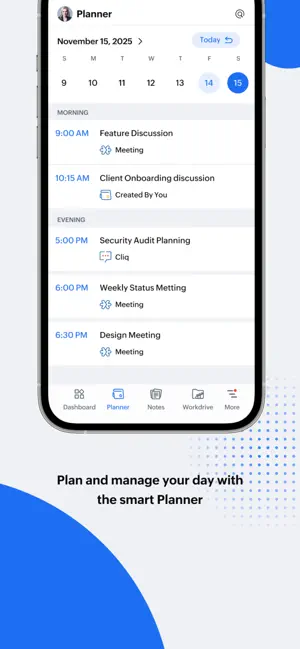
Zoho One App brings together everything you need to plan, manage, and act on your work, all from one place. Designed exclusively for Zoho One users, this app unifies your tools, tasks, and approvals from across the Zoho One suite, helping you stay productive wherever you are. Whether you’re approving an expense request, joining a meeting, or sharing a file, you’ll find everything you need in one place. Key Features: • Unified Dashboard - Create your perfect workspace with customizable widgets from all your Zoho services. • Planner - View your day at a glance using time-based and category-based card views, and stay ahead of what’s next. • Approvals - Manage all pending requests from invoices and trip expenses to CRM records and document sign-offs. • Files - Browse, preview, and share files from WorkDrive and other connected Zoho services, securely and on the go. Why you'll love it: Manage everything across your Zoho One suite from one unified app Save time by eliminating the need to switch between different Zoho apps A clean, mobile-friendly interface built for efficiency and productivity The Zoho One app is enterprise-ready, secure, and built to streamline how you work; fewer apps, one mobile interface, and maximum efficiency. Download the Zoho One app and transform how you plan, manage, and act on work.
What’s new
Version 1.3.4 · Updated September 22, 2026
Zoho One Meets iOS 27! Liquid Glass: The entire app interface, right from your customizable dashboard to your daily planner has been rebuilt around iOS's Liquid Glass design language. Enjoy a modern, translucent, and layered aesthetic that feels completely native to the latest OS while keeping your essential controls right where you expect them. Set your status from Home Screen: A new Home Screen widget makes checking in and setting your status effortless. Set yourself as available, engaged, or on a break, all from your iPhone Home Screen. Hands-Free Meetings with Siri: Siri now understands your Zoho One planner. Just ask Siri to start or join your meeting so you can hop on hands-free. If you have multiple meetings lined up, Siri will list them out and instantly open the exact one you want. Spotlight Search: Swipe down on your iPhone Home Screen to search for any meeting quickly, select it, and open it straight inside Zoho One planner.
App privacy
The developer, Zoho Corporation, reported these privacy practices to Apple.
Data Linked to You
The following data, which may be collected and linked to your identity, may be used for the following purposes:
- User Content: Customer Support, Other User Content, Photos or Videos, Audio Data
- Identifiers: Device ID, User ID
- Usage Data: Product Interaction, Other Usage Data
- Diagnostics: Crash Data, Performance Data, Other Diagnostic Data
- Other Data: Other Data Types
- Location: Precise Location, Coarse Location
- Contact Info: Physical Address, Email Address, Name, Phone Number
- Search History: Search History
Used for: Analytics, App Functionality
Alternatives to Zoho One
Looking for apps like Zoho One? Here are 6 similar apps on the App Store. The highest rated is Cal.com (4.9/5), and all 6 are free to download.
-
 Ingram Micro Xvantage
3.9
-
 Copper CRM
4.7
-
 Sintra: AI Employees
4.6
-
 Cal.com
4.9
-
 Make for iOS
3.3
-
 Freshsales
4.5
| App | Rating | Price | Last updated | Compare |
|---|---|---|---|---|
| Zoho One | – | Free | September 22, 2026 | |
| Ingram Micro Xvantage | 3.9 / 5 (8) | Free | Oct 11, 2026 | Compare |
| Copper CRM | 4.7 / 5 (446) | Free | Oct 16, 2026 | Compare |
| Sintra: AI Employees | 4.6 / 5 (2,635) | Free | Oct 27, 2026 | Compare |
| Cal.com | 4.9 / 5 (222) | Free | Oct 30, 2026 | Compare |
| Make for iOS | 3.3 / 5 (32) | Free | Jul 23, 2026 | Compare |
| Freshsales | 4.5 / 5 (525) | Free | Oct 21, 2026 | Compare |
Compare Zoho One with the top alternatives: ratings, updates, ASO score and keyword gaps →