

Copper CRM
Copper CRM, Inc. Business iPhoneiPadiPod touch
Copper CRM is a free Business app for iPhone and iPad by Copper CRM, Inc. Rated 4.7/5 from 446 ratings. Requires iOS 15.0. Updated September 29, 2026.
- Rating
- 4.7
- 446 ratings
- Price
- Free
- on the App Store
- Size
- 80 MB
- Age 4+
- Updated
- Sep 29
- 2026 · v8.7.0
Screenshots


About Copper CRM
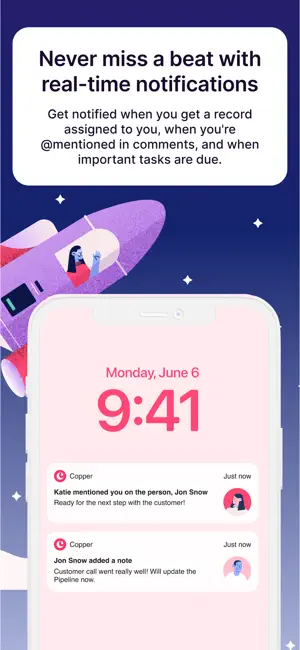
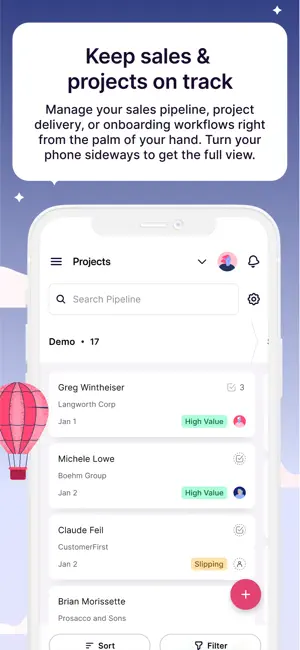
Copper CRM helps you connect with leads, win deals, deliver projects and create repeat clients. It’s the CRM made for Google Workspace, so it pulls in contact information and email conversations, and layers on productivity tools. Copper helps you manage your entire sales process and projects using visual pipelines right from your iPhone, so you can bring Copper anywhere your business takes you. • You can try Copper CRM for free with our 14-day trial—no credit card required. • Copper for iPhone is designed as a companion to the Copper web app. Highlights: • CRM for Google—Syncs with Gmail, Contacts, Calendar, Docs, Sheets, Slides and Google Drive. • Access all customer data, log calls and text messages, and add meeting notes so every interaction is tracked. • Manage opportunities and projects in a visual pipeline. Easily sort, filter and track updates to keep deals and projects moving forward. • Scan business cards at meetings and events to easily add new contacts • Save time by speaking into your phone to log activities and notes – no typing needed. Features & Benefits: Native G Suite Integration Copper CRM is seamlessly integrated with Google Workspace, so you can access your CRM where you already work—your Gmail, Google Calendar, and Google Drive. Automated Workflows Capture website form fills and reply instantly to set up your first meeting. Automatically send follow up emails when you move an opportunity or project to the next stage in your process. Insights across the entire customer journey With advanced reporting, dashboards, project management and customizable pipelines, you will have real-time analytics to help you deliver client projects and exceed expectations. Get up and running in days, not months Connect your team’s Gmail accounts first. Copper then pulls in contact information and email conversations. Connect the tools you’re already using Copper’s powerful integrations seamlessly connect with your favorite tools to bring in even more customer information.
Ratings & reviews
4.7
446 ratings
What’s new
Version 8.7.0 · Updated September 29, 2026
Crowd pleasers and customer requests in this release! • Faster access to the business card scanner – press and hold the app icon and voila! • Use rich text formatting in comments (finally) • Edit your comments – no more sticky finger typos! • See the chart of opportunity win rate on related records • Hiding things you don’t have access to instead of showing an error message (because why?): create actions, tasks
App privacy
The developer, Copper CRM, Inc., reported these privacy practices to Apple.
Data Linked to You
The following data, which may be collected and linked to your identity, may be used for the following purposes:
- Identifiers: User ID
- Usage Data: Product Interaction
- Contacts: Contacts
- User Content: Customer Support
- Search History: Search History
Used for: Analytics, App Functionality
Data Not Linked to You
The following data, which may be collected but is not linked to your identity, may be used for the following purposes:
- Location: Coarse Location
- Identifiers: Device ID
- Diagnostics: Crash Data, Performance Data
Used for: Analytics
Alternatives to Copper CRM
Looking for apps like Copper CRM? Here are 6 similar apps on the App Store. The highest rated is OnePageCRM - Simple CRM System (4.8/5), and all 6 are free to download.
-
 OnePageCRM - Simple CRM System
4.8
OnePageCRM - Simple CRM System
4.8
-
 Streak - CRM for Gmail
4.3
Streak - CRM for Gmail
4.3
-
 Capsule CRM
4.5
Capsule CRM
4.5
-
 Nutshell – Small Business CRM
3.1
Nutshell – Small Business CRM
3.1
-
 Cloze Relationship Management
4.7
Cloze Relationship Management
4.7
-
 Insightly CRM
4.3
Insightly CRM
4.3
| App | Rating | Price | Last updated | Compare |
|---|---|---|---|---|
| Copper CRM | 4.7 / 5 (446 ratings) | Free | September 29, 2026 | |
| OnePageCRM - Simple CRM System | 4.8 / 5 (379) | Free | Sep 24, 2026 | Compare |
| Streak - CRM for Gmail | 4.3 / 5 (159) | Free | Sep 12, 2026 | Compare |
| Capsule CRM | 4.5 / 5 (44) | Free | Oct 1, 2026 | Compare |
| Nutshell – Small Business CRM | 3.1 / 5 (85) | Free | Oct 1, 2026 | Compare |
| Cloze Relationship Management | 4.7 / 5 (2,830) | Free | May 18, 2026 | Compare |
| Insightly CRM | 4.3 / 5 (293) | Free | Oct 2, 2026 | Compare |
Compare Copper CRM with the top alternatives: ratings, updates, ASO score and keyword gaps →