

CrewCast
Friis Mobility ApS Photo & Video iPhoneiPadiPod touch
CrewCast is a free Photo & Video app for iPhone and iPad by Friis Mobility ApS. Requires iOS 26.0. Updated October 12, 2026.
- Price
- Free
- on the App Store
- Size
- 40 MB
- Age 4+
- Updated
- Oct 12
- 2026 · v2.0.1
Screenshots


About CrewCast
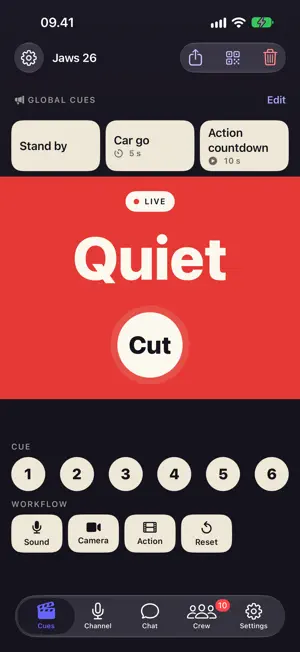
CrewCast keeps your whole crew in sync. Designed specifically for film productions — from major studio sets to small indie shoots — it puts everyone on the same beat: "Quiet on Set!", "Action!", "Cut!" reach every crew member instantly, with silent CUE signals during takes and live production status on the phones they already carry. Push-to-talk voice channels and group chats are built in — and it all works alongside your existing gear, so keep your radios for what they do best. ACTION COORDINATION - Instant production-wide alerts: "Quiet on Set!", "Action!", "Cut!" - Non-blocking action banners — crew keeps working while staying informed - Adjustable countdown timers for timed actions (Lunch, Break) - CUE signals to actors and crew during takes - Visual countdown timers and BPM pulses - Lock screen notifications via Live Activities VOICE CHANNELS - Walkie-talkie style push-to-talk communication - Open mic mode for continuous transmission - Main channel for production-wide announcements - Team channels for department-specific coordination - Private group channels for quick collaborations - Auto-reconnect keeps you connected on spotty set WiFi - Toggle mic with AirPods or any Bluetooth headset - Audio continues on lock screen via CallKit GROUP CHATS - Create group conversations with anyone on the production - AI-generated chat names for quick identification - Any group member can invite others - Unread message badges so you never miss a message - Team chat and production-wide chat built in CREW & AD MANAGEMENT - Promote or demote crew members to AD with a swipe - Organize crew into teams (Camera, Sound, Lighting, etc.) - QR code crew onboarding — scan to join - AD invite QR codes for quick onboarding of assistant directors HARDWARE INTEGRATION - CrewCast Button for hands-free control - Pair physical buttons via Bluetooth - Trigger actions and CUEs from anywhere on set BUILT FOR PRODUCTION - Works reliably on set with poor connectivity - Battery-efficient design for all-day shoots - Dark mode optimized for low-light sets - Also available on Mac for video village - Designed with input from professional film crews FLEXIBLE PRICING - Subscribe monthly for ongoing productions - Or buy a Day Pass (2/3/5/7 days) for a one-off shoot — no subscription needed - Day passes stack and are only used on the days you actually run a production Your AD triggers "Quiet on Set" and every crew member sees it instantly — no more missed calls. Perfect for: - Feature films and TV productions - Documentary crews - Commercial shoots - Music video productions - Live events and broadcasts Free to try. Go Pro with a subscription — or grab a Day Pass (2/3/5/7 days) for one-off productions, no subscription required. Terms of Use (EULA): https://crewcast.online/terms Privacy Policy: https://crewcast.online/privacy
What’s new
Version 2.0.1 · Updated October 12, 2026
ADJUSTMENTS AFTER 2.0 CUES TAB - The main action sits centred with clear space to the other actions, so Lunch is not tapped by accident - Global Cues stay at the top and step aside while an action runs - Crew count in the Crew tab title, new check-in and check-out symbols GLOBAL CUES - Switch Global Cues off per production (Production Settings > Global Cues) FIXES - An app out of step with the server drops the production so you can rejoin with the QR code, instead of showing you as checked out - The device that answers "Available" shows you checked in right away - Chat: photos without a caption stand on their own, reactions sit on the bubble's corner
App privacy
The developer, Friis Mobility ApS, reported these privacy practices to Apple.
Data Linked to You
The following data, which may be collected and linked to your identity, may be used for the following purposes:
- Contact Info: Email Address, Name
- User Content: Emails or Text Messages, Photos or Videos
- Identifiers: User ID, Device ID
Used for: App Functionality
Data Not Linked to You
The following data, which may be collected but is not linked to your identity, may be used for the following purposes:
- Usage Data: Product Interaction
- Diagnostics: Crash Data, Performance Data, Other Diagnostic Data
Used for: Analytics, Product Personalization, App Functionality
Alternatives to CrewCast
Looking for apps like CrewCast? Here are 6 similar apps on the App Store. The highest rated is Production Shot Lists (5.0/5), and 3 of the 6 are free to download.
-
 Crew Comms
-
 Lama fiXing
-
 Pontus Focus & ColorChecker
-
 VisLive NDI Monitor
-
 Production Shot Lists
5.0
-
 TesCam Studio for Tesla
4.7
| App | Rating | Price | Last updated | Compare |
|---|---|---|---|---|
| CrewCast | – | Free | October 12, 2026 | |
| Crew Comms | – | Free | Mar 31, 2026 | Compare |
| Lama fiXing | – | 4.99 USD | Mar 11, 2026 | Compare |
| Pontus Focus & ColorChecker | – | 3.99 USD | May 11, 2026 | Compare |
| VisLive NDI Monitor | – | 9.99 USD | Jun 4, 2024 | Compare |
| Production Shot Lists | 5.0 / 5 (8) | Free | Oct 30, 2026 | Compare |
| TesCam Studio for Tesla | 4.7 / 5 (29) | Free | Oct 31, 2026 | Compare |
Compare CrewCast with the top alternatives: ratings, updates, ASO score and keyword gaps →