

Sleepa: Sleep Tracker & Alarm
Medisense, Inc. Medical iPhoneiPadiPod touch
Sleepa: Sleep Tracker & Alarm is a free Medical app for iPhone and iPad by Medisense, Inc. Rated 1.0/5 from 1 ratings. Requires iOS 26.0.
- Rating
- 1.0
- 1 ratings
- Price
- Free
- on the App Store
- Size
- 61 MB
- Age 17+
- Updated
- Sep 9
- 2026 · v1.6.0
Screenshots


About Sleepa: Sleep Tracker & Alarm
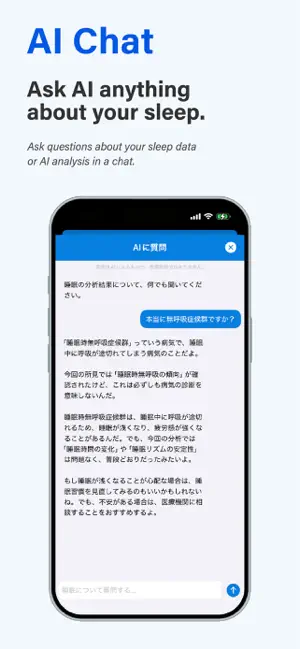
"I'm not sleeping." — Are you sure? Let's check the data. Sleepa measures your sleep with Apple Watch, then uses AI to explain what is actually happening, in plain language. Developed with guidance from a sleep medicine specialist. ◉ AI ANALYZES YOUR SLEEP One tap analyzes your last 30 days and explains the findings in clear language. • Breathing patterns — Overnight blood oxygen and breathing events detected by Apple Watch • Insomnia patterns — Sleep duration, time to fall asleep, and night wakings, checked against established clinical criteria • Your own normal — Compared against your own baseline over time, not against other people No need to interpret graphs or numbers. Sleepa tells you things like "You have been sleeping less than usual lately." Read-aloud is supported, so you can listen instead. Have a question? Ask the AI directly: "Why does this say caution?" "What should I do?" It answers based on your own results. Every night also receives a sleep score from 0 to 100, based on duration, efficiency, depth, breathing stability, and night wakings. ※ All analysis runs entirely on your iPhone. Your sleep data is never sent to an external server. ◉ REVEALING SLEEP STATE MISPERCEPTION Even when you feel you are not sleeping, you may in fact be sleeping. This is known as sleep state misperception, and here the problem is not a lack of sleep. The first step is to confirm objectively whether you are sleeping. Sleepa's sleep diary records how you felt you slept, hour by hour, and shows it alongside what Apple Watch measured. The gap between the two is the key to identifying it. Sleep can also feel insufficient when the duration is adequate but the depth is not. Sleepa breaks your night into REM, Core, Deep, and Awake so you can see whether you are getting genuinely deep sleep. Over time, patterns emerge — the nights you feel rested, and the nights you do not. ◉ AN ALARM THAT ACTUALLY WAKES YOU Sleepa includes a powerful alarm. • Sounds reliably even in Silent Mode and Focus Mode • With snooze on, it repeats for up to 30 minutes until you press stop • Use your own audio files (.mp3 / .wav) as your alarm sound If you need to be certain you will wake up, this is for you. ◉ HOW TO USE SLEEPA 1. Set your alarm • Choose your sound and snooze interval 2. Wear your Apple Watch to bed • That is all it takes to measure your sleep 3. Check your graph and score • See the whole night at a glance 4. Write your sleep diary • Record how you felt you slept, then compare it with the measured data. A large gap may indicate sleep state misperception 5. Let the AI analyze • Tap "Analyze Sleep" for a summary of your last 30 days, then ask follow-up questions ◉ FEATURES • AI sleep analysis and summary • Ask the AI (chat) • Sleep score (0–100) • Sleep graph • Sleep statistics • Sleep diary • Powerful alarm clock • Alerts ◉ PRICING Sleepa is free for one week after installation, with full access to all features. After that, choose Sleepa Premium, or Sleepa Limited, a three-month plan. Both include every feature. ◉ BEFORE YOU BEGIN ※ An Apple Watch is required. ※ Sleep measurement uses Apple HealthKit. ※ AI written summaries and chat require a device that supports Apple Intelligence. On other devices, results are shown as standard text. ※ Sleepa's analysis is reference information to help you understand your own sleep tendencies. Sleepa is not a medical device and does not provide medical diagnosis. If you have concerns about your health, please consult a medical professional.
What’s new
Version 1.6.0 · Updated September 9, 2026
◎ver. 1.6.0 - Localization has been expanded. - Minor bugfixes.
App privacy
The developer, Medisense, Inc., reported these privacy practices to Apple.
Data Linked to You
The following data, which may be collected and linked to your identity, may be used for the following purposes:
- Identifiers: User ID
- Health & Fitness: Health, Fitness
- Contact Info: Email Address
Used for: Developer’s Advertising or Marketing, Product Personalization, App Functionality
Data Not Linked to You
The following data, which may be collected but is not linked to your identity, may be used for the following purposes:
- Usage Data: Product Interaction
- Diagnostics: Crash Data
Used for: Analytics
Alternatives to Sleepa: Sleep Tracker & Alarm
Looking for apps like Sleepa: Sleep Tracker & Alarm? Here are 6 similar apps on the App Store. The highest rated is NightEcho: AI Sleep Recorder (5.0/5), and all 6 are free to download.
-
 NeuroSleep - Top Sleep Tracker
-
 SnoreYoga: Sleep & Snore Coach
-
 NightEcho: AI Sleep Recorder
5.0
NightEcho: AI Sleep Recorder
5.0
-
 Eyeary
-
 Sleepaholic - Sleep Tracker
3.0
Sleepaholic - Sleep Tracker
3.0
-
 Heart Rate Log - Pulse Rate
| App | Rating | Price | Last updated | Compare |
|---|---|---|---|---|
| Sleepa: Sleep Tracker & Alarm | 1.0 / 5 (1 rating) | Free | September 9, 2026 | |
| NeuroSleep - Top Sleep Tracker | – | Free | Jun 9, 2026 | Compare |
| SnoreYoga: Sleep & Snore Coach | – | Free | Aug 27, 2026 | Compare |
| NightEcho: AI Sleep Recorder | 5.0 / 5 (1) | Free | Sep 30, 2026 | Compare |
| Eyeary | – | Free | Oct 8, 2026 | Compare |
| Sleepaholic - Sleep Tracker | 3.0 / 5 (2) | Free | Dec 8, 2025 | Compare |
| Heart Rate Log - Pulse Rate | – | Free | Aug 24, 2026 | Compare |