

UI Components Playground
Hemal Modi Developer Tools iPhoneiPadiPod touch
UI Components Playground is a free Developer Tools app for iPhone and iPad by Hemal Modi. Requires iOS 18.0. Updated October 17, 2026.
- Price
- Free
- on the App Store
- Size
- 17 MB
- Age 4+
- Updated
- Oct 17
- 2026 · v1.8
Screenshots


About UI Components Playground
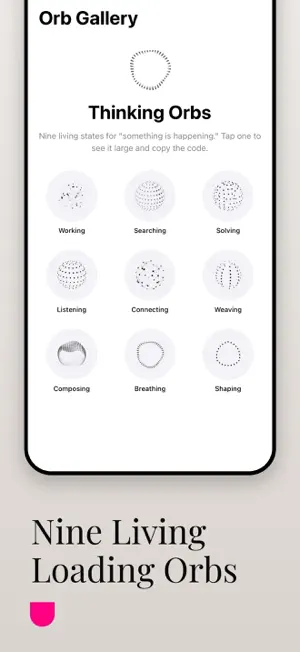
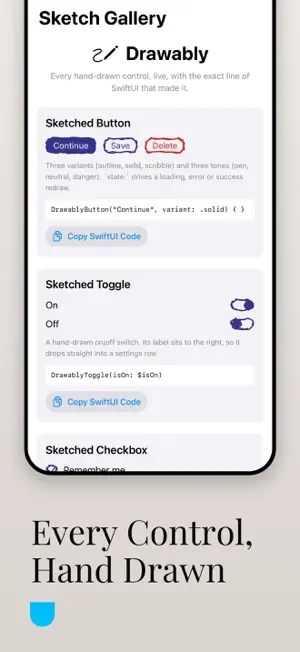
SwiftUI examples you can touch and copy. UI Components Playground is an interactive catalog of native iOS controls in the Liquid Glass look: buttons, sliders, switches, pickers, text fields and segmented controls, each with SwiftUI code you can copy. It also holds an Orb Gallery and a Sketch Gallery, on-device explanations for any component and Siri shortcuts to open them. UI Components Playground is an interactive component catalog and design-system reference: a shared, native-fidelity playground for designers, developers and product teams who need consistency between design and engineering. Explore real, native platform controls rendered in the system's own modern "liquid glass" aesthetic: buttons, sliders, switches, pickers, text fields, segmented controls and more, each fully interactive and behaving exactly as it would in a shipping app. Add-On Libraries (new) Two living galleries built right into the catalog: • Orb Gallery: every "Thinking Orbs" loading state (working, searching, solving, listening, connecting, weaving, composing, breathing, shaping), shown large with the exact SwiftUI line that draws it. • Sketch Gallery: every hand-drawn "Drawably" control (buttons, toggles, checkboxes, radios, fields, cards, badges, dividers, lists), boiling-ink animation included. Tap Copy on any snippet to put the working SwiftUI code straight on your clipboard. Recently copied snippets are remembered on the home screen. On-device explanations Tap "Explain" on any component to get a short, plain-language explanation composed live by the on-device language model: no account, no network request, and a clear written fallback if the model isn't available on this device. Hands-free with Siri Open the Orb Gallery or Sketch Gallery, ask for an explanation, or copy a component's code: all by voice, using this version's Siri shortcuts. Why This App Static wireframes and mockups often fall short when it comes to conveying the behavior and subtlety of real user interface components. This app solves that by showing real, native components exactly as they appear and behave on the platform, alongside two of the most talked-about SwiftUI open-source styling libraries. It is ideal for running design reviews, conducting product demos, leading team alignment workshops, or simply exploring UI capabilities and reusable code. Key Features Live native UI elements: real controls that respond exactly as they would in a production app. Modern visual style: a clean interface inspired by the system's liquid glass design direction. Add-on component libraries: the Orb and Sketch galleries above, each with copyable code. On-device AI explanations: private, on-device, with a graceful offline fallback. Design-to-development clarity: reference live, accurate UI components instead of static images. Presentation-friendly: great for product walkthroughs and executive demos. Ideal For Product designers, UX and UI researchers, product managers, developers and engineering leads, startup founders, creative and digital agencies, client-facing design consultants, and educators and design mentors. Practical Use Cases Review designs with real UI before development. Align design and engineering expectations visually. Present native component behaviors to stakeholders. Reuse working SwiftUI snippets in your own project. Train junior designers and interns on platform guidelines. Reduce design handoff confusion. Using native components and well-made open-source styling libraries ensures optimal user experience, performance, and consistency across the platform. This app is a design alignment engine: real controls as your reference point make product conversations clearer, faster and more productive. Open it, tap a control and copy the code.
What’s new
Version 1.8 · Updated October 17, 2026
Now free to download. Every native demo and live example is free, with 3 code copies a day. A one-time Pro unlock adds unlimited copies and the Orb and Sketch galleries. If you bought the app before, everything stays unlocked at no cost.
App privacy
The developer, Hemal Modi, reported these privacy practices to Apple.
Data Not Collected
The developer does not collect any data from this app.
Alternatives to UI Components Playground
Looking for apps like UI Components Playground? Here are 6 similar apps on the App Store. The highest rated is Privacy Policy Generator (4.9/5), and 5 of the 6 are free to download.
-
 MF Components
-
 Vendora DS
-
 Privacy Policy Generator
4.9
Privacy Policy Generator
4.9
-
 Blissum
-
 StyleGuide: Indie Dev HIG Tool
-
 TunnelKit tunnel testing tool
| App | Rating | Price | Last updated | Compare |
|---|---|---|---|---|
| UI Components Playground | – | Free | October 17, 2026 | |
| MF Components | – | Free | Feb 24, 2026 | Compare |
| Vendora DS | – | Free | Jan 26, 2026 | Compare |
| Privacy Policy Generator | 4.9 / 5 (8) | 1.99 USD | Jul 27, 2024 | Compare |
| Blissum | – | Free | May 27, 2026 | Compare |
| StyleGuide: Indie Dev HIG Tool | – | Free | Oct 21, 2026 | Compare |
| TunnelKit tunnel testing tool | – | Free | Oct 7, 2025 | Compare |