

ByTime: Time Hub
Baalavignesh A Productivity iPhoneiPadiPod touch
ByTime: Time Hub is a free Productivity app for iPhone and iPad by Baalavignesh A. Rated 5.0/5 from 1 ratings. Requires iOS 18.6. Updated May 20, 2026.
- Rating
- 5.0
- 1 ratings
- Price
- Free
- on the App Store
- Size
- 10 MB
- Age 4+
- Updated
- May 20
- 2026 · v1.1.2
Screenshots


About ByTime: Time Hub
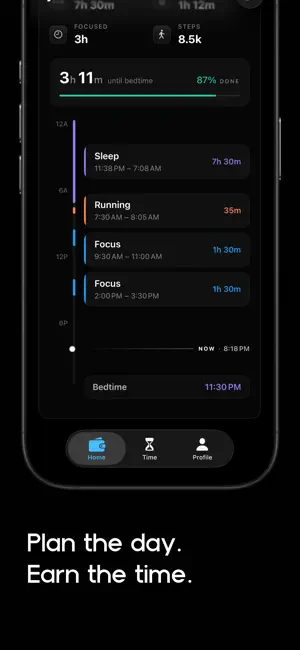
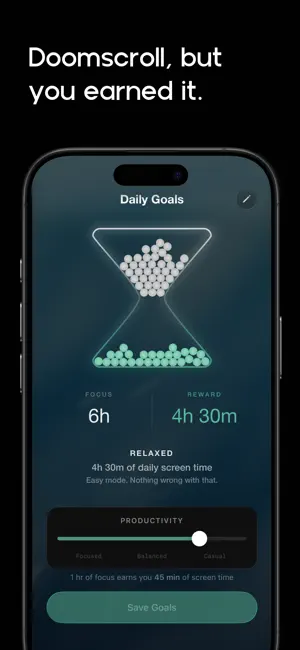
Earn your screen time. Most screen-time apps work by taking things away. ByTime works by giving them back — but only when you've earned them. Focus for a few minutes, and minutes drop into your wallet. When you want to use Instagram, TikTok, or any app you've blocked, you spend from what you earned. No daily quotas. No willpower contests. No guilt afterwards. It's the simplest behaviour change there is: you can have it, you just have to earn it first. HOW IT WORKS 1. Pick the apps and websites you want to keep at arm's length. 2. Run a focus session. Three minutes, thirty minutes — your call. 3. Spend what you've earned. Tap the shield over a blocked app, choose how many minutes to spend, and it opens. When the minutes run out, the shield comes back. A WALLET, NOT A WARDEN Your earned minutes sit in a balance you can see at a glance. Carry minutes forward. Spend them on whatever you want, in whatever order you want. The app doesn't decide what's important — you do. A FOCUS SESSION YOU CAN LIVE WITH The session screen is dominated by a slow, ambient surface that breathes for as long as you focus — Aurora, Sunset, Observatory, and a handful of other shader-rendered backgrounds you can pick from. The timer is there when you need it, but it isn't the loudest thing on the screen. And the reward you're earning sits next to the time you have left, so the session is about what you're gaining, not just what you're spending. BUILT ON THE 8-8-8 BALANCE Eight hours of focus. Eight hours of reward. Eight hours of sleep. ByTime is built around the idea that a day works best when those three are in rough balance — and your screen time belongs in the reward eight, paid for by the focus eight. You set the daily targets; the wallet does the accounting. A REWARD, NOT A PUNISHMENT The earn-then-spend loop works the way brains actually respond to incentives: positive reinforcement instead of punishment, delayed gratification instead of impulse. You're not being scolded for picking up your phone — you're being paid for putting it down. PRIVACY THE WAY APPLE INTENDED ByTime is built on Apple's Screen Time APIs (FamilyControls, ManagedSettings, DeviceActivity). Your usage data never leaves your device. We don't collect it, we don't see it, and we don't sell it. CALM, PREMIUM, INTENTIONAL Dark-first interface, tactile glass surfaces, fluid motion. ByTime is designed to feel like a well-made instrument — a tool you reach for, not one that scolds you. WHO IT'S FOR — Students who lose hours to TikTok between every study block and want their phone back on their own terms. — Anyone who's tried five blockers and felt punished by all of them. — Adults who want to spend less time scrolling and more time on what they actually planned to do. WHAT IT'S NOT — Not a parental control app. ByTime is built for self-management; you set your own rules. — Not a streak machine. There are no fires to lose, no badges to chase, no scoreboards. — Not a shame engine. The app never tells you you've used your phone too much. It just shows you what you've earned. Earn it. Spend it. Stop fighting your phone.
What’s new
Version 1.1.2 · Updated May 20, 2026
Critical Bug Fixes. Category selection works. Fixed the issue where the shield throws user back to home screen and not let user spend the time.
App privacy
The developer, Baalavignesh A, reported these privacy practices to Apple.
Data Linked to You
The following data, which may be collected and linked to your identity, may be used for the following purposes:
- Contact Info: Email Address, Name
- Identifiers: User ID
Used for: App Functionality
Alternatives to ByTime: Time Hub
Looking for apps like ByTime: Time Hub? Here are 6 similar apps on the App Store. The highest rated is Scrollar - Screen Time Control (5.0/5), and all 6 are free to download.
-
 Scrollar - Screen Time Control
5.0
Scrollar - Screen Time Control
5.0
-
 ScrollKick Screen Time Control
5.0
ScrollKick Screen Time Control
5.0
-
 StreakUp Habit Tracker & Goals
5.0
StreakUp Habit Tracker & Goals
5.0
-
 Today - A Daily To do List
-
 LockHour Pro: Block Apps
-
 FocusFirst Screen Time Control
5.0
FocusFirst Screen Time Control
5.0
| App | Rating | Price | Last updated | Compare |
|---|---|---|---|---|
| ByTime: Time Hub | 5.0 / 5 (1 rating) | Free | May 20, 2026 | |
| Scrollar - Screen Time Control | 5.0 / 5 (1) | Free | May 18, 2026 | Compare |
| ScrollKick Screen Time Control | 5.0 / 5 (2) | Free | Sep 4, 2026 | Compare |
| StreakUp Habit Tracker & Goals | 5.0 / 5 (1) | Free | Oct 14, 2026 | Compare |
| Today - A Daily To do List | – | Free | Apr 12, 2026 | Compare |
| LockHour Pro: Block Apps | – | Free | Oct 9, 2026 | Compare |
| FocusFirst Screen Time Control | 5.0 / 5 (1) | Free | Aug 26, 2026 | Compare |
Compare ByTime: Time Hub with the top alternatives: ratings, updates, ASO score and keyword gaps →