

Project Lens
Project Lens Business iPhoneiPadiPod touch
Project Lens is a free Business app for iPhone and iPad by Project Lens. Rated 5.0/5 from 11 ratings. Requires iOS 16.4. Updated October 14, 2026.
- Rating
- 5.0
- 11 ratings
- Price
- Free
- on the App Store
- Size
- 62 MB
- Age 4+
- Updated
- Oct 14
- 2026 · v1.0.37
Screenshots



About Project Lens
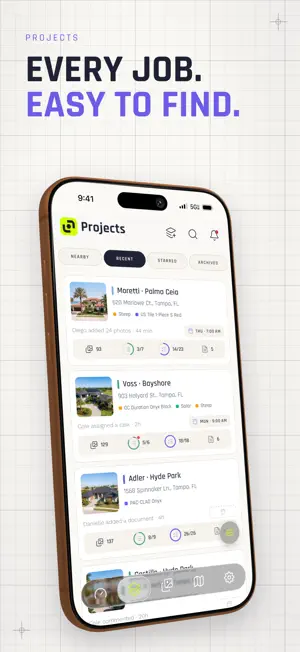
Every job. In focus. Project Lens helps contractors document jobs with photos and videos, track progress, and keep crews and clients informed. From the first estimate to the final walkthrough, keep the details of every job together. Your projects, photos, and updates stay organized and accessible on mobile and web, keeping the field and office on the same page. - Jobsite photos and videos: Capture work with the in-app camera and keep photos and videos organized by project. Document conditions, progress, and completed work with unlimited photo and video storage. - Photo markup: Add arrows, shapes, drawings, and text to jobsite photos. Point out damage, highlight an installation detail, or show your crew exactly what you mean. - Tasks and checklists: Assign work, follow project checklists, and track completion. See what's done and what still needs attention. - Activity history: See who did what and when. Follow photo uploads, task completions, comments, and project updates in one activity feed. - Project conversations: Keep questions, instructions, and follow-up attached to the job. Talk with your team from the field or the office, with comments on projects and individual photos. - Client updates: Share photo galleries and reports with customers to show progress, explain findings, and provide a clear record of completed work. - AI Rundowns: Talk through the job while taking photos. Turn your voice and photos into clear, structured job documentation with AI. Export a PDF to share with your team or clients. - Your schedule: Check upcoming appointments and scheduled work from your phone so you know where you're headed and what's next. - Documents and photo reports: Keep project files with the job and open documents in the field. Create photo reports on the web to bring your photos and job details together. - Estimates on the web: Prepare customer estimates in the web app and keep them connected to the project, alongside its photos, documents, and updates. Terms of Use: https://www.apple.com/legal/internet-services/itunes/dev/stdeula/ Privacy Policy: https://projectlens.io/privacy
Ratings & reviews
5.0
11 ratings
What’s new
Version 1.0.37 · Updated October 14, 2026
We've been busy on-site. Fresh coat of paint, tightened a few bolts.
App privacy
The developer, Project Lens, reported these privacy practices to Apple.
Data Linked to You
The following data, which may be collected and linked to your identity, may be used for the following purposes:
- Identifiers: Device ID, User ID
- Usage Data: Product Interaction
- Diagnostics: Crash Data, Performance Data, Other Diagnostic Data
- Location: Precise Location, Coarse Location
- Purchases: Purchase History
- Contact Info: Email Address, Name, Phone Number
- User Content: Photos or Videos, Audio Data, Other User Content
- Search History: Search History
Used for: Developer’s Advertising or Marketing, Analytics, Product Personalization, App Functionality
Alternatives to Project Lens
Looking for apps like Project Lens? Here are 6 similar apps on the App Store. The highest rated is TaskTag: How to project. (5.0/5), and all 6 are free to download.
-
 Punchify
-
 TaskTag: How to project.
5.0
TaskTag: How to project.
5.0
-
 RelayCam: Job Photo App
4.7
RelayCam: Job Photo App
4.7
-
 HubEngage - Employee App
4.7
HubEngage - Employee App
4.7
-
 JobSight Restoration Software
5.0
JobSight Restoration Software
5.0
-
 D-Tools Cloud
1.9
D-Tools Cloud
1.9
| App | Rating | Price | Last updated | Compare |
|---|---|---|---|---|
| Project Lens | 5.0 / 5 (11 ratings) | Free | October 14, 2026 | |
| Punchify | – | Free | Sep 19, 2026 | Compare |
| TaskTag: How to project. | 5.0 / 5 (20) | Free | Oct 19, 2026 | Compare |
| RelayCam: Job Photo App | 4.7 / 5 (41) | Free | Oct 19, 2026 | Compare |
| HubEngage - Employee App | 4.7 / 5 (118) | Free | Oct 14, 2026 | Compare |
| JobSight Restoration Software | 5.0 / 5 (11) | Free | Sep 24, 2026 | Compare |
| D-Tools Cloud | 1.9 / 5 (15) | Free | Oct 8, 2026 | Compare |
Compare Project Lens with the top alternatives: ratings, updates, ASO score and keyword gaps →