

TaskTag: How to project.
eloveit, ltd. Business iPhoneiPadiPod touch
TaskTag: How to project. is a free Business app for iPhone and iPad by eloveit, ltd. Rated 5.0/5 from 20 ratings. Requires iOS 15.1.
- Rating
- 5.0
- 20 ratings
- Price
- Free
- on the App Store
- Size
- 112 MB
- Age 4+
- Updated
- Oct 19
- 2026 · v3.17.1
Screenshots


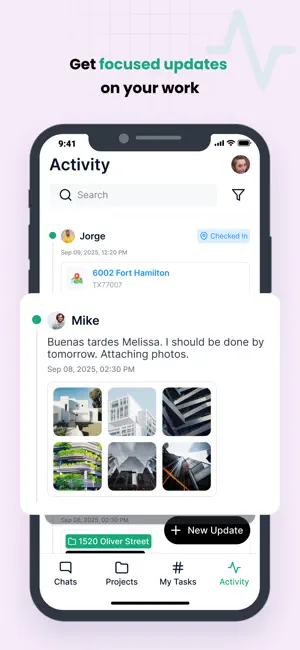
About TaskTag: How to project.
TaskTag is the all-in-one construction project management app. Assign tasks, track projects, and organize files all through chat! TaskTag helps to: • Stay up-to-date on the project status • Assign and manage tasks among vendors • Communicate jobs to crews and subcontractors involved • Manage all files associated with a project • Remove the headaches of training employees with complicated project management software Is your latest job running on schedule? Does your crew have everything they need to get the project done on time? Are questions being answered in a timely and efficient way? Members of your construction team can be added to a project and stay up-to-date on important tasks and developments. How to streamline projects with TaskTag: • Create a new project • Add anyone you want to be involved • Update and tag files/photos to your project • Easily organize and search multiple projects at once It’s that simple! TaskTag was made for go-getters. Built for those who are on-site, on the floor, and always on the move. TaskTag helps crews of all sizes manage their team, files, tasks, and projects – all through chat. All for free. Turn discussions into tasks and ideas into plans — in the office or on the go. It’s how to project. Download the app to see for yourself. Terms of Use: https://www.apple.com/legal/internet-services/itunes/dev/stdeula/ Terms and Conditions: https://tasktag.com/terms-and-conditions Privacy Policy: https://tasktag.com/privacy
Ratings & reviews
5.0
20 ratings
What’s new
Version 3.17.1 · Updated October 19, 2026
Optimize the system UI; Improve the stability of the task list
App privacy
The developer, eloveit, ltd., reported these privacy practices to Apple.
Data Linked to You
The following data, which may be collected and linked to your identity, may be used for the following purposes:
- Contact Info: Email Address, Name, Phone Number
- Identifiers: User ID, Device ID
- Diagnostics: Crash Data, Performance Data, Other Diagnostic Data
- Location: Precise Location
- Contacts: Contacts
- User Content: Photos or Videos, Audio Data
- Search History: Search History
Used for: Analytics, App Functionality
Alternatives to TaskTag: How to project.
Looking for apps like TaskTag: How to project.? Here are 6 similar apps on the App Store. The highest rated is Lnvo (5.0/5), and all 6 are free to download.
-
 YacDaddy
4.7
YacDaddy
4.7
-
 Lnvo
5.0
Lnvo
5.0
-
 RelayCam: Job Photo App
4.7
RelayCam: Job Photo App
4.7
-
 Crews by Core - Construction
4.7
Crews by Core - Construction
4.7
-
 Project Lens
5.0
Project Lens
5.0
-
 SKYSITE Projects: Construction
4.5
SKYSITE Projects: Construction
4.5
| App | Rating | Price | Last updated | Compare |
|---|---|---|---|---|
| TaskTag: How to project. | 5.0 / 5 (20 ratings) | Free | October 19, 2026 | |
| YacDaddy | 4.7 / 5 (12) | Free | Apr 14, 2026 | Compare |
| Lnvo | 5.0 / 5 (14) | Free | Dec 9, 2025 | Compare |
| RelayCam: Job Photo App | 4.7 / 5 (42) | Free | Oct 19, 2026 | Compare |
| Crews by Core - Construction | 4.7 / 5 (14) | Free | Jan 5, 2026 | Compare |
| Project Lens | 5.0 / 5 (11) | Free | Oct 14, 2026 | Compare |
| SKYSITE Projects: Construction | 4.5 / 5 (159) | Free | Dec 5, 2025 | Compare |