

Lock My Doc – Secure Files
KOMARA TECHNOLOGIES PRIVATE LIMITED Productivity iPhoneiPadiPod touch
Lock My Doc – Secure Files is a free Productivity app for iPhone and iPad by KOMARA TECHNOLOGIES PRIVATE LIMITED. Requires iOS 16.0. Updated July 22, 2025.
- Price
- Free
- on the App Store
- Size
- 4 MB
- Age 4+
- Updated
- Jul 22
- 2025 · v1.0.3
Screenshots


About Lock My Doc – Secure Files
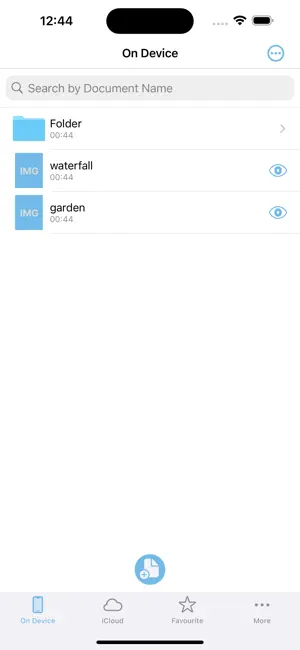
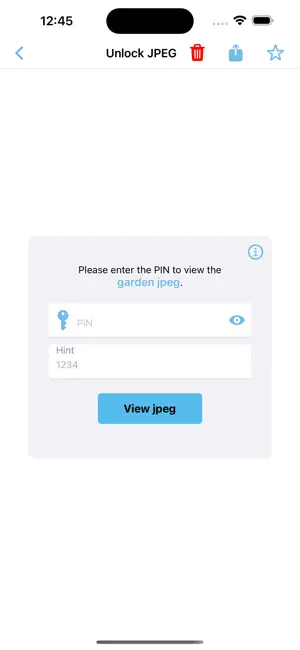
Lock My Doc – Secure Encryption for Your Files Keep your important documents safe with Lock My Doc — the easiest way to encrypt and decrypt your files directly on your iPhone or iPad. Lock My Doc prioritizes your data privacy and security. The application does not collect, transmit, or store any user passwords or sensitive content on external servers. All encrypted files and user credentials are stored locally on the device. Documents in the iCloud section are synced with users personal iCloud Drive. For enhanced security, Lock My Doc does not provide a “Forgot Password” or any password recovery mechanism. Users are fully responsible for managing and remembering their Master PIN, Password, or any security credentials. Deleted documents are permanently erased and cannot be recovered under any circumstances. Users can set a Master PIN and/or Password for faster encryption (lock), which can then be used to encrypt files without having to enter credentials repeatedly. Features: Strong Encryption: Protect your documents with robust encryption that only you can unlock. iCloud Sync: Seamlessly sync your encrypted files across all your devices — iPhone, iPad, and Mac. Simple & Intuitive: Effortlessly import, encrypt, decrypt, and organize your files with a clean, user-friendly interface. Your Privacy First: No one can read your files but you — not even us. Whether you want to lock PDFs, notes, images, or any other file, Lock My Doc ensures they stay private and accessible only to you. Download Lock My Doc today and take control of your privacy! Terms And Conditions link: https://docs.google.com/document/d/1DLy34KS8QGIaMm1auJgzHUiJlWzSCThh1ARutlpcvms/edit?usp=sharing Terms Of Use: https://komaratech.in/termsofuse.php
What’s new
Version 1.0.3 · Updated July 22, 2025
- Minor UI improvements and bug fixes to make your experience smoother. - Free Document Encryption & Decryption: Users can now encrypt and decrypt up to 3 documents for free, without a subscription! - Subscription with Free Trial: Continue exploring all premium features with our free trial.
App privacy
The developer, KOMARA TECHNOLOGIES PRIVATE LIMITED, reported these privacy practices to Apple.
Data Not Collected
The developer does not collect any data from this app.
Alternatives to Lock My Doc – Secure Files
Looking for apps like Lock My Doc – Secure Files? Here are 6 similar apps on the App Store. The highest rated is Cipherr (5.0/5), and all 6 are free to download.
-
 NousPDF: AI PDF Reader & Chat
-
 Cipherr
5.0
Cipherr
5.0
-
 Oblo
Oblo
-
 Chat PDF AI - Chat with PDF
-
 Geo Survey
-
 Barriers: Task & Money Planner
5.0
Barriers: Task & Money Planner
5.0
| App | Rating | Price | Last updated | Compare |
|---|---|---|---|---|
| Lock My Doc – Secure Files | – | Free | July 22, 2025 | |
| NousPDF: AI PDF Reader & Chat | – | Free | Jun 11, 2026 | Compare |
| Cipherr | 5.0 / 5 (4) | Free | Apr 1, 2026 | Compare |
| Oblo | – | Free | Sep 28, 2026 | Compare |
| Chat PDF AI - Chat with PDF | – | Free | Oct 18, 2026 | Compare |
| Geo Survey | – | Free | Aug 28, 2025 | Compare |
| Barriers: Task & Money Planner | 5.0 / 5 (5) | Free | Oct 24, 2026 | Compare |