

Scrollshot: Long Screenshot
Chanaka Caldera Helessage Utilities iPhoneiPadiPod touch
Scrollshot: Long Screenshot is a free Utilities app for iPhone and iPad by Chanaka Caldera Helessage. Rated 1.0/5 from 3 ratings. Requires iOS 26.0.
- Rating
- 1.0
- 3 ratings
- Price
- Free
- on the App Store
- Size
- 15 MB
- Age 17+
- Updated
- Oct 21
- 2026 · v12.0.0
Screenshots
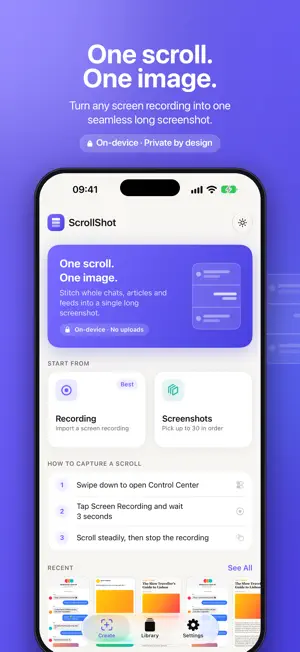


About Scrollshot: Long Screenshot
ScrollShot – One scroll. One image. Save entire chats, long articles and endless feeds as one clean, seamless screenshot. Record your screen while you scroll, and ScrollShot stitches it into a single high-resolution image – right on your device. HOW IT WORKS 1. Start a screen recording from Control Center 2. Scroll through the chat, page or post you want to keep 3. Import the recording – or pick screenshots from Photos 4. ScrollShot finds the frames and stitches them together 5. Edit if you like, then share or save FEATURES • Stitch screen recordings or screenshots into one long image • Review frames: reorder or remove them before stitching • Edit: crop and annotate, plus blur private details and add borders (Pro) • Share as PNG or JPEG, or as PDF (Pro), to Files, Mail, Messages and any app • Library to keep, tag and reshare your captures • Beautiful new design with Liquid Glass and Dark Mode • Made for iPad: side-by-side panels, drag & drop and keyboard shortcuts • Made for iPhone Duo: uses both displays and adapts as you open, close and fold it • Private by design: everything is processed on your device, nothing is uploaded FREE & PRO ScrollShot is free to use: create screenshots on a free weekly allowance and watch a short ad whenever you need one more. The free plan keeps 3 screenshots in your Library, with up to 10 photos per capture, a small watermark on exports and ads. ScrollShot Pro is a one-time purchase, not a subscription. It unlocks unlimited screenshots, an unlimited Library, up to 30 photos per capture, Original quality, no watermark, no ads, Blur, Border, PDF export and priority feedback. Capture the whole story, not just the screen.
What’s new
Version 12.0.0 · Updated October 21, 2026
MADE FOR IPHONE DUO. ScrollShot now uses every bit of both displays and adapts instantly as you open, close, fold or rotate iPhone Duo. On the outer display, controls move to the side to leave more room for your screenshot. On the inner display, panels and grids stay clear of the fold. Annotate, Blur and Crop keep your place in a long screenshot when the screen changes size. Plus cleaner layouts and fixes throughout.
App privacy
The developer, Chanaka Caldera Helessage, reported these privacy practices to Apple.
Data Not Collected
The developer does not collect any data from this app.
Alternatives to Scrollshot: Long Screenshot
Looking for apps like Scrollshot: Long Screenshot? Here are 6 similar apps on the App Store. The highest rated is ScrollShot - Long Screenshots (5.0/5), and all 6 are free to download.
-
 ScrollShot - Long Screenshots
5.0
-
 Picsnp-Screenshot Stitching
4.2
-
 Long Shot -Collage,Stitch,Edit
-
 Long: Full Screenshot Capture
3.7
-
 Zeta Stitch - Long Screenshots
4.7
-
 unroll - Screenshot Stitch
| App | Rating | Price | Last updated | Compare |
|---|---|---|---|---|
| Scrollshot: Long Screenshot | 1.0 / 5 (3 ratings) | Free | October 21, 2026 | |
| ScrollShot - Long Screenshots | 5.0 / 5 (1) | Free | Oct 21, 2026 | Compare |
| Picsnp-Screenshot Stitching | 4.2 / 5 (5) | Free | Jul 29, 2026 | Compare |
| Long Shot -Collage,Stitch,Edit | – | Free | Jul 8, 2025 | Compare |
| Long: Full Screenshot Capture | 3.7 / 5 (3) | Free | Jun 13, 2026 | Compare |
| Zeta Stitch - Long Screenshots | 4.7 / 5 (372) | Free | Oct 21, 2026 | Compare |
| unroll - Screenshot Stitch | – | Free | Apr 3, 2026 | Compare |