

智剪SnapCut
Chengdu Zhihui World Technology Co., Ltd. Photo & Video iPhoneiPadiPod touch
智剪SnapCut is a free Photo & Video app for iPhone and iPad by Chengdu Zhihui World Technology Co., Ltd. Rated 5.0/5 from 1 ratings. Requires iOS 18.0.
- Rating
- 5.0
- 1 ratings
- Price
- Free
- on the App Store
- Size
- 189 MB
- Age 4+
- Updated
- Oct 4
- 2026 · v2.2.1
Screenshots



About 智剪SnapCut
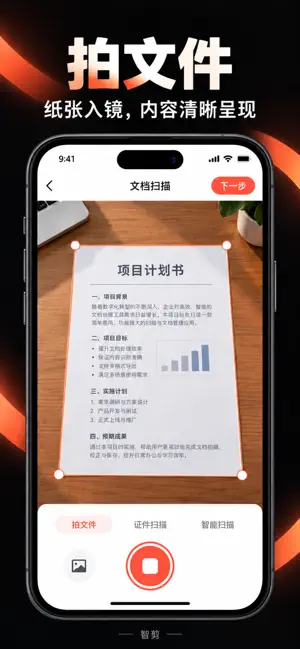
Zhijian: Scan important documents well, and keep your favorite lines. One phone that balances efficient organization and effortless creation. [Document Scanning | Capture Clearly, Organize Neatly] Scan documents, receipts, and ID cards; detect edges and correct the image, turning paper into digital copies that are easy to save and share. Supports multi-page scanning, importing from the photo album, page adjustment and enhancement, and export to PDF or PNG. ID cards and similar documents can be organized by front and back; when layout is needed, you can also combine multiple pages in custom editing. [Dialogue Collage | Turn Great Dialogue into a Work] Import videos or images, recognize the dialogue in the visuals, and stitch it into an image; subtitle position and spacing can be adjusted to your preference. Whether you want to record movie dialogue, create images for content, or share a line that moved you, you can get it done faster. Got a new inspiration? Say or type your idea, and you can also generate dialogue and pair it with visuals to create your own expression. [More Practical Tools] Smart photo editing, smart segmentation, photo and video collages, dual-direction camera, and AI body processing meet needs such as everyday photo editing, content creation, and privacy masking. [Subscription Details] Zhijian offers auto-renewing memberships. Plans, prices, and benefits are as displayed on the in-app purchase page. Subscriptions can be managed or canceled in device settings. Privacy Policy: https://xdrawvision.com/privacy_policy.html Terms of Service: https://www.apple.com/legal/internet-services/itunes/dev/stdeula
What’s new
Version 2.2.1 · Updated October 4, 2026
1. Fixed known issues. 2. This update focuses on two things: scanning documents better and assembling dialogue better. [Document Scanning] • Smoother framing, shooting guidance, and cropping for scanning documents and IDs. • Stronger and faster correction and enhancement for document scans. • Multiple pages can now be brought into custom editing together. • Improved PDF/PNG export and sharing, with A4 layout that better matches actual paper size. [Dialogue Collage] • Improved the dialogue collage experience for videos and images, making subtitle position and spacing easier to adjust. • New "Generate Dialogue from Ideas": speak or type an idea to generate dialogue and pair it with visuals.
App privacy
The developer, Chengdu Zhihui World Technology Co., Ltd., reported these privacy practices to Apple.
Data Not Linked to You
The following data, which may be collected but is not linked to your identity, may be used for the following purposes:
- Contact Info: Phone Number
- User Content: Photos or Videos, Audio Data
Used for: App Functionality, Other Purposes
Alternatives to 智剪SnapCut
Looking for apps like 智剪SnapCut? Here are 6 similar apps on the App Store.
-
 VSplit - Video Splitter
-
 Video Screenshot Pro
-
 2Capture
-
 BiCamera - Dual Video Recorder
-
 OnLens
-
 Auto Video Slicer
| App | Rating | Price | Last updated | Compare |
|---|---|---|---|---|
| 智剪SnapCut | 5.0 / 5 (1 rating) | Free | October 4, 2026 | |
| VSplit - Video Splitter | – | Free | Jan 6, 2026 | Compare |
| Video Screenshot Pro | – | 0.99 USD | Apr 28, 2026 | Compare |
| 2Capture | – | Free | May 7, 2026 | Compare |
| BiCamera - Dual Video Recorder | – | Free | Aug 22, 2026 | Compare |
| OnLens | – | Free | May 6, 2026 | Compare |
| Auto Video Slicer | – | Free | Aug 5, 2026 | Compare |
Compare 智剪SnapCut with the top alternatives: ratings, updates, ASO score and keyword gaps →