

GIF Keyboard: Memes & Emoji
RANIA ABDELALEEM Utilities iPhoneiPadiPod touch
GIF Keyboard: Memes & Emoji is a free Utilities app for iPhone and iPad by RANIA ABDELALEEM. Rated 4.5/5 from 432 ratings. Requires iOS 16.0.
- Rating
- 4.5
- 432 ratings
- Price
- Free
- on the App Store
- Size
- 31 MB
- Age 4+
- Updated
- Oct 3
- 2026 · v1.8.3
Screenshots

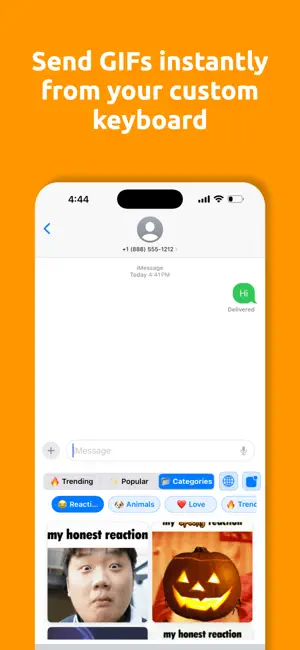
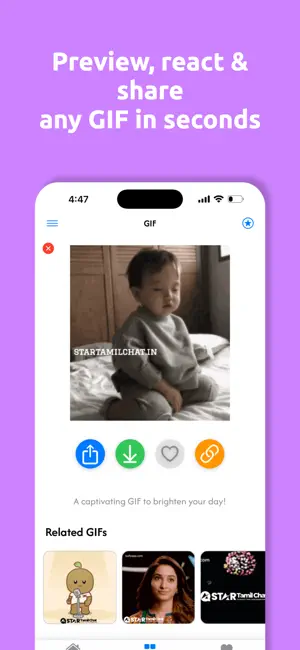

About GIF Keyboard: Memes & Emoji
Find the right GIF, meme, or reaction without leaving the conversation. KEY FEATURES • Search trending GIFs, memes, stickers, and reactions • Recent GIFs in the keyboard, available offline after they load • Save favorites for quick access • Quick Replies for messages you use often • A complete text keyboard with letters, numbers, and symbols • Type normally even without Full Access • Clear copy, share, and send-confirmation feedback • Faster loading with cached results when available WORKS WITH YOUR CHATS Use GIF Keyboard with iMessage, WhatsApp, Instagram, Snapchat, Telegram, Discord, TikTok DMs, email, and other apps that support third-party keyboards and GIF pasting. HOW TO ENABLE THE KEYBOARD 1. Open GIF Keyboard and choose Setup. 2. Open iPhone Settings. 3. Go to General > Keyboard > Keyboards > Add New Keyboard. 4. Select GIF Keyboard. 5. Turn on Allow Full Access to search, copy GIFs, and access saved replies. 6. Open a chat, tap the globe key, and choose GIF Keyboard. PRIVACY When the keyboard is active, nearby text may be processed locally on your device to generate reply suggestions. Message content is not stored or sent to our servers. GIF search terms are sent to our GIF providers to return results. Advertising and analytics data are handled as described in our Privacy Policy. Privacy Policy: https://aswapps.com/privacy-policy Terms of Use: https://www.apple.com/legal/internet-services/itunes/dev/stdeula/
Ratings & reviews
4.5
432 ratings
What’s new
Version 1.8.3 · Updated October 3, 2026
A fresh new look GIF Keyboard has a brand-new app icon — same app you love, cleaner look on your Home Screen. Under the hood Performance and stability improvements across the app. Enjoying GIF Keyboard? A quick rating on the App Store really helps us keep improving it. Thank you!
App privacy
The developer, RANIA ABDELALEEM, reported these privacy practices to Apple.
Data Used to Track You
The following data may be used to track you across apps and websites owned by other companies:
- Identifiers: Device ID
- Usage Data: Advertising Data
Data Not Linked to You
The following data, which may be collected but is not linked to your identity, may be used for the following purposes:
- Identifiers: Device ID
- Usage Data: Advertising Data
- Diagnostics: Crash Data
Used for: Third-Party Advertising, Analytics
Alternatives to GIF Keyboard: Memes & Emoji
Looking for apps like GIF Keyboard: Memes & Emoji? Here are 6 similar apps on the App Store. The highest rated is Emoji Elite + GIFs (4.9/5), and all 6 are free to download.
-
 GIF Keyboard · Editor · Master
4.7
GIF Keyboard · Editor · Master
4.7
-
 GIF Genius: GIF keyboard
4.4
GIF Genius: GIF keyboard
4.4
-
 GIF Maker – GIFs for Texting
4.8
GIF Maker – GIFs for Texting
4.8
-
 QuickGIF: GIF Search
-
 Emoji Elite + GIFs
4.9
Emoji Elite + GIFs
4.9
-
 GIF Maker - Memes & GIFs
4.6
GIF Maker - Memes & GIFs
4.6
| App | Rating | Price | Last updated | Compare |
|---|---|---|---|---|
| GIF Keyboard: Memes & Emoji | 4.5 / 5 (432 ratings) | Free | October 3, 2026 | |
| GIF Keyboard · Editor · Master | 4.7 / 5 (307) | Free | Sep 21, 2026 | Compare |
| GIF Genius: GIF keyboard | 4.4 / 5 (37) | Free | Jun 29, 2026 | Compare |
| GIF Maker – GIFs for Texting | 4.8 / 5 (2,383) | Free | Jul 30, 2026 | Compare |
| QuickGIF: GIF Search | – | Free | Oct 17, 2026 | Compare |
| Emoji Elite + GIFs | 4.9 / 5 (2,543) | Free | May 20, 2026 | Compare |
| GIF Maker - Memes & GIFs | 4.6 / 5 (87,977) | Free | Oct 15, 2026 | Compare |