

GIF Maker – GIFs for Texting
Dream Downloader Infotech Ltd. Utilities iPhoneiPadiPod touch
GIF Maker – GIFs for Texting is a free Utilities app for iPhone and iPad by Dream Downloader Infotech Ltd. Rated 4.8/5 from 2,390 ratings. Requires iOS 15.0.
- Rating
- 4.8
- 2.3K ratings
- Price
- Free
- on the App Store
- Size
- 172 MB
- Age 12+
- Updated
- Jul 30
- 2026 · v1.4.4
Screenshots
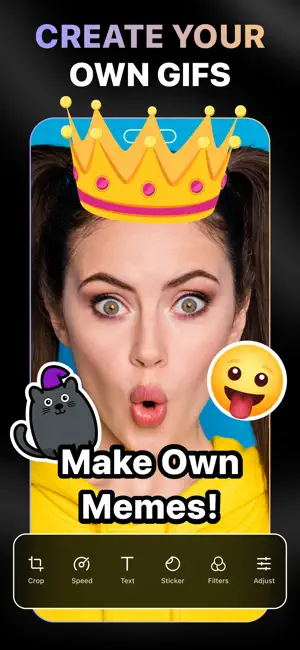
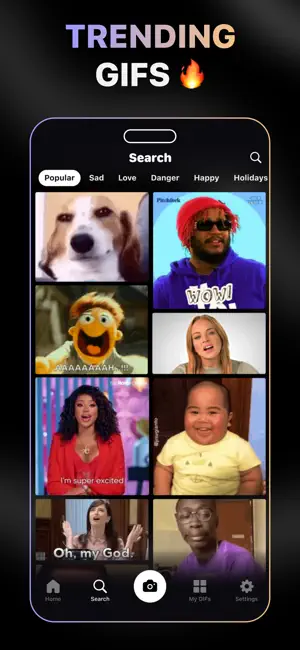

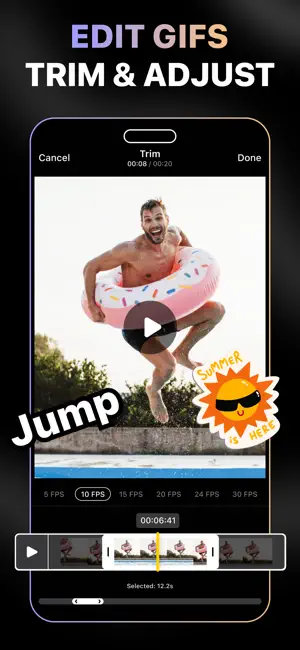
About GIF Maker – GIFs for Texting
GIF Maker is the best app to create high-quality GIFs on your iPhone from photos, videos, or instant captures. Transform your moments into smooth, expressive animations or import trending content directly from GIPHY. Enhance your GIFs with text, playful stickers, precise speed controls, and more, then share your creations across your favorite platforms. Key Features of GIF Maker: • Import and download GIFs from GIPHY • Create your own free GIFs from photos and videos • Capture and save videos as GIFs on iPhone • Rotate, flip, or trim GIFs using the built-in GIF editor • Add captions and animated stickers • Draw over your GIFs • Use stickers from GIPHY • Transform your favorite moments into GIFs • AI Cutout to remove backgrounds • Adjust brightness, contrast, exposure, saturation, etc. • Play with the GIF speed • Create loop videos on iPhone • Change canvas size and apply backgrounds • Export in multiple qualities: Low, Medium, or High • Save your creation as a GIF, Video, or Live Photo All-in-one GIF Creator When it comes to the best free GIF apps for iPhone, GIF Maker exceeds with superior tools capable of both creating and editing GIF animations on the go. Access your media by choosing the Photo to GIF or Video to GIF converter tool. You can also record video, capture with face effects, create stop-motion, take burst photos using the Camera option, then turn them into funny GIFs. Collection of Trending GIFs & Memes Utilize the full potential of powerful GIF search engines like GIPHY, and find the perfect GIFs for you. You can either download the shareable GIFs or customize them to add text or change GIF speed using this app before saving them on your iPhone. Robust GIF Editor Wondering how to edit a GIF on iPhone before sharing it online? GIF Maker features all the necessary tools to personalize GIFs the way you want. Once you choose the photos or a video, you can use the GIF speed changer to speed up or slow down a GIF. You can also rotate, adjust brightness, saturation, contrast, apply filters, change the background, use AI cutout, modify the canvas, and draw to enhance your GIFs. Export & Share Instantly GIF Maker lets you choose the export quality and file format before you save the GIF and share it. For instance, you can export as a GIF, Live Photo, or save the file as a Loop Video. No need to worry about how to make high-quality GIFs on iPhone because you can choose high-resolution GIFs and their file sizes as well. How to make a GIF from a video on iPhone? - Launch the GIF Maker app and tap on the Video to GIF button - Select a video from your iPhone Library - Choose your desired FPS and trim the video if necessary. Then tap the tick button on the top - The GIF editor tool will appear - Edit as you want and tap on “Export” Auto-Renewable Subscription Terms: Subscribe to get unrestricted access to all the features outlined above. • Subscription Length: Weekly, Yearly • Subscription with a free trial period will automatically renew to a paid subscription unless it is canceled at least 24 hours before the end of the trial period. • Payment will be charged to iTunes Account at confirmation of purchase. • Your Apple ID account will be charged for renewal within 24 hours before the end of the trial period. • You can manage and cancel your subscriptions by going to your account settings on the App Store. • Any unused portion of a free trial period, if offered, will be forfeited when the user purchases a subscription to that publication, where applicable. • By signing up for this subscription, you agree to our Terms of Use and Privacy Policy. Terms of Use: https://dreamdownloader.net/legal/gifmaker/terms.html Privacy Policy: https://dreamdownloader.net/legal/gifmaker/privacy.html Disclaimer: This app is free to download, but you will be required to sign-up for an auto-renewing subscription to access the app's full functionality.
Ratings & reviews
4.8
2.3K ratings
What’s new
Version 1.4.4 · Updated July 30, 2026
[Fixes] • Bug fixes and performance improvements.
App privacy
The developer, Dream Downloader Infotech Ltd., reported these privacy practices to Apple.
Data Used to Track You
The following data may be used to track you across apps and websites owned by other companies:
- Identifiers: User ID, Device ID
Data Linked to You
The following data, which may be collected and linked to your identity, may be used for the following purposes:
- Identifiers: User ID, Device ID
- Usage Data: Advertising Data, Product Interaction
- Diagnostics: Crash Data, Performance Data
- Other Data: Other Data Types
Used for: Third-Party Advertising, Analytics, Product Personalization, App Functionality
Alternatives to GIF Maker – GIFs for Texting
Looking for apps like GIF Maker – GIFs for Texting? Here are 6 similar apps on the App Store. The highest rated is Video To GIF Converter - GIFit (4.9/5), and all 6 are free to download.
-
 GIF Maker - Memes & GIFs
4.6
GIF Maker - Memes & GIFs
4.6
-
 WaSticker - Sticker Maker
4.7
WaSticker - Sticker Maker
4.7
-
 Video To GIF Converter - GIFit
4.9
Video To GIF Converter - GIFit
4.9
-
 Sticker Maker・Stickers & Emoji
4.4
Sticker Maker・Stickers & Emoji
4.4
-
 GIF Keyboard
4.7
GIF Keyboard
4.7
-
 Sticker Maker & Stickers
4.5
Sticker Maker & Stickers
4.5
| App | Rating | Price | Last updated | Compare |
|---|---|---|---|---|
| GIF Maker – GIFs for Texting | 4.8 / 5 (2,390 ratings) | Free | July 30, 2026 | |
| GIF Maker - Memes & GIFs | 4.6 / 5 (87,996) | Free | Oct 15, 2026 | Compare |
| WaSticker - Sticker Maker | 4.7 / 5 (31,014) | Free | Aug 21, 2026 | Compare |
| Video To GIF Converter - GIFit | 4.9 / 5 (700) | Free | Aug 31, 2026 | Compare |
| Sticker Maker・Stickers & Emoji | 4.4 / 5 (109) | Free | Feb 4, 2025 | Compare |
| GIF Keyboard | 4.7 / 5 (1,431,578) | Free | Sep 30, 2024 | Compare |
| Sticker Maker & Stickers | 4.5 / 5 (2,741) | Free | Dec 13, 2024 | Compare |