

Screenshot To PDF
Riadh Daoued Photo & Video iPhoneiPadiPod touch
Screenshot To PDF is a free Photo & Video app for iPhone and iPad by Riadh Daoued. Requires iOS 16.6. Updated April 29, 2025.
- Price
- Free
- on the App Store
- Size
- 4 MB
- Age 4+
- Updated
- Apr 29
- 2025 · v1.0
Screenshots


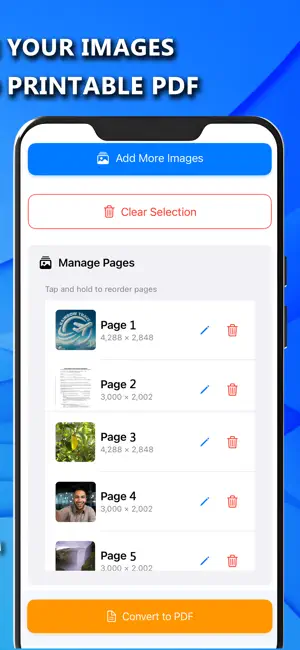
About Screenshot To PDF
Screenshot To PDF is the fastest way to turn your images into shareable and printable PDF documents. Whether you're a student, professional, or traveler, this app helps you stay organized and productive by transforming your images into neat, single or multi-page PDFs. Turn your images into high-quality PDF documents with ease! Screenshot To PDF Converter is a fast, secure, and offline tool. Why Use Screenshot To PDF Converter? - No watermarks: Get clean, professional PDF files. - No file size limits – Convert images without restrictions. - Lightweight & Fast – Designed for efficiency without compromising quality. - Completely Private – All conversions happen on your device, keeping your files secure. Use Cases: - Personal Documents: Digitize and store your ID, passport, insurance card, or birth certificate securely. - For Students: Combine notes, diagrams, or assignments into a single PDF for exams and submissions. - Professional Use: Save and send invoices, contracts, meeting notes, or receipts in organized PDF format. - Travel Essentials: Keep your flight tickets, hotel bookings, visas, and other travel documents in one PDF. - Applications & Forms: Take photos of official forms, certificates, or tax documents and convert them into shareable PDFs. - Creative Projects: Turn your artwork, collages, or photo collections into portable PDF files.
App privacy
The developer, Riadh Daoued, reported these privacy practices to Apple.
Data Used to Track You
The following data may be used to track you across apps and websites owned by other companies:
- Location: Coarse Location
- Identifiers: Device ID
- Usage Data: Advertising Data
Data Linked to You
The following data, which may be collected and linked to your identity, may be used for the following purposes:
- Location: Coarse Location
- Identifiers: Device ID
- Usage Data: Advertising Data
Used for: Third-Party Advertising, Analytics
Data Not Linked to You
The following data, which may be collected but is not linked to your identity, may be used for the following purposes:
- User Content: Other User Content
- Other Data: Other Data Types
Used for: App Functionality
Alternatives to Screenshot To PDF
Looking for apps like Screenshot To PDF? Here are 6 similar apps on the App Store. The highest rated is AICut - Video Search & Trimmer (5.0/5), and all 6 are free to download.
-
 AICut - Video Search & Trimmer
5.0
AICut - Video Search & Trimmer
5.0
-
 Timestamp GPS Camera: InfoCam
-
 AI Photo Enhancer: Photos App
3.0
AI Photo Enhancer: Photos App
3.0
-
 Video To A Photo
-
 Background Remover & Editor
5.0
Background Remover & Editor
5.0
-
 Merge: add audio to video
1.0
Merge: add audio to video
1.0
| App | Rating | Price | Last updated | Compare |
|---|---|---|---|---|
| Screenshot To PDF | – | Free | April 29, 2025 | |
| AICut - Video Search & Trimmer | 5.0 / 5 (1) | Free | Mar 23, 2026 | Compare |
| Timestamp GPS Camera: InfoCam | – | Free | May 23, 2025 | Compare |
| AI Photo Enhancer: Photos App | 3.0 / 5 (4) | Free | Sep 16, 2025 | Compare |
| Video To A Photo | – | Free | Jun 28, 2026 | Compare |
| Background Remover & Editor | 5.0 / 5 (2) | Free | Aug 18, 2026 | Compare |
| Merge: add audio to video | 1.0 / 5 (1) | Free | Dec 18, 2025 | Compare |
Compare Screenshot To PDF with the top alternatives: ratings, updates, ASO score and keyword gaps →