

Video To A Photo
katapu.net Photo & Video iPhoneiPadiPod touch
Video To A Photo is a free Photo & Video app for iPhone and iPad by katapu.net. Requires iOS 15.6. Updated June 28, 2026.
- Price
- Free
- on the App Store
- Size
- 72 MB
- Age 4+
- Updated
- Jun 28
- 2026 · v1.1.2
Screenshots
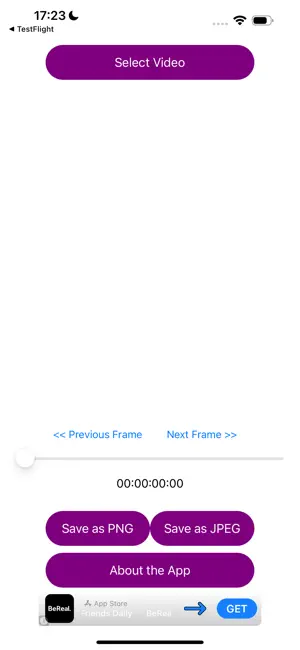


About Video To A Photo
The definitive app for turning videos into still photos is here! Save that perfect “this is it!” moment from your favorite videos as a high-quality photo with a single tap. Sparkling night scenes, decisive moments with your pet, or powerful sports action. Even the moment you could not pause in time can be easily saved as a still photo with this app. Because extraction is frame-accurate, you do not need to worry about quality loss. It is free, so you can use it casually whenever you like. A paid “PRO” version with no ads is also available. The app features are the same. Main features • High-precision capture down to a single frame. • Fine-tune the position with the slider, ±1 frame buttons, or frame timestamp. • Save at the original video quality. • Export in either PNG or JPEG, whichever you prefer. • Smooth performance and fast saving, without waiting for encoding. How to use 1. Tap “Select Video” to load a video. 2. Move the slider, or use the ±1 frame buttons or the frame timestamp to find the best shot. 3. Check the still image in the preview area in the center. 4. Tap “Save as PNG” or “Save as JPEG” to save it to your camera roll!
What’s new
Version 1.1.2 · Updated June 28, 2026
Fixed an issue where frames saved from high-resolution videos, such as 4K videos imported from Photos, could fail to preserve the original video resolution. Improved JPEG save quality. Minor bug fixes and stability improvements.
App privacy
The developer, katapu.net, reported these privacy practices to Apple.
Data Used to Track You
The following data may be used to track you across apps and websites owned by other companies:
- Location: Coarse Location
- Identifiers: Device ID
- Usage Data: Product Interaction, Advertising Data
- Diagnostics: Crash Data, Performance Data
Data Linked to You
The following data, which may be collected and linked to your identity, may be used for the following purposes:
- Location: Coarse Location
- Identifiers: Device ID
- Usage Data: Product Interaction, Advertising Data
- Diagnostics: Performance Data
Used for: Third-Party Advertising
Data Not Linked to You
The following data, which may be collected but is not linked to your identity, may be used for the following purposes:
- Diagnostics: Crash Data
Used for: Third-Party Advertising, App Functionality
Alternatives to Video To A Photo
Looking for apps like Video To A Photo? Here are 6 similar apps on the App Store. The highest rated is Background Remover & Editor (5.0/5), and 5 of the 6 are free to download.
-
 Timestamp GPS Camera: InfoCam
-
 Background Remover & Editor
5.0
-
 Video Edit Tools. Video Editor
-
 Screenshot To PDF
-
 Sweep Declutter Photos Videos
5.0
-
 VintCam: Your Vintage Camera
| App | Rating | Price | Last updated | Compare |
|---|---|---|---|---|
| Video To A Photo | – | Free | June 28, 2026 | |
| Timestamp GPS Camera: InfoCam | – | Free | May 23, 2025 | Compare |
| Background Remover & Editor | 5.0 / 5 (2) | Free | Aug 18, 2026 | Compare |
| Video Edit Tools. Video Editor | – | Free | Oct 9, 2025 | Compare |
| Screenshot To PDF | – | Free | Apr 29, 2025 | Compare |
| Sweep Declutter Photos Videos | 5.0 / 5 (1) | 1.99 USD | Jul 24, 2026 | Compare |
| VintCam: Your Vintage Camera | – | Free | Nov 24, 2025 | Compare |
Compare Video To A Photo with the top alternatives: ratings, updates, ASO score and keyword gaps →