

i PixScan
Hardik Changela Productivity iPhoneiPadiPod touch
i PixScan is a free Productivity app for iPhone and iPad by Hardik Changela. Requires iOS 15.6. Updated April 29, 2025.
- Price
- Free
- on the App Store
- Size
- 7 MB
- Age 17+
- Updated
- Apr 29
- 2025 · v1.1
Screenshots


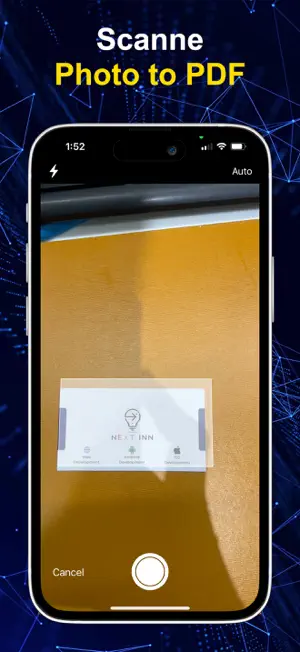

About i PixScan
iPixScan is a powerful and easy-to-use document scanner app that turns your phone into a portable scanner. With its advanced scanning features, you can scan receipts, notes, contracts, business cards, whiteboards, and other documents with just a tap. Whether you're at home, in the office, or on the go, iPixScan ensures you never lose track of important documents again. Key Features: High-Quality Scanning: Capture documents with crystal-clear quality using your phone’s camera. Auto-Detection: Automatically detects edges of the document and crops it for perfect scans. Multiple File Formats: Scan documents to PDF, JPG, PNG, and other formats. OCR (Optical Character Recognition): Extract text from scanned images for easy editing and sharing. Smart Enhancement: Auto-adjusts the brightness, contrast, and sharpness for perfect scans. Batch Scanning: Quickly scan multiple pages and combine them into one document. Easy Sharing: Share your documents via email, social media, or any other communication app with ease. How It Works: Open the app and point your phone’s camera at the document. iPixScan will automatically detect the document and crop it for you. Enhance the scan by adjusting settings or let the app do it automatically. Save the scan in your preferred format and share or store it. Why Choose iPixScan: Efficiency: Save time by turning your phone into a full-featured scanner. Portability: Carry all your important documents with you in digital form. User-Friendly: No complicated setup or usage – scan with just a few taps. Privacy & Security: iPixScan is designed with your privacy in mind, offering encrypted scans and secure cloud options.
What’s new
Version 1.1 · Updated April 29, 2025
bug fixing..
App privacy
The developer, Hardik Changela, reported these privacy practices to Apple.
Data Used to Track You
The following data may be used to track you across apps and websites owned by other companies:
- Usage Data: Advertising Data
Data Linked to You
The following data, which may be collected and linked to your identity, may be used for the following purposes:
- Usage Data: Advertising Data
Used for: Third-Party Advertising
Data Not Linked to You
The following data, which may be collected but is not linked to your identity, may be used for the following purposes:
- User Content: Photos or Videos
- Other Data: Other Data Types
Used for: App Functionality
Alternatives to i PixScan
Looking for apps like i PixScan? Here are 6 similar apps on the App Store. The highest rated is PDF Scanner: AI OCR (5.0/5), and 4 of the 6 are free to download.
-
 PixScan AI – Smart Scanner
-
 ScanPix | Professional scanner
-
 PDF Scanner: AI OCR
5.0
PDF Scanner: AI OCR
5.0
-
 EasyTranslate AI: PDF & Docs
-
 VoiceStream: AI Voice Notes
-
 Grindcalculator
1.0
Grindcalculator
1.0
| App | Rating | Price | Last updated | Compare |
|---|---|---|---|---|
| i PixScan | – | Free | April 29, 2025 | |
| PixScan AI – Smart Scanner | – | Free | Feb 19, 2026 | Compare |
| ScanPix | Professional scanner | – | Free | Aug 7, 2026 | Compare |
| PDF Scanner: AI OCR | 5.0 / 5 (1) | 4.99 USD | Oct 14, 2026 | Compare |
| EasyTranslate AI: PDF & Docs | – | Free | May 23, 2026 | Compare |
| VoiceStream: AI Voice Notes | – | Free | Oct 8, 2026 | Compare |
| Grindcalculator | 1.0 / 5 (1) | 6.99 USD | Feb 26, 2026 | Compare |
Compare i PixScan with the top alternatives: ratings, updates, ASO score and keyword gaps →