

Schedule Planner - To Do List
APPS15 VISIONARY SOFTWARE LLP Productivity iPhoneiPadiPod touch
Schedule Planner - To Do List is a free Productivity app for iPhone and iPad by APPS15 VISIONARY SOFTWARE LLP. Rated 5.0/5 from 4 ratings. Requires iOS 13.0.
- Rating
- 5.0
- 4 ratings
- Price
- Free
- on the App Store
- Size
- 41 MB
- Age 4+
- Updated
- Mar 19
- 2026 · v1.7
Screenshots

About Schedule Planner - To Do List
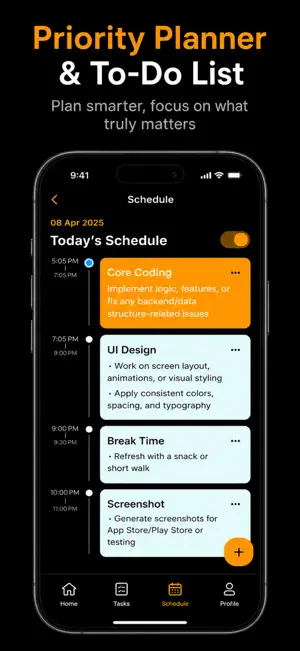
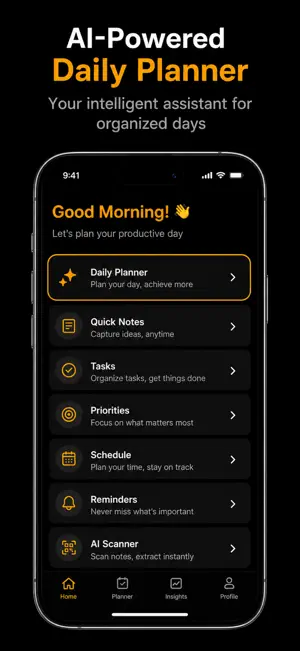
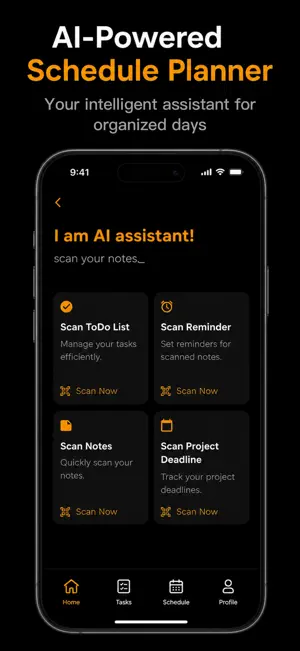
Life gets busy — between work, school, family, and everything in between, it’s easy to feel overwhelmed and forget important tasks. That’s exactly why we built Schedule Planner — your personal assistant to help you stay organized, focused, and in control of your day. Schedule Planner isn’t just another productivity app. It’s a simple yet powerful tool designed to help you take back your time. Whether you’re jotting down quick notes, creating a detailed to-do list, or planning out your entire week, everything you need is right here in one clean, easy-to-use interface. With the Notepad, you can quickly write down ideas, reminders, or anything on your mind. It’s perfect for capturing thoughts before they slip away. The TO-DO section helps you stay on top of your daily tasks. Create checklists, mark off completed items, and enjoy that satisfying feeling of getting things done. Use Manage Priorities to focus on what’s most important. Organize tasks by importance so you can stop wasting time on distractions and start moving toward your goals. With Schedule Task, you can plan ahead. Whether it’s a meeting, an assignment, or a workout, simply schedule it and let the app remind you. It’s all about building routines and making the most of your day. And speaking of reminders — never miss a beat with the Reminders feature. Get notified exactly when you need it, whether it’s taking medication, attending a call, or preparing for an event. Plus, our smart AI Scanner helps you turn handwritten notes into digital tasks with ease. Snap a photo and let the app do the work — no more typing or manual entry. Designed with a clean black theme and user-friendly layout, Schedule Planner makes productivity feel effortless. Whether you’re a student, professional, or just someone trying to stay organized, this app fits right into your daily routine. Take control of your time. Start planning smarter, not harder. Download Schedule Planner today — because your time matters. Note - A purchase amount and period purchase will be applied to your iTunes account at the end of the trial or intro on confirmation. Subscriptions will automatically renew unless canceled within 24-hours before the end of the current period. You can cancel anytime with your iTunes account settings. Any unused portion of a free trial will be forfeited if you purchase a subscription. Terms of Use - http://apps15.com/termsofuse.html Privacy policy - https://apps15.com/privacy.html
What’s new
Version 1.7 · Updated March 19, 2026
Minor Bug Fixes
App privacy
The developer, APPS15 VISIONARY SOFTWARE LLP, reported these privacy practices to Apple.
Data Not Linked to You
The following data, which may be collected but is not linked to your identity, may be used for the following purposes:
- Identifiers: User ID, Device ID
Used for: Developer’s Advertising or Marketing
Alternatives to Schedule Planner - To Do List
Looking for apps like Schedule Planner - To Do List? Here are 6 similar apps on the App Store. The highest rated is Star Tasks – Streaks and focus (5.0/5), and all 6 are free to download.
-
 IdeaVault - Store Goals, Ideas
4.4
IdeaVault - Store Goals, Ideas
4.4
-
 New Year Resolutions: Yearvana
3.7
New Year Resolutions: Yearvana
3.7
-
 Index ∙ Lists & Tasks
-
 Watchlist Manager: TubePocket
3.5
Watchlist Manager: TubePocket
3.5
-
 Star Tasks – Streaks and focus
5.0
Star Tasks – Streaks and focus
5.0
-
 Clew: Highlights and Notes
5.0
Clew: Highlights and Notes
5.0
| App | Rating | Price | Last updated | Compare |
|---|---|---|---|---|
| Schedule Planner - To Do List | 5.0 / 5 (4 ratings) | Free | March 19, 2026 | |
| IdeaVault - Store Goals, Ideas | 4.4 / 5 (7) | Free | Feb 23, 2026 | Compare |
| New Year Resolutions: Yearvana | 3.7 / 5 (3) | Free | Oct 1, 2026 | Compare |
| Index ∙ Lists & Tasks | – | Free | Mar 27, 2026 | Compare |
| Watchlist Manager: TubePocket | 3.5 / 5 (2) | Free | May 14, 2025 | Compare |
| Star Tasks – Streaks and focus | 5.0 / 5 (6) | Free | Sep 8, 2026 | Compare |
| Clew: Highlights and Notes | 5.0 / 5 (3) | Free | Oct 10, 2026 | Compare |