

Clew: Highlights and Notes
Thomas Twardzik Productivity iPhoneiPadiPod touch
Clew: Highlights and Notes is a free Productivity app for iPhone and iPad by Thomas Twardzik. Rated 5.0/5 from 3 ratings. Requires iOS 18.0.
- Rating
- 5.0
- 3 ratings
- Price
- Free
- on the App Store
- Size
- 33 MB
- Age 4+
- Updated
- Sep 21
- 2026 · v1.6
Screenshots


About Clew: Highlights and Notes
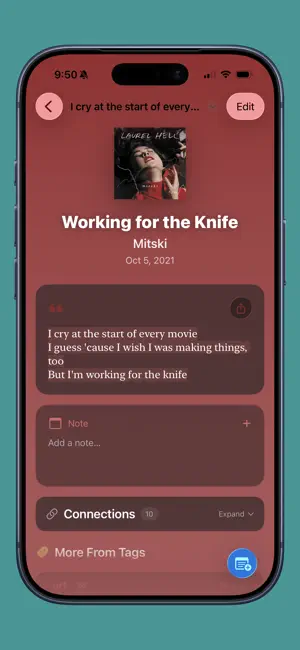
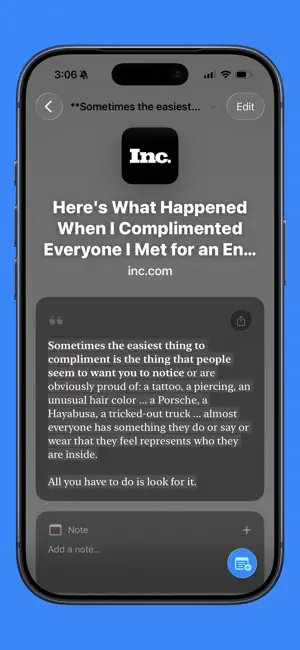
Clew is the fastest, easiest way to save passages, quotes, and notes from the things you read, watch, and listen to, so you can start discovering connections between everything you save. Remember the last time you wrote in the margin of a novel, only to finish the book and never see that thought again? How many times have you clipped parts of articles, songs, and podcasts and saved them to a note somewhere, hidden and forgotten? Clew is a single place for all your highlights, clips, and favorite lines—stored, organized, and searchable in one place. It's a commonplace book that you'll always have with you, easily searchable and synced between all your devices. Clew helps you connect thoughts across sources, centuries, and media types through powerful tagging and intelligent recommendations. Start discovering connections between everything you've saved from: - Books and poems you read - Movies and TV shows you watch - Podcasts and audiobooks you listen to - Songs you love - Articles you read online or on paper Simply copy-and-paste text into the app, use the Share extension, or scan book pages and documents with your device's camera to save a new highlight. Clew makes it easy to sort and search your highlights by source (author, website, etc.), date saved, publication year, genre, keywords, and more. Build your collection, and watch as you start finding connections and patterns across books, artists, decades, genres, languages, and more. This is your new favorite place to store, sort, and share clippings from all your favorite media, whether it's a mind-blowing plot twist in a novel, a hilarious quote in a movie or play, a devastating song lyric, a grand discovery in an article, or simply a quirky adjective you can't wait to use in your own writing. This is Clew. Terms of Use (EULA): https://www.apple.com/legal/internet-services/itunes/dev/stdeula/
What’s new
Version 1.6 · Updated September 21, 2026
Clew Deluxe is an optional subscription that unlocks these special features, with more to come: - Highlight Cards: share any highlight as a beautifully designed image - Import Highlights from Online Services: one new service added, with more to come - Custom Widget Themes: design your own, or start from a built-in theme and customize it to fit the aesthetic of your home screen and lock screen Other Improvements - Each tab of the source picker now shows the books, pages, and songs you used most recently, so you don't have to scroll to find them. - The Create Highlight action in Shortcuts can now take a source, page, link, tags, pinned/not pinned status, and date, and hand back the new highlight so you can build on it in your Shortcut. - The dashboard cards section is no longer pinned to the top of the collections list view on iPhone. It scrolls with the list, instead. Bug Fixes - Tapping a stat now opens the correct list on iPhone instead of just closing the sheet. - App settings are now properly backed up and can be restored. - Minor UI bugs fixed and improvements made throughout the app.
App privacy
The developer, Thomas Twardzik, reported these privacy practices to Apple.
Data Not Collected
The developer does not collect any data from this app.
Alternatives to Clew: Highlights and Notes
Looking for apps like Clew: Highlights and Notes? Here are 6 similar apps on the App Store. The highest rated is Dotomo AI Task Reminder (5.0/5), and 5 of the 6 are free to download.
-
 Griffee
-
 EasyPrompt: AI Prompt Builder
-
 Onda AI Podcast Note Taker
-
 Untold Novel - Story Planner
4.8
Untold Novel - Story Planner
4.8
-
 Anchor - Task Manager
4.5
Anchor - Task Manager
4.5
-
 Dotomo AI Task Reminder
5.0
Dotomo AI Task Reminder
5.0
| App | Rating | Price | Last updated | Compare |
|---|---|---|---|---|
| Clew: Highlights and Notes | 5.0 / 5 (3 ratings) | Free | September 21, 2026 | |
| Griffee | – | Free | Mar 25, 2025 | Compare |
| EasyPrompt: AI Prompt Builder | – | Free | Dec 31, 2025 | Compare |
| Onda AI Podcast Note Taker | – | Free | Aug 25, 2025 | Compare |
| Untold Novel - Story Planner | 4.8 / 5 (8) | 14.99 USD | Nov 4, 2025 | Compare |
| Anchor - Task Manager | 4.5 / 5 (14) | Free | Jun 27, 2026 | Compare |
| Dotomo AI Task Reminder | 5.0 / 5 (1) | Free | Jan 26, 2025 | Compare |