

AI PDF Converter: Files to PDF
AQUAWOOD PTE. LTD. Productivity iPhoneiPadiPod touch
AI PDF Converter: Files to PDF is a free Productivity app for iPhone and iPad by AQUAWOOD PTE. LTD. Requires iOS 15.6. Updated August 13, 2026.
- Price
- Free
- on the App Store
- Size
- 47 MB
- Age 4+
- Updated
- Aug 13
- 2026 · v1.0.9
Screenshots



About AI PDF Converter: Files to PDF
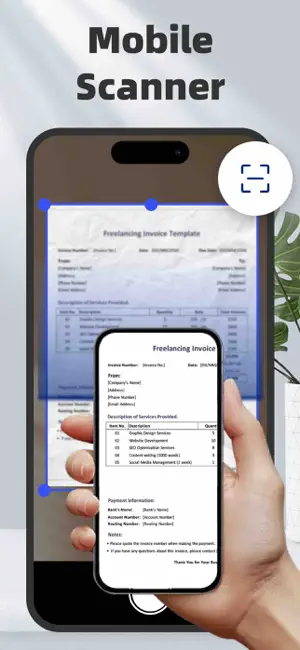
PDF Converter – Convert, Scan, Merge, Sign & Create PDFs Easily! Turn any document into a high-quality PDF in seconds with the most powerful PDF converter for iOS! Whether you need to convert files, scan to PDF, merge or split PDFs, or add e-signatures, this all-in-one tool simplifies document management on your iPhone. Convert Files to PDFs – The Ultimate PDF Toolkit Effortlessly convert Word, Excel, PowerPoint, and text documents into professional-grade PDFs in just a few taps. PDF Converter supports a wide range of formats, including: - Documents: DOC, DOCX, TXT, RTF, ODT, WPS - Spreadsheets: XLS, XLSX, CSV, ODS - Presentations: PPT, PPTX, PPS, PPSX, ODP - Images: JPG, PNG, SVG, BMP, GIF, TIFF, HEIC, WEBP Seamlessly import files from iCloud, your device gallery, then share, save, or print instantly! Scan to PDF – Digitize Documents with Ease Easily scan paper documents and turn them into crisp, clear PDF files. Whether it’s receipts, contracts, invoices, or handwritten notes, the built-in scanner uses auto edge detection and smart enhancement for professional results. - Auto-crop & enhance scans for the best quality - Batch scanning to convert multiple pages at once - Apply professional filters to improve visibility & readability Image to PDF – Convert & Enhance Photos Before Saving Need to save images as PDFs? Convert JPG, PNG, HEIC, WEBP, and more into high-quality PDF files in a flash. Perfect for organizing photos, screenshots, and scanned images in a document format. Enhance your images before conversion! - Crop & rotate images for perfect alignment - Apply professional filters to improve visibility & readability - Optimize image quality for sharper PDF output Add E-Signatures – Sign Documents Digitally Sign contracts, invoices, and agreements directly on your iPhone! - Draw or import electronic signatures - Save multiple signatures for future use - Quickly sign and share legally binding documents Merge, Split & Create PDFs – Full PDF Editing Suite - Merge PDFs: Combine multiple PDFs into one file effortlessly - Split PDFs: Extract pages from PDFs and save them as separate files - Create PDFs: Generate new PDFs from documents, images, and scanned files Security and Privacy: Certain conversions are processed on a secure cloud server and require an internet connection. By using this app, you consent to the transmission of your files to our cloud server for conversion. We prioritize your privacy and ensure that all files are handled securely. Both the original and converted files are automatically deleted from the cloud immediately upon conversion task completion. Furthermore, this app offers auto-renewing subscription, granting you unlimited access to all premium features throughout the subscription period. About subscription: payment will be charged to iTunes Account at confirmation of purchase. Subscriptions automatically renew unless auto-renew is turned off at least 24 hours before the end of the current period. Your account will be charged for renewal within 24 hours prior to the end of the current period. You can manage your subscriptions and turn off auto-renewal by going to your Account Settings after purchase. Any unused portion of a free trial period (if provided) will be forfeited upon purchasing a subscription (if applicable). For more information, please see our Privacy Policy and Terms of Service. Terms of Service: https://xtrustai.github.io/tos Privacy Policy: https://xtrustai.github.io/privacy.html
What’s new
Version 1.0.9 · Updated August 13, 2026
We’ve improved PDF Converter to make document processing faster, smoother and more reliable. - Faster PDF conversion and file processing - Improved scanning, editing and export performance - Enhanced stability across the app - Fixed crashes and minor interface issues
App privacy
The developer, AQUAWOOD PTE. LTD., reported these privacy practices to Apple.
Data Used to Track You
The following data may be used to track you across apps and websites owned by other companies:
- Usage Data: Advertising Data
Data Not Linked to You
The following data, which may be collected but is not linked to your identity, may be used for the following purposes:
- Identifiers: Device ID
- Usage Data: Advertising Data, Product Interaction, Other Usage Data
- Diagnostics: Crash Data, Performance Data, Other Diagnostic Data
Used for: Third-Party Advertising, Developer’s Advertising or Marketing, Analytics, App Functionality
Alternatives to AI PDF Converter: Files to PDF
Looking for apps like AI PDF Converter: Files to PDF? Here are 6 similar apps on the App Store. The highest rated is Doc Master: Scan & Sign PDFs (5.0/5), and all 6 are free to download.
-
 AI Note Taker – Voice to Text
-
 Doc Master: Scan & Sign PDFs
5.0
Doc Master: Scan & Sign PDFs
5.0
-
 Clipboard Manager - ClipBox
5.0
Clipboard Manager - ClipBox
5.0
-
 Shorty - AI Summarizer
4.0
Shorty - AI Summarizer
4.0
-
 Note AI: Transcribe, Summarize
2.2
Note AI: Transcribe, Summarize
2.2
-
 AI Voice Clone Studio
3.8
AI Voice Clone Studio
3.8
| App | Rating | Price | Last updated | Compare |
|---|---|---|---|---|
| AI PDF Converter: Files to PDF | – | Free | August 13, 2026 | |
| AI Note Taker – Voice to Text | – | Free | Sep 3, 2026 | Compare |
| Doc Master: Scan & Sign PDFs | 5.0 / 5 (3) | Free | Apr 29, 2025 | Compare |
| Clipboard Manager - ClipBox | 5.0 / 5 (7) | Free | Oct 14, 2026 | Compare |
| Shorty - AI Summarizer | 4.0 / 5 (2) | Free | Oct 20, 2026 | Compare |
| Note AI: Transcribe, Summarize | 2.3 / 5 (4) | Free | Dec 3, 2025 | Compare |
| AI Voice Clone Studio | 3.8 / 5 (6) | Free | Jul 21, 2026 | Compare |