

Front Dash Cam
Land Analysis Lab Utilities iPhoneiPadiPod touch
Front Dash Cam is a free Utilities app for iPhone and iPad by Land Analysis Lab. Rated 5.0/5 from 3 ratings. Requires iOS 15.6. Updated October 14, 2026.
- Rating
- 5.0
- 3 ratings
- Price
- Free
- on the App Store
- Size
- 44 MB
- Age 4+
- Updated
- Oct 14
- 2026 · v2.0.0
Screenshots

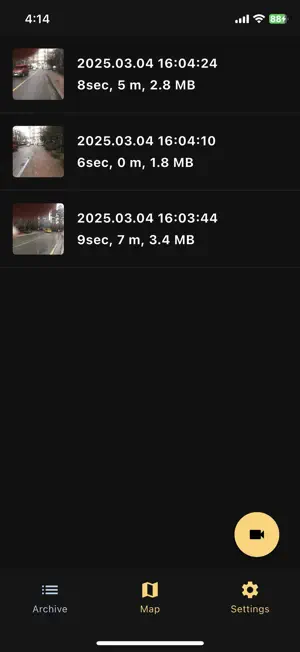
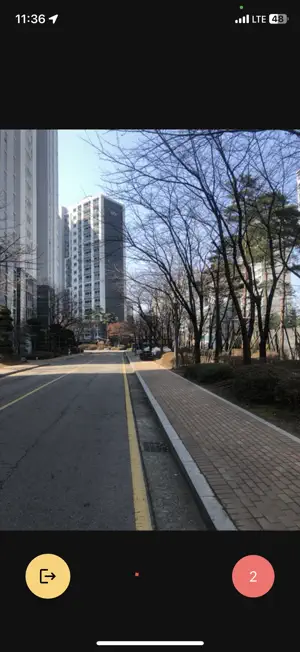

About Front Dash Cam
Dash Cam — GPS Drive Recorder Turn your smartphone into a powerful dash cam. Dash Cam continuously records your drives, logs your GPS route, and automatically detects collisions — giving you the evidence you need and a clear picture of every journey. [KEY FEATURES] ▶ Continuous Video Recording Seamlessly records driving footage with no gaps. Choose your preferred video quality (High / Medium / Low), toggle audio recording, and enable compression to save storage space. ▶ GPS Route Logging & Map Visualization Every trip is saved as a GPX track and displayed on Google Maps. View your start point, endpoint, total distance traveled, and time elapsed at a glance. ▶ Collision Detection The accelerometer continuously monitors for impacts. When a collision is detected, the exact moment is marked in both the video timeline and on the map - so you can instantly review what happened. Use "Record on Event Only" mode to save storage by recording only when an impact occurs. ▶ Video Playback & Collision Navigation Watch recorded footage directly in the app with a real-time speed overlay. Jump straight to any collision moment with a single tap, and an indicator automatically appears whenever playback is within 5 seconds of an impact. Video rotation is also supported. ▶ Save Video & GPS Track Share or save your MP4 videos and GPX route files directly to your device. ▶ Flexible Settings • Video quality: High / Medium / Low • Audio recording on / off • Video compression • Retention limit: automatically delete the oldest recordings when the limit is reached • Distance unit: km / miles • Map type selection (Normal, Satellite, Terrain, Hybrid) • Dark / Light / System theme ▶ 7 Languages Supported Korean, English, Spanish, Arabic, Hindi, Japanese, Chinese [PREMIUM] One-time purchase to remove all ads and enjoy every feature without interruption.
What’s new
Version 2.0.0 · Updated October 14, 2026
Bug fixes.
App privacy
The developer, Land Analysis Lab, reported these privacy practices to Apple.
Data Used to Track You
The following data may be used to track you across apps and websites owned by other companies:
- Location: Coarse Location
- Identifiers: Device ID
- Usage Data: Product Interaction, Advertising Data
- Diagnostics: Crash Data, Performance Data
Data Linked to You
The following data, which may be collected and linked to your identity, may be used for the following purposes:
- Location: Coarse Location
- Identifiers: Device ID
- Usage Data: Product Interaction, Advertising Data
- Diagnostics: Crash Data, Performance Data
Used for: Third-Party Advertising, Analytics, Product Personalization
Alternatives to Front Dash Cam
Looking for apps like Front Dash Cam? Here are 6 similar apps on the App Store. The highest rated is DashCam - Dash Cam & Recorder (5.0/5), and all 6 are free to download.
-
 AutoCam: Smart Dash Cam
-
 Roadly
-
 Roadly PRO
3.0
Roadly PRO
3.0
-
 DashCam - Dash Cam & Recorder
5.0
DashCam - Dash Cam & Recorder
5.0
-
 QROV DASHCAM
1.0
QROV DASHCAM
1.0
-
 DashCamConnect
4.0
DashCamConnect
4.0
| App | Rating | Price | Last updated | Compare |
|---|---|---|---|---|
| Front Dash Cam | 5.0 / 5 (3 ratings) | Free | October 14, 2026 | |
| AutoCam: Smart Dash Cam | – | Free | Oct 23, 2025 | Compare |
| Roadly | – | Free | Jun 25, 2024 | Compare |
| Roadly PRO | 3.0 / 5 (1) | Free | Sep 15, 2026 | Compare |
| DashCam - Dash Cam & Recorder | 5.0 / 5 (1) | Free | Sep 10, 2026 | Compare |
| QROV DASHCAM | 1.0 / 5 (1) | Free | Jul 10, 2026 | Compare |
| DashCamConnect | 4.0 / 5 (1) | Free | Oct 17, 2026 | Compare |
Compare Front Dash Cam with the top alternatives: ratings, updates, ASO score and keyword gaps →