

VidVibe – Video & Photo Editor
Gurjeet Kaur Photo & Video iPhoneiPadiPod touch
VidVibe – Video & Photo Editor is a free Photo & Video app for iPhone and iPad by Gurjeet Kaur. Rated 4.5/5 from 2 ratings. Requires iOS 15.0.
- Rating
- 4.5
- 2 ratings
- Price
- Free
- on the App Store
- Size
- 116 MB
- Age 4+
- Updated
- Jan 3
- 2026 · v1.8
Screenshots


About VidVibe – Video & Photo Editor
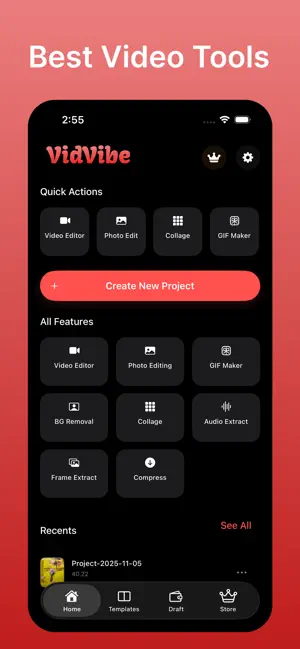
VidVibe – Powerful Video & Photo Editor VidVibe is an all-in-one creative editor that transforms your photos and videos into high-quality, professional content. Whether you're editing reels, creating photo collages, compressing videos, or removing backgrounds, VidVibe provides all the tools you need in one simple and efficient app. This app is designed for content creators, influencers, editors, students, businesses, and anyone who wants professional results without complexity. MAIN FEATURES Video Editor • Cut, split, merge, and trim videos • Add text, stickers, and custom overlays • Adjust brightness, contrast, saturation, and more • Apply transitions and visual effects • Add professional filters • Change video aspect ratios (1:1, 9:16, 4:5, 16:9, and others) • Rotate, flip, and crop videos • Export in high quality, including HD and Full HD Photo Editor • Crop, rotate, adjust, and enhance photos • Add text with custom fonts • Apply filters and color corrections • Add overlays, borders, and effects • Draw or annotate using brush tools • Enhance and retouch photos Collage Maker • Quickly create multi-photo collages • Choose from modern and stylish layouts • Adjust spacing, borders, and backgrounds • Add text and stickers for personalization • Perfect for social media posts and stories Video Compression • Reduce video file sizes efficiently • Multiple compression levels (Low, Medium, High) • Maintain high visual quality • Perfect for sharing via WhatsApp, Instagram, YouTube, and email Extract Audio from Video • Extract audio from any video • Save sound files for reuse • Useful for music, voice, narration, or sound effects Green Screen (Chroma Key) • Remove green backgrounds with precision • Adjust removal strength and edge smoothness • Add custom backgrounds or images • Ideal for creative video production Photo Background Removal • AI-powered background removal • Accurate edge detection • Replace with solid colors, gradients, or custom images • Perfect for product photos, profile pictures, and professional content ADDITIONAL FEATURES • Save and manage projects • Full layer support for advanced editing • Undo and redo options • Fast exporting and optimized performance • Works offline without an internet connection • Modern and user-friendly interface • Direct sharing to all major social platforms WHO IT’S FOR VidVibe is designed for: • Content creators • Social media users & influencers • Students & educators • Small business owners • Product photographers • Video editors • Anyone who needs fast and professional editing tools PRICING Subscriptions & Pricing: • $2.99 per month – Access to all premium tools and features • $19.99 per year – Full premium access with the best value LEGAL INFORMATION Privacy Policy: https://tinyurl.com/nhj97kjj Terms of Use: https://tinyurl.com/5hc7ceeb
What’s new
Version 1.8 · Updated January 3, 2026
- Performance Improvements - Bug fixings
App privacy
The developer, Gurjeet Kaur, reported these privacy practices to Apple.
Data Not Collected
The developer does not collect any data from this app.
Alternatives to VidVibe – Video & Photo Editor
Looking for apps like VidVibe – Video & Photo Editor? Here are 6 similar apps on the App Store. The highest rated is StyleSprout - Video Generator (5.0/5), and all 6 are free to download.
-
 EVIX – Photo Editor
-
 CupidPout: Philtrum Retouch
-
 StyleSprout - Video Generator
5.0
-
 ReelCut: Video Editor & Maker
-
 Eydol: AI Images & Videos
-
 ALLAI: AI Video & Photo Maker
| App | Rating | Price | Last updated | Compare |
|---|---|---|---|---|
| VidVibe – Video & Photo Editor | 4.5 / 5 (2 ratings) | Free | January 3, 2026 | |
| EVIX – Photo Editor | – | Free | Aug 27, 2026 | Compare |
| CupidPout: Philtrum Retouch | – | Free | Oct 23, 2026 | Compare |
| StyleSprout - Video Generator | 5.0 / 5 (1) | Free | Sep 1, 2025 | Compare |
| ReelCut: Video Editor & Maker | – | Free | Oct 27, 2026 | Compare |
| Eydol: AI Images & Videos | – | Free | Jul 19, 2026 | Compare |
| ALLAI: AI Video & Photo Maker | – | Free | Sep 14, 2026 | Compare |