

Weekstack: Weekly Planner
Brett Jackson Productivity iPhoneiPadiPod touch
Weekstack: Weekly Planner is a free Productivity app for iPhone and iPad by Brett Jackson. Rated 3.4/5 from 31 ratings. Requires iOS 26.5.
- Rating
- 3.4
- 31 ratings
- Price
- Free
- on the App Store
- Size
- 5 MB
- Age 4+
- Updated
- Nov 18
- 2026 · v3.2
Screenshots
Save to Pinterest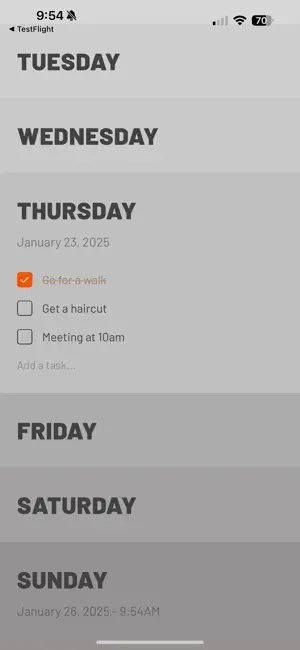

About Weekstack: Weekly Planner
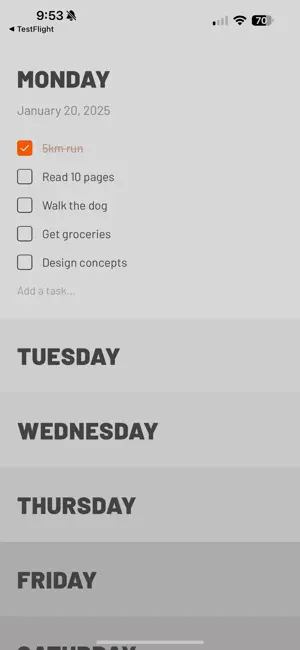
Weekstack is a weekly planner with nothing extra. Seven days, stacked. Tap a day to open it, add what needs doing, and check it off. PLAN THE WEEK, NOT THE YEAR • One simple list for each day, Monday through Sunday • Unfinished tasks move forward into the new week, so nothing gets lost • Drag tasks between days, or swipe to delete • Start your week on Monday, Sunday or Saturday MAKE IT YOURS • Choose when completed tasks clear: right away, at the end of the day, or at the end of the week • Keep completed tasks on top, or leave them where they are • Light and dark gradient themes • Works fully offline, with no account and no sign-up WEEKSTACK PRO • Calendar and week navigation: plan ahead and look back, week by week • Daily notes: a page for each day’s thoughts, one swipe from your tasks • Home Screen and Lock Screen widgets: check off today’s tasks without opening the app • Reminders: a nudge at the time you choose, with Complete right in the notification • Auto-rollover: unfinished tasks move to today on their own • Siri and Shortcuts: add tasks by voice, Back Tap or the Action button • Stone, Charcoal, Stark White and Midnight Black themes, plus five accent colors Weekstack Pro is available monthly, yearly, or as a one-time lifetime purchase. New subscribers get a free week. PRIVATE BY DESIGN Your tasks and notes stay on your device. Weekstack doesn’t collect any data. Subscriptions renew automatically unless cancelled at least 24 hours before the end of the current period. Manage or cancel any time in Settings › your Apple Account › Subscriptions. Terms of Use: https://www.apple.com/legal/internet-services/itunes/dev/stdeula/ Privacy Policy: https://weekstack.io/privacy
Ratings & reviews
3.4
31 ratings
What’s new
Version 3.2 · Updated November 18, 2026
More color, smarter reminders and a faster Weekstack. New with Weekstack Pro: • Two new accent colors, Forest and Mint • App icons to match your accent color, plus the Big W. Find them in Settings › Appearance. • Set a reminder while you type a new task, with Morning, Noon, Afternoon or Evening in one tap • Tap a reminder and Weekstack opens that task's day • Daily notes swipe more smoothly, and long notes fade softly at the top For everyone: • Come back on a new day and today is already open • Faster and smoother, however many tasks you've kept • Settings are grouped into sections, so everything is easier to find • The task you're typing is easier to see • Dates and times follow your phone's format, and tasks now autocorrect • Better support for larger text and VoiceOver • Fixes for iPhone Duo and reminders Thanks for using Weekstack! If you enjoy it, a rating or review on the App Store really helps.
App privacy
The developer, Brett Jackson, reported these privacy practices to Apple.
Data Not Collected
The developer does not collect any data from this app.
Alternatives to Weekstack: Weekly Planner
Looking for apps like Weekstack: Weekly Planner? Here are 6 similar apps on the App Store. The highest rated is Ripples: Habit Tracker (4.7/5), and all 6 are free to download.
-
 Did I Do? - ADHD & OCD Help
4.4
-
 Left: Widgets for Time Left
4.6
-
 choclift: Workflow Sweetener
4.2
-
 Ripples: Habit Tracker
4.7
-
 Meteor: Note and Calendar
4.5
-
 yeknegah
4.4
| App | Rating | Price | Last updated | Compare |
|---|---|---|---|---|
| Weekstack: Weekly Planner | 3.4 / 5 (31 ratings) | Free | November 18, 2026 | |
| Did I Do? - ADHD & OCD Help | 4.4 / 5 (91) | Free | Sep 9, 2026 | Compare |
| Left: Widgets for Time Left | 4.6 / 5 (526) | Free | Nov 18, 2026 | Compare |
| choclift: Workflow Sweetener | 4.2 / 5 (10) | Free | Oct 15, 2026 | Compare |
| Ripples: Habit Tracker | 4.7 / 5 (241) | Free | Nov 17, 2026 | Compare |
| Meteor: Note and Calendar | 4.5 / 5 (153) | Free | Nov 16, 2026 | Compare |
| yeknegah | 4.4 / 5 (11) | Free | Oct 6, 2026 | Compare |