

Screen Live
DMITRIJS JUSKOVS Photo & Video iPhoneiPadiPod touch
Screen Live is a free Photo & Video app for iPhone and iPad by DMITRIJS JUSKOVS. Requires iOS 18.0. Updated October 21, 2026.
- Price
- Free
- on the App Store
- Size
- 62 MB
- Age 4+
- Updated
- Oct 21
- 2026 · v1.1.0
Screenshots
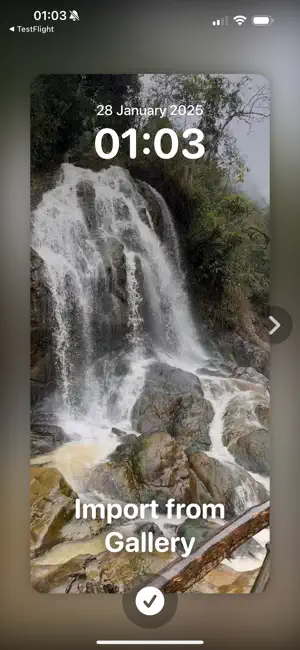


About Screen Live
Turn your favorite videos into Live Photo wallpapers that move on your lock screen. Pick the part you love, choose how the motion plays out, and save it to Photos in seconds. Free to use. VIDEO TO LIVE PHOTO - Import any video from your library. Longer videos? Choose the 5-second part you want. - Frame it your way: drag and pinch the video to choose exactly which area becomes your wallpaper. - Built for iOS 18 and the lock screen's Live Photo animation. SHAPE THE MOTION - Select the range of the video that becomes the animation. - Choose how the frames are spaced: Even, Soft, Strong, Extreme, Reverse or S-curve. Each one gives the animation a different feel. - Preview the animation before you save it. FINE-TUNE EVERY FRAME - See which frames of the source video are used. - Tap any frame to replace it and compose your own Live Photo. SAVE AND SET - Saved straight to your Photos app. Then open it, tap Share, and choose "Use as Wallpaper". Important notice: iOS decides whether a Live Photo can animate on the lock screen. Videos with flashes or rapid scene changes may not play the motion. For the best result, use calm clips with smooth, continuous motion.
What’s new
Version 1.1.0 · Updated October 21, 2026
- New preselect screen: drag and pinch your video under a fixed frame to choose the area, and pick a 5-second part of longer videos. - New frame spacing picker: choose how frames are spread across the animation. - Smoother preview that follows the real lock screen animation. - Frames used by the animation are outlined in the frame editor. - Bundled sample videos now load even if they are very short. - Fixes and improvements.
App privacy
The developer, DMITRIJS JUSKOVS, reported these privacy practices to Apple.
Data Used to Track You
The following data may be used to track you across apps and websites owned by other companies:
- Location: Coarse Location
- Identifiers: Device ID
- Usage Data: Product Interaction, Advertising Data
- Diagnostics: Crash Data, Performance Data
Data Linked to You
The following data, which may be collected and linked to your identity, may be used for the following purposes:
- Location: Coarse Location
- Identifiers: Device ID
- Usage Data: Product Interaction, Advertising Data
- Diagnostics: Performance Data
Used for: Third-Party Advertising
Data Not Linked to You
The following data, which may be collected but is not linked to your identity, may be used for the following purposes:
- Diagnostics: Crash Data
Used for: Third-Party Advertising
Alternatives to Screen Live
Looking for apps like Screen Live? Here are 6 similar apps on the App Store. The highest rated is FramePick: Catch Reactions (5.0/5), and all 6 are free to download.
-
 FramePick: Catch Reactions
5.0
-
 AI Video Picker
-
 Sparkle - Live Photos
5.0
-
 LivePlus: Live Photo Camera
-
 Awesome Live Photo
-
 Image Resize: Batch & Custom
| App | Rating | Price | Last updated | Compare |
|---|---|---|---|---|
| Screen Live | – | Free | October 21, 2026 | |
| FramePick: Catch Reactions | 5.0 / 5 (1) | Free | Jul 22, 2026 | Compare |
| AI Video Picker | – | Free | Oct 22, 2026 | Compare |
| Sparkle - Live Photos | 5.0 / 5 (1) | Free | Jun 10, 2026 | Compare |
| LivePlus: Live Photo Camera | – | Free | Oct 22, 2026 | Compare |
| Awesome Live Photo | – | Free | Apr 20, 2026 | Compare |
| Image Resize: Batch & Custom | – | Free | Sep 30, 2026 | Compare |
Compare Screen Live with the top alternatives: ratings, updates, ASO score and keyword gaps →