

PDF Scan: Document Scanner
TOKYOBAY K.K. Utilities iPhoneiPadiPod touch
PDF Scan: Document Scanner is a free Utilities app for iPhone and iPad by TOKYOBAY K.K. Requires iOS 18.6. Updated August 17, 2026.
- Price
- Free
- on the App Store
- Size
- 34 MB
- Age 4+
- Updated
- Aug 17
- 2026 · v2.0.2
Screenshots
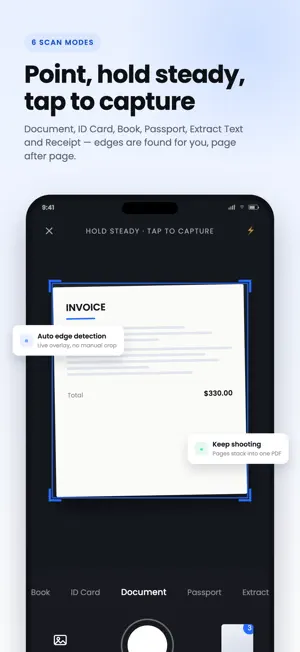


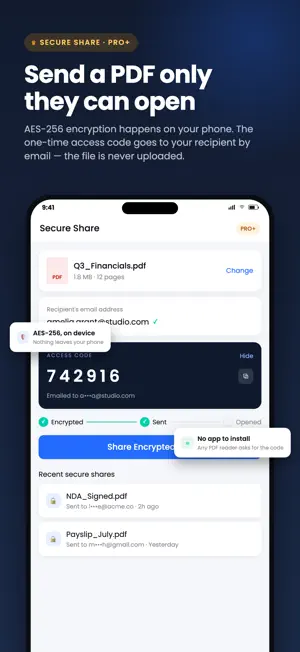
About PDF Scan: Document Scanner
Transform your smartphone into a complete document powerhouse with PDF Scanner: Document Scanner - the all-in-one Camera Scanner, eSign, OCR, and PDF Editor app. Scan, sign, secure, and convert documents anytime, anywhere - even without an internet connection. NEW & POWERFUL FEATURES * eSign PDF: Sign documents instantly with your finger or a typed signature. No printing, no scanning, no hassle. * AI Receipt Analyser: Scan receipts and let AI automatically extract totals, dates, and categories - perfect for expense tracking and budgeting. * Secure Vault: Lock your sensitive documents and files behind PIN, pattern, or fingerprint protection. * Multiple Scan Modes: Dedicated scanning for Documents, ID Cards, Passports, and Books - each optimised for perfect captures every time. * OCR Text Extraction: Turn scanned images into editable, searchable text directly on your device. * AI Organised Folders: Your scans are automatically sorted into smart folders, so you never lose a document again. * Smart File Naming: AI automatically names your files based on content - no more "Scan_2847.pdf." * Google Drive Cloud Backup: Safely back up and sync your documents to Google Drive. * Complete PDF Toolkit: Reorder pages, compress PDFs, and convert Word to PDF, Excel to PDF, and PowerPoint to PDF - all built in. CORE SCANNING & PDF FEATURES * Document Scanning: Scan any document, note, or paper into a clear digital copy using your phone's camera. * Image to PDF: Convert single or multiple images into professional, polished PDFs. * PDF Splitting: Break large PDFs into smaller, manageable files. * PDF Merging: Combine multiple PDFs into a single document. * Password Protection: Encrypt your PDFs with strong password security. * JPEG Scanner: Scan directly to JPEG for quick sharing or archiving. * Offline Scanning: Scan and convert documents without Wi-Fi or mobile data - ideal for travel and business. YOUR PRIVACY MATTERS Your scans and documents are processed securely. Sensitive files stored in Secure Vault stay protected on your device with PIN, pattern, or fingerprint locks. Cloud Backup is fully optional and only syncs when you choose to enable it. LEGAL By subscribing, you agree to our Terms of Use (EULA): https://www.apple.com/legal/internet-services/itunes/dev/stdeula/ Privacy Policy: https://tokyobay.co.jp/privacy/pdf-scanner.html FREE TO START Get started with our core scanning, Image-to-PDF, and PDF tools at no cost. Unlock premium features like AI Receipt Analyser, Secure Vault, and unlimited Cloud Backup with a simple subscription - cancel anytime. WHY CHOOSE PDF SCANNER? * All-in-One: Replace your scanner, signer, receipt tracker, and file converter with a single app. * Travel-Ready: Essential for professionals on the move - scan, sign, and send documents anytime. * Versatile: Perfect as a home document scanner or a complete office productivity tool. * User-Friendly: Designed for simplicity, making it the best camera scanner and PDF tool for everyone. We value your feedback! Contact us at [email protected]. PDF Scanner: Document Scanner App by Tokyobay K.K. is your one-stop solution for scanning, signing, securing, and managing documents. Download now for a seamless, efficient document management experience!
What’s new
Version 2.0.2 · Updated August 17, 2026
Big Update: PDF Scanner Just Became a Complete Document Suite! What's New: Secure Share – Send PDFs with encryption + one-time password sent to recipient's email Collaboration Hub – Track every shared file in one dashboard: storage usage, pending reviews, expired links, recent activity eSign PDF – sign instantly AI Receipt Analyser Secure Vault Scan Modes: ID Card, Passport, Book OCR Text Extraction AI Organised Folders Smart File Naming Google Drive Backup Word/Excel/PPT to PDF, Compress, Reorder Pages Plus bug fixes & performance boosts!
App privacy
The developer, TOKYOBAY K.K., reported these privacy practices to Apple.
Data Used to Track You
The following data may be used to track you across apps and websites owned by other companies:
- Identifiers: Device ID
- Diagnostics: Crash Data
Data Not Linked to You
The following data, which may be collected but is not linked to your identity, may be used for the following purposes:
- Identifiers: Device ID
- User Content: Photos or Videos
- Diagnostics: Crash Data
Used for: Third-Party Advertising, Developer’s Advertising or Marketing, Analytics, App Functionality
Alternatives to PDF Scan: Document Scanner
Looking for apps like PDF Scan: Document Scanner? Here are 6 similar apps on the App Store. The highest rated is Video Size Reducer (5.0/5), and 5 of the 6 are free to download.
-
 Document Scanner Offline Vault
-
 Concrete Calc Professional
1.0
Concrete Calc Professional
1.0
-
 Video Size Reducer
5.0
Video Size Reducer
5.0
-
 Batch BG Remover - Offline
5.0
Batch BG Remover - Offline
5.0
-
 QR Code Inspector
-
 Clipboard - CopyPaste
| App | Rating | Price | Last updated | Compare |
|---|---|---|---|---|
| PDF Scan: Document Scanner | – | Free | August 17, 2026 | |
| Document Scanner Offline Vault | – | Free | Nov 7, 2025 | Compare |
| Concrete Calc Professional | 1.0 / 5 (1) | Free | Oct 12, 2026 | Compare |
| Video Size Reducer | 5.0 / 5 (1) | Free | Aug 26, 2026 | Compare |
| Batch BG Remover - Offline | 5.0 / 5 (1) | Free | Mar 26, 2026 | Compare |
| QR Code Inspector | – | Free | Aug 11, 2026 | Compare |
| Clipboard - CopyPaste | – | 3.99 USD | Sep 8, 2026 | Compare |