

Concrete Calc Professional
Snappy Appz Inc. Utilities iPhoneiPadiPod touch
Concrete Calc Professional is a free Utilities app for iPhone and iPad by Snappy Appz Inc. Rated 1.0/5 from 1 ratings. Requires iOS 17.0.
- Rating
- 1.0
- 1 ratings
- Price
- Free
- on the App Store
- Size
- 90 MB
- Age 4+
- Updated
- Oct 12
- 2026 · v2.0
Screenshots


About Concrete Calc Professional
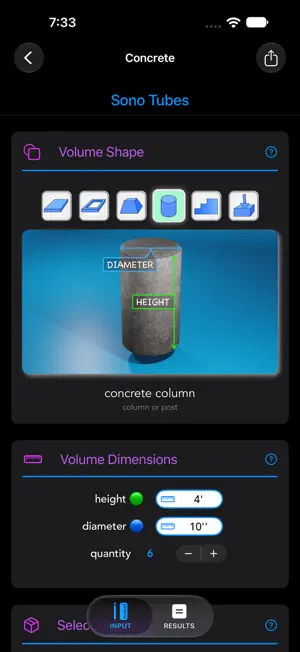
Take the guesswork out of concrete pours, site layout, and material costs. Whether you're pouring a backyard shed pad, framing footings, or managing large commercial pours, Concrete Calculator delivers instant volume takeoffs, bag counts, labor estimates, and professional client quotes—right from the job site. Version 2.0 is a complete overhaul built specifically for modern iOS and iPadOS devices, featuring an intuitive 3D dimensional interface, a built-in feet-inch-fraction construction calculator, and comprehensive project quoting tools. POWERFUL TRADE ESTIMATORS Concrete Slabs & Walls: Enter length, width, and thickness in real tape-measure fractions (e.g., 24' 6" × 20' 8" × 4-1/2") to calculate exact cubic volume, ready-mix yardage, or pre-mix bag counts. Columns & Sonotubes: Fast cylindrical footing estimators with multi-unit quantity multipliers for pier and post-hole runs. Aggregates & Gravel: Calculate base material requirements in cubic yards, cubic feet, or tons. Block & Brick: Instant unit counts and mortar takeoffs for standard masonry assemblies. SITE LAYOUT & GEOMETRY Pad Squaring & Diagonals: Quickly square up forms before pouring using built-in Pythagorean layout tools. 2D Areas & Angles: Calculate complex multi-shape site footprints and compound areas with dedicated dimension readouts. 3D Volumes: Dedicated calculators for prisms, cylinders, truncated cones, and custom shapes. BUILT-IN CONSTRUCTION CALCULATOR Traditional jobsite keypad with dedicated unit keys (Yards, Feet, Inches, Centimeters, Meters). True fractional entry down to 1/16" with running history tape. Multiply linear dimensions directly into cubic volume (e.g., 24'6" × 20'8" × 4-1/2" = 7.03 YD³). PROJECT MANAGEMENT & CLIENT QUOTES Organize calculations under dedicated job folders (e.g., "Smith Driveway & Garage"). Build detailed client estimates combining materials, waste margins, and customizable labor hourly rates. Maintain a custom Material Database with localized pricing and density specs. Export and share clean estimates and material orders directly via email or message. DESIGNED FOR FIELD & OFFICE Native iPad Multitasking: Full 3-column split-view layout for desktop-grade estimating on 13" iPad Pro and Air. Full Dark & Light Themes: High-contrast modes optimized for bright sunlight outdoors and low-light plan reviews indoors. Universal Units: Seamless switching between Imperial (feet, inches, fractions, yards) and Metric (meters, cm, mm, m³). Built for concrete finishers, general contractors, masons, landscapers, and serious DIYers who need jobsite precision without the math errors.
What’s new
Version 2.0 · Updated October 12, 2026
What's New in Version 2.0 Concrete Calculator has been completely rebuilt from the ground up for modern iOS and iPadOS. While version 2.0 includes all the trade calculations you rely on, the entire engine, user interface, and workflow have been overhauled. What’s New & Improved: Complete Modern Redesign: Clean, fluid interface updated for the latest iOS and iPadOS hardware with full support for Dark Mode and high-contrast Light Mode. Visual 3D & 2D Inputs: Form inputs now feature clear visual diagrams for slabs, footings, Sonotubes, and site layouts so you can see your dimensions as you enter them. Dedicated 3-Column iPad Experience: Takes full advantage of 13" iPad Pro and Air screens with a desktop-class multi-column layout for faster workflow. Refined Job Management: Organize multiple slab, pier, and footing calculations under named client projects to keep job tickets organized in one place. Enhanced Construction Calculator: Updated keypad interface with running history tape, dedicated unit keys, and direct dimensional-to-volume math. Performance & Engine Overhaul: Faster launch times, streamlined exports, and full compatibility with modern display resolutions.
App privacy
The developer, Snappy Appz Inc., reported these privacy practices to Apple.
Data Used to Track You
The following data may be used to track you across apps and websites owned by other companies:
- Identifiers: Device ID
Data Not Linked to You
The following data, which may be collected but is not linked to your identity, may be used for the following purposes:
- Location: Coarse Location
- Identifiers: Device ID
- Usage Data: Product Interaction, Advertising Data
- Diagnostics: Crash Data, Performance Data
Used for: Third-Party Advertising, Analytics, App Functionality
Alternatives to Concrete Calc Professional
Looking for apps like Concrete Calc Professional? Here are 6 similar apps on the App Store. The highest rated is Construction Calculator ° (5.0/5), and 5 of the 6 are free to download.
-
 Zi Cutting Planner
-
 Snagging
-
 Stamp Concrete Calculator
4.8
Stamp Concrete Calculator
4.8
-
 PDF Scan: Document Scanner
-
 Construction Calculator °
5.0
Construction Calculator °
5.0
-
 Construction Calculator: Rulr
| App | Rating | Price | Last updated | Compare |
|---|---|---|---|---|
| Concrete Calc Professional | 1.0 / 5 (1 rating) | Free | October 12, 2026 | |
| Zi Cutting Planner | – | 0.99 USD | Mar 6, 2025 | Compare |
| Snagging | – | Free | Jun 20, 2024 | Compare |
| Stamp Concrete Calculator | 4.8 / 5 (16) | Free | Jan 16, 2024 | Compare |
| PDF Scan: Document Scanner | – | Free | Aug 17, 2026 | Compare |
| Construction Calculator ° | 5.0 / 5 (2) | Free | Oct 22, 2026 | Compare |
| Construction Calculator: Rulr | – | Free | Aug 15, 2026 | Compare |