

Parental Control KidsLink Kids
Yqjc Technology Co., Ltd. Utilities iPhoneiPadiPod touch
Parental Control KidsLink Kids is a free Utilities app for iPhone and iPad by Yqjc Technology Co., Ltd. Rated 5.0/5 from 1 ratings. Requires iOS 14.0.
- Rating
- 5.0
- 1 ratings
- Price
- Free
- on the App Store
- Size
- 43 MB
- Age 4+
- Updated
- Aug 6
- 2026 · v1.24
Screenshots
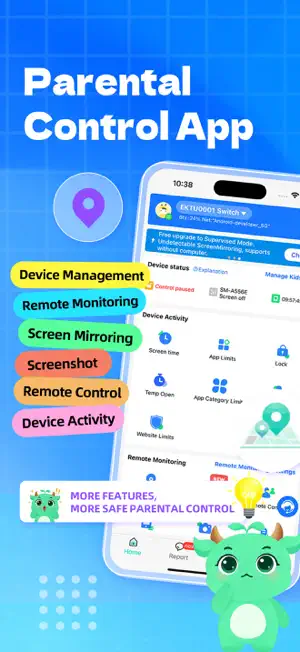


About Parental Control KidsLink Kids
Parental Control App helps users track a device’s location, monitor screen time, view device activity, record video and audio, check app downloads, and block websites. It helps improve safety and encourages healthy device usage habits. Why Choose Parental Control App: ◆ Real-Time Monitoring & Remote Control – View the device screen in real time and understand which apps are being used and how often. You can also remotely manage the device to guide responsible usage. ◆ App Notification Sync – Sync notifications from social media platforms such as Facebook, Instagram, and Messenger to better understand device activity and help reduce potential risks. ◆ Screen Time Management – Set screen time schedules to ensure the device is used at appropriate times. ◆ Website & App Blocker – Filter inappropriate websites and restrict certain apps (such as adult content, dating apps, or games) to guide healthier usage. ◆ GPS Location Tracker – View the device’s real-time location and daily route history on the map to enhance safety awareness. ◆ Screenshot Capture – Capture the device screen remotely to help understand usage behavior. ◆ One-Way Recording & Video – Record audio and camera video from the device when necessary for safety-related scenarios. ◆ Mode Switching – Switch between Normal Mode and Study Mode. In Study Mode, only parent-approved apps can be viewed or used, reducing distractions and improving study focus. Start Protecting Your Device 1.Download the app on your phone. 2.Download the corresponding companion app on the target device. 3.Link the device by scanning a QR code or entering a pairing code to complete setup. Parental Control App offers a 3-day free trial with full features. A subscription is required after the trial period. No ads included. A parent account can connect up to 3 devices and invite additional parents for shared monitoring. ---POLICIES & TERMS OF USE--- Privacy Policy: https://ossfiles.kidslink.info/mp-configs/SXB/htmls/privacy.html Terms of Use: https://ossfiles.kidslink.info/mp-configs/SXB/htmls/user.html Website: https://www.kidslink.info/ Contact US: [email protected] The app asks for the following permissions: 1.Display over other apps - to block applications when time limit rules occur 2.Accessibility services - to Restrict modifications to system settings and app permissions, and automatically grant certain permissions. 3.VpnService - to Restrict access to designated unhealthy websites. 4.Usage access - to collect statistics about the application uptime. 5.Autostart - for constant operation of the application tracker on the device. 6.Device admin apps - to protect against unauthorized deletion.
What’s new
Version 1.24 · Updated August 6, 2026
* Improved Screen Time and Parental Control experience * Enhanced Study Mode and Focus Mode stability * Better game, TikTok, and app restriction controls * Improved Real-Time Screen View and Learning Playback * Enhanced Anti-Uninstall and Anti-Tamper Protection * Optimized AI Alerts and device activity reports * Bug fixes and overall performance improvements
App privacy
The developer, Yqjc Technology Co., Ltd., reported these privacy practices to Apple.
Data Not Linked to You
The following data, which may be collected but is not linked to your identity, may be used for the following purposes:
- Identifiers: User ID, Device ID
Used for: App Functionality
Alternatives to Parental Control KidsLink Kids
Looking for apps like Parental Control KidsLink Kids? Here are 6 similar apps on the App Store. The highest rated is 守护宝家长端 (5.0/5), and all 6 are free to download.
-
 家长管家-手机防沉迷管理守护
-
 守护宝家长端
5.0
-
 Parental Control Assistant
-
 Kids Guardian & Remote Control
5.0
-
 Kupola Jr: Kid Safety Tracker
-
 Havenly Parental Control
5.0
| App | Rating | Price | Last updated | Compare |
|---|---|---|---|---|
| Parental Control KidsLink Kids | 5.0 / 5 (1 rating) | Free | August 6, 2026 | |
| 家长管家-手机防沉迷管理守护 | – | Free | Oct 21, 2026 | Compare |
| 守护宝家长端 | 5.0 / 5 (2) | Free | Oct 11, 2026 | Compare |
| Parental Control Assistant | – | Free | Jul 21, 2025 | Compare |
| Kids Guardian & Remote Control | 5.0 / 5 (1) | Free | Aug 22, 2025 | Compare |
| Kupola Jr: Kid Safety Tracker | – | Free | Oct 23, 2026 | Compare |
| Havenly Parental Control | 5.0 / 5 (6) | Free | Feb 11, 2026 | Compare |